

Recruiters face increasing pressure to meet hiring demands while managing uneven workloads. Data can help solve this by providing clarity and actionable insights. Here's how:
- Track Key Metrics: Monitor hires per recruiter, open roles, pipeline coverage, and interview-to-offer ratios to identify workload issues early.
- Use Historical Data: Analyze past trends to set benchmarks, predict capacity, and manage expectations.
- Visualize Workloads: Dashboards and heat maps can highlight imbalances and bottlenecks for quick adjustments.
- Automate Tasks: Streamline repetitive actions like scheduling and screening to save time and reduce manual effort.
- Redistribute Work: Use data to allocate tasks based on team capacity and role complexity.
Teams that rely on data double productivity and reduce turnover by 30%. By focusing on metrics, automating processes, and redistributing tasks, recruiters can handle surges efficiently and avoid burnout.
::: @figure 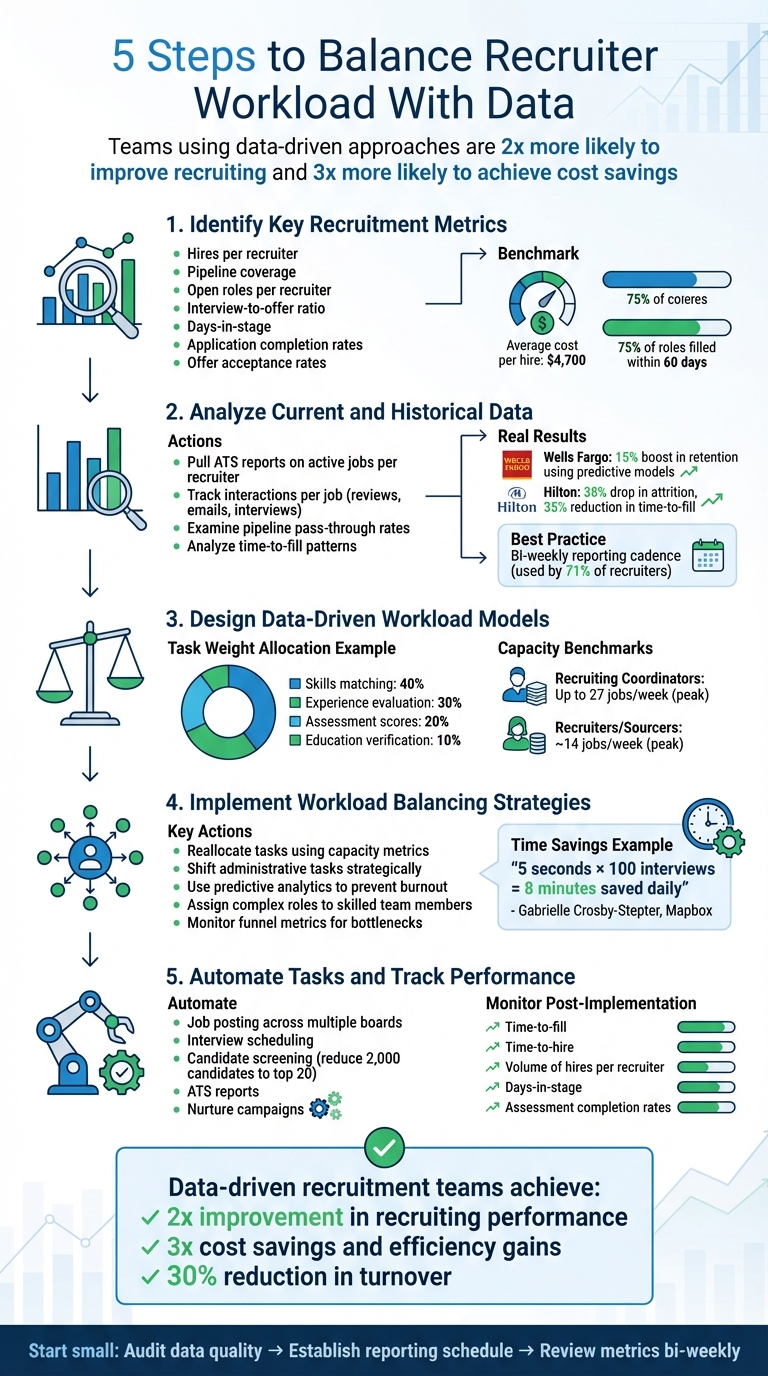 {5-Step Data-Driven Recruiter Workload Balancing Process}
Step 1: Identify Key Recruitment Metrics
Define Core Metrics
To effectively balance workloads using data, start by tracking hires per recruiter. This helps you understand your team’s capacity and set realistic hiring goals for the year ahead . Without this baseline, it’s tough to gauge how much your team can handle.
Another critical metric is pipeline coverage, which ensures your candidate funnel aligns with hiring targets. Keeping an eye on open roles per recruiter can alert you to capacity issues early on. Additionally, tracking the interview-to-offer ratio is essential - if this ratio is too high, it may mean your team is spending too much time on interviews that don’t lead to offers .
Metrics like days-in-stage can reveal delays in your process. For instance, if candidates are stuck in the review stage for too long, it could indicate a bottleneck that’s unnecessarily adding to your team’s workload . Other valuable metrics include application completion rates, which highlight potential friction in the candidate experience, and offer acceptance rates, which reflect how well your team is closing candidates .
Once you’ve identified these core metrics, use historical data to establish benchmarks that will guide your recruitment strategy.
Establish Baselines
Dive into past hiring data to create clear benchmarks for your team. For new roles, look at similar past positions to estimate the number of phone screens and onsite interviews required . These benchmarks provide a foundation for resource allocation and help manage stakeholder expectations.
Industry benchmarks can offer additional context. For example, the average cost per hire is approximately $4,700, and 75% of roles are filled within 60 days. Technical roles often take about 60 days to fill, while business roles typically require around 50 days . While these figures are helpful, your own historical data should take precedence when planning workloads.
To stay on top of these metrics, consider implementing a bi-weekly reporting cadence. Regular reviews make it easier to spot and address anomalies before they develop into larger issues .
Step 2: Analyze Current and Historical Data
Gather Data from Past Hiring Cycles
Your ATS (Applicant Tracking System) is a treasure trove of insights into your recruitment workload. Start by pulling reports on active jobs per recruiter - this gives a snapshot of real-time capacity and highlights anyone who may be overburdened . Dive into interactions per job, tracking metrics like application reviews, role-specific emails, and scheduled interviews. These numbers reveal how much effort each hire demands.
Next, examine pipeline pass-through rates to understand how many candidates advance through each stage. This data can help you estimate the workload required for future hires . As Michelle Yoshihara, Manager of Recruiting Operations at Greenhouse, puts it:
"Recruitment analytics involves looking at the information you have within your ATS or recruiting software – whether it's from an old search or sourcing strategy – and using that to predict what might happen with future searches."
Patterns in time-to-fill are also worth exploring. For instance, in September 2025, Wells Fargo used predictive models on data from over two million candidates, leading to a 15% boost in retention for tellers and a 12% improvement for personal bankers [Source: Talent Management Institute, 2025]. Similarly, Hilton leveraged historical assessments and performance metrics to achieve a 38% drop in attrition rates and a 35% reduction in time-to-fill for critical roles [Source: Talent Management Institute, 2025].
Once you've gathered this historical data, the next step is to translate it into visuals for quick and actionable insights.
Visualize Workload Distribution
Turning raw ATS data into visual formats makes it easier to spot workload imbalances and inefficiencies. Dashboards are particularly effective for this. Many ATS platforms include role-specific dashboards that show requisition statuses and pipeline progress for individual team members . Tools like heat maps can highlight "hotspots" where recruiters are overwhelmed, while funnel visualizations help pinpoint the stages where candidates are most likely to drop off .
For example, a centralized Tableau dashboard enabled 90% of a recruitment team to access real-time data while reducing analyst workload by 90% . Similarly, Lenovo replaced manual sales reports across 28 countries with automated dashboards, improving reporting efficiency by 95% . To stay on top of these insights, establish a bi-weekly reporting schedule - a practice already followed by 71% of recruiters . Regular reviews help you identify and address outliers before they escalate into bigger issues.
You can also track feedback speed through your ATS to see which interviewers or recruiters are quick to respond and which ones may be causing delays . Recognize top performers and address bottlenecks where necessary. Additionally, monitor the source of hire for each recruiter to ensure they’re focusing their efforts on high-yield channels rather than spreading themselves too thin across less effective job boards .
Step 3: Design Data-Driven Workload Models
Create a unified workload model by analyzing task demands and adjusting for the unique complexities of different roles. This approach ensures a balanced and efficient allocation of recruiting efforts.
Assign Task Weights
Start by quantifying tasks based on the time and effort they require. Use historical data to assign weights systematically. For instance, you might allocate 40% to skills matching, 30% to experience evaluation, 20% to assessment scores, and 10% to education verification . These weights help measure how much capacity each activity consumes.
Analytics can provide insights into how long specific tasks - like sourcing, screening, or interviewing - typically take . If data shows that screening candidates for senior roles takes more time than for junior positions, adjust weights accordingly. Research shows that teams with advanced analytics practices are twice as likely to enhance recruiting efforts and three times more likely to achieve cost savings and efficiency improvements .
Set clear thresholds for task completion using a data-driven approach. For example, on a 0–100 scale, a score of 80+ might indicate "Strong/Shortlist" status . Include transparency features, such as flags for auditability, and normalize data points before combining them into final scores. This ensures that all signals are comparable and reliable .
Finally, refine your model by factoring in the complexities specific to each role.
Incorporate Role Complexity
Recruiting efforts can vary significantly based on the complexity of the role. Some positions demand more than just technical expertise - they require adaptability, collaboration, and the ability to communicate technical concepts effectively . These factors can extend the time needed for screening and interviews.
Benchmarking can help differentiate capacity expectations. For example, Recruiting Coordinators typically handle up to 27 jobs per week at peak capacity (90th percentile), while Recruiters and Sourcers manage around 14 jobs . Coordinators often manage higher volumes because their tasks, like scheduling, are repetitive and easier to automate. On the other hand, Recruiters dealing with complex roles need more time per candidate. One consulting firm improved its ability to predict new hire success by 40% after implementing a scoring system based on five years of performance data .
The organizational context also plays a role. In larger enterprises, Recruiting Coordinators can manage three times as many jobs as their counterparts in smaller companies, thanks to streamlined processes and advanced tools . To fine-tune your model, segment workload data by department, location, or job role to identify trends and adjust complexity factors . Regular updates are crucial - use anchor profiles and feedback loops to recalibrate your model monthly or quarterly, ensuring it stays aligned with market changes .
Hiring engineers?
Connect with developers where they actually hang out. No cold outreach, just real conversations.
Step 4: Implement Data-Driven Workload Balancing Strategies
Use your workload model to redistribute tasks effectively, guided by data.
Reallocate Tasks Using Metrics
Start by measuring team capacity, focusing on active jobs per week. On average, recruiters handle about 14 active jobs weekly at their peak, while Recruiting Coordinators manage up to 27. This difference stems from coordinators managing high-volume, repetitive tasks like scheduling .
To keep operations running smoothly, shift administrative tasks strategically. Redistributing workloads based on historical data can help your team handle surges without hitting capacity limits .
"Even something as minor as my recently used email templates populating at the top of the email instead of scrolling through to find it saves me five extra seconds. And five seconds times 100 interviews… eight minutes saved just that day. These little wins matter." – Gabrielle Crosby-Stepter, Talent Operations Specialist, Mapbox
Use real-time capacity data and predictive analytics to adjust assignments before issues arise, helping to prevent burnout . Historical metrics like "time to fill" and "time to screen" can highlight potential bottlenecks, enabling proactive adjustments . Monitor funnel metrics to identify where candidates may be stalling and refocus recruiter efforts as needed . Additionally, maintain a detailed database of your team's skills, including technical expertise, experience, and soft skills, so complex roles are assigned to the most capable team members .
Finally, incorporate analytics to automate repetitive tasks, freeing up time for higher-value activities.
Use daily.dev Recruiter for Smarter Sourcing
Beyond internal workload redistribution, streamline your candidate sourcing process with smarter tools.
Sourcing and outreach can eat up hours, especially when cold emails yield low response rates. daily.dev Recruiter simplifies this by connecting you with developers where they already spend their time - on daily.dev. The platform uses a warm introduction model with double opt-in, ensuring you only engage with candidates who have expressed interest, saving time and effort.
Step 5: Automate Tasks and Track Performance
Once tasks have been effectively redistributed, the next step is to focus on automation to streamline processes and improve efficiency. After reallocating responsibilities based on data, automating manual tasks can save time and effort while allowing you to measure the impact of these changes.
Automate Repetitive Tasks
Start by identifying high-volume tasks that often slow things down. Use ATS data to spot bottlenecks, such as delays in approvals or scheduling . Repetitive activities like posting jobs across multiple boards, chasing interview feedback, or sending out scheduling emails are prime candidates for automation .
One of the biggest time drains is candidate screening. By automating this process with tools like skills assessments or video interviews, you can drastically reduce the number of applicants to review manually. For example, automation can narrow a pool of 2,000 candidates down to the top 20 most qualified individuals . Additionally, automating ATS reports can save hours typically spent on manual data collection and ensure regular updates are shared effortlessly .
"Making things as automated as possible when setting up your system is going to set you up for success in the long run." – Michelle Yoshihara, Manager of Recruiting Operations, Greenhouse
To maintain data accuracy, standardize data entry by requiring specific fields . Automated nurture campaigns can also help keep candidates engaged through timely, personalized messages, reducing the need for constant recruiter follow-ups .
Monitor Post-Implementation Metrics
After implementing automation, it’s crucial to track its effectiveness. Building on earlier metric analysis, monitor key performance indicators to ensure automation is delivering results. Metrics like time-to-fill and time-to-hire can reveal whether your process is becoming faster . Similarly, tracking the volume of hires per recruiter can help with capacity planning and ensure your team can meet hiring goals without being overburdened .
Dive deeper into metrics like days-in-stage and funnel movement to pinpoint where candidates might be getting stuck, which could indicate workload imbalances or inefficiencies . If you’ve automated screening, keep an eye on assessment completion rates and pass rates to ensure tests are effective without discouraging candidates . For scheduling automation, metrics like time to schedule and interviews per hire can provide insights into efficiency improvements .
"It's not about perfection [when it comes to using talent acquisition insights]. It's about reviewing the data, adjusting accordingly, and keeping the train on the track." – Christina Schmit, Director of Talent & Culture, Renewal by Andersen
To ensure your system continues to run smoothly, schedule monthly or quarterly data quality reviews. These reviews can help catch irregularities and confirm that your automated processes are capturing accurate information . Teams with advanced analytics practices are shown to be twice as likely to improve their recruiting efforts and three times more likely to achieve cost savings and efficiency improvements . Use these insights to fine-tune your strategy and maintain balanced workloads over time.
Conclusion
Managing recruiter workloads effectively requires smarter strategies powered by data. By focusing on the right metrics, learning from historical trends, and automating repetitive tasks, recruitment teams can transition from constantly putting out fires to planning ahead with confidence. Teams that embrace advanced analytics are twice as likely to enhance their recruiting performance and three times as likely to achieve cost savings and improved efficiency .
Data serves as the backbone for strategic decisions, helping recruiters navigate the high expectations that 82% of them face from hiring managers . Armed with evidence, recruiters can challenge unrealistic timelines and reduce unconscious bias, creating a more balanced and fair hiring process.
This data-driven mindset also supports the use of tools designed to simplify candidate engagement. For tech-focused hiring, platforms like daily.dev Recruiter can make a huge difference by eliminating cold outreach. Instead of chasing unresponsive leads, recruiters receive warm, double opt-in introductions to pre-qualified developers who are already interested in opportunities. This targeted approach turns recruiting into a precision effort, saving time and fostering trust.
Start small and build from there. Begin by auditing your data quality to ensure your ATS holds accurate, actionable information . Next, establish a consistent reporting schedule - 71% of recruiters already generate reports at least every two weeks to drive better hiring outcomes . Regularly review critical metrics like time-to-fill and candidate conversion rates on a weekly or bi-weekly basis. Spotting bottlenecks early allows you to address issues before they escalate . This proactive, data-first approach helps balance workloads, prevent burnout, and maintain high hiring standards. Continuous improvement fueled by data is the key to long-term success.
FAQs
How can using data reduce recruiter burnout?
Data can be a game-changer in tackling recruiter burnout. By monitoring essential metrics like time-to-fill, cost-per-hire, and pipeline bottlenecks, recruitment teams gain the clarity needed to manage workloads more effectively. This transparency enables managers to shift tasks around, ensuring no one feels buried under an unmanageable workload.
On top of that, data can help automate tedious, repetitive tasks. This means recruiters can spend less time on administrative work and more time on what truly matters - building meaningful connections with candidates. With streamlined processes and improved efficiency, data-driven recruitment helps create a more balanced and manageable workflow for everyone on the team.
What are the key metrics for managing recruiter workloads effectively?
Effectively managing recruiter workloads means keeping track of a few key metrics that shed light on capacity, efficiency, and results. Start with metrics like requisitions per recruiter (how many open roles each recruiter is handling), time-to-fill (the average number of days it takes to fill a position), and quality of hire (measured by performance or retention of new hires). These help gauge workload balance and hiring success.
It’s also important to monitor offer acceptance rates, candidate satisfaction, and drop-off rates to identify any bottlenecks or inefficiencies in the process. On top of that, tracking pipeline health metrics - such as source-of-hire efficiency and diversity of applicants - can reveal whether recruiters are overly reliant on specific sources or channels. By analyzing these data points, you can balance workloads more effectively, avoid burnout, and maintain high hiring standards.
How can automation make the recruitment process more efficient?
Automation makes the recruitment process more efficient by taking care of time-consuming tasks like resume screening, scheduling interviews, and sending status updates. AI-powered tools can quickly analyze resumes, match candidates to job requirements, and sync calendars, saving recruiters hours of manual work.
With these tasks handled automatically, recruiters can shift their focus to building relationships and planning strategically rather than getting bogged down in administrative duties. Automation also delivers useful data insights - such as metrics like time-to-fill and pipeline velocity - which help teams spot bottlenecks and manage workloads more effectively. Platforms like daily.dev Recruiter use automation to connect recruiters with pre-qualified developers, ensuring their time is spent on meaningful, high-value interactions.
.png)


