

Recruitment automation saves time, reduces costs, and improves hiring efficiency. By automating repetitive tasks like resume screening, interview scheduling, and candidate communication, recruiters can focus on engaging with top candidates. Companies using automation report up to 75% faster hiring times and 30% lower costs. Here's how you can get started:
- Assess Your Current Process: Identify bottlenecks like ATS integration vs. manual processes or inefficient workflows.
- Set Clear Goals: Define measurable outcomes, like reducing time-to-hire by 30% or saving recruiter hours.
- Choose the Right Tools: Use an ATS with automation features, scheduling platforms, and AI-powered chatbots.
- Automate Key Tasks: Streamline job postings, resume screening, interview coordination, and offer letters.
- Monitor and Optimize: Track metrics like time-to-hire and candidate satisfaction, adjusting automation rules as needed.
Automation isn't about replacing recruiters - it’s about freeing them to focus on meaningful interactions. Start by fixing inefficiencies, then implement tools that simplify your workflow while maintaining fairness and compliance.
::: @figure 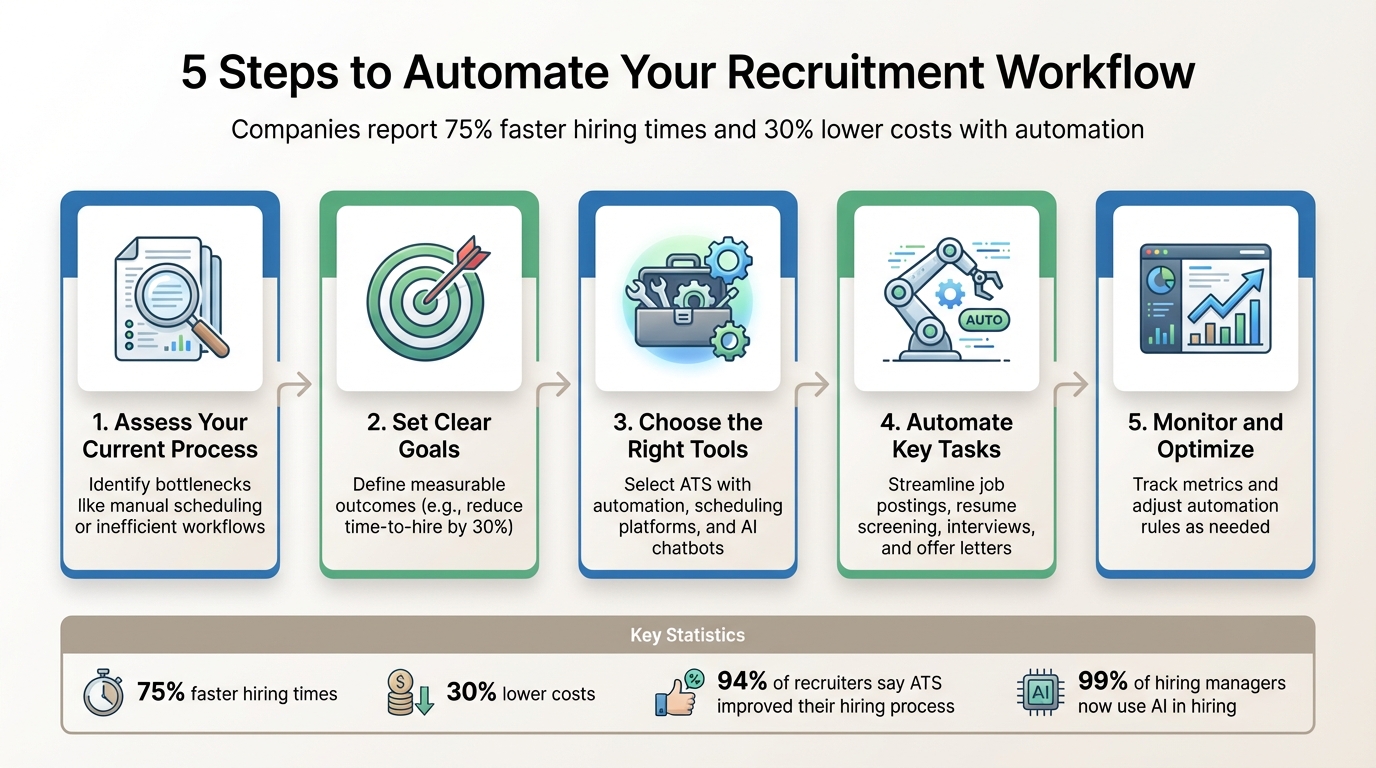 {5-Step Recruitment Automation Implementation Process}
Preparation Steps Before Automating
Getting your process in order is the first step to making automation work for you. Without a clear plan, automation can end up magnifying inefficiencies instead of solving them. As Talent Frequency wisely points out:
"If your manual recruiting process is inefficient and frustrating, automating it just creates automated inefficiency and frustration. Fix your process first, then automate it"
- Talent Frequency
The key is to map out your current workflow thoroughly and identify where automation can genuinely make a difference.
Review Your Current Recruitment Process
Start by breaking down every step of your recruitment process - from when a job opening is approved to when the new hire finishes onboarding. Document all stages, who’s involved, and what tools or systems are being used. This will help you spot repetitive tasks and time-wasters.
Look for common manual bottlenecks. These might include things like entering data into multiple systems, long email threads just to schedule an interview, or delays caused by waiting on feedback from hiring managers. For example, in September 2023, Odlenika Joseph, a Talent Operations Specialist at Muck Rack, discovered she was spending 80% of her workday manually scheduling and rescheduling interviews. By identifying this issue and using Calendly for scheduling automation, her team cut their time-to-hire by eight days .
Another great way to uncover inefficiencies? Go through the process as if you’re a candidate. This hands-on approach can quickly highlight pain points. For instance, a complicated application form can lead to up to 60% of candidates abandoning the process . Delays in providing feedback can also discourage potential hires, creating a negative impression of your company.
Define Your Automation Goals
Once you’ve pinpointed inefficiencies, it’s time to set clear, measurable goals. Are you aiming to reduce time-to-hire by 30%, lower your cost-per-hire, save 20 hours per recruiter each week, or improve your candidate Net Promoter Score?
A good example of goal-driven automation comes from IBM. In 2024, they introduced "AskHR", an AI-powered HR agent designed to streamline HR tasks for managers. By the end of the year, this system had handled 11.5 million interactions and helped managers complete tasks 75% faster .
Think about the potential return on investment. For instance, if five recruiters spend 13 hours each week screening resumes, that’s 260 hours per month that automation could save. At the same time, it’s important to define areas where human judgment is still critical - like evaluating cultural fit or negotiating complex offers. Automation should enhance, not replace, the personal touch in recruiting.
Create Detailed Candidate Profiles
Clear and detailed candidate profiles are essential for effective automation. Define the skills, certifications, experience levels, and deal-breakers for each role. These profiles serve as the foundation for your Applicant Tracking System (ATS) to scan resumes and rank candidates.
When creating profiles, include specific keywords, technical requirements, and any priorities from hiring managers. This structured approach not only improves automation accuracy but also helps reduce unconscious bias by focusing on objective criteria. With these profiles in place, your automation tools can consistently identify top talent, saving you time and effort while ensuring fairness in the process.
Tools and Platforms for Recruitment Automation
Building a tech stack that streamlines your recruitment process can dramatically cut down on manual tasks and delays. According to Capterra, 94% of recruiters say their Applicant Tracking System (ATS) has improved their hiring process , and 86% report faster and more efficient hiring thanks to ATS technology . The key is selecting tools that integrate well and address your hiring challenges.
Choose an ATS with Automation Features
An ATS is the backbone of recruitment automation. Look for features like automated job postings, AI-driven resume parsing and ranking, self-service interview scheduling, and integration with background checks, assessments, and payroll systems . The results speak for themselves: 62% of teams using an ATS find higher-quality candidates, and 79% of recruiters report better hires after adopting an ATS .
For onboarding, digital document management and e-signature tools are must-haves. E-signatures alone can save $300 per new hire by cutting printing and paper costs .
When evaluating ATS options, prioritize systems with "writeback" functionality to keep candidate data updated automatically . Tools featuring visual workflow builders with no-code interfaces allow easy customization, even for non-technical users . To avoid excluding qualified candidates, define clear screening criteria - like specific keywords, certifications, and experience levels - when setting up AI filters .
Use daily.dev Recruiter for Developer Hiring
If you're hiring software developers, daily.dev Recruiter offers a refreshing approach to sourcing talent. Instead of traditional job boards or databases filled with outdated resumes, the platform connects you with passive, pre-qualified developers who are actively engaged in their field.
Through double opt-in introductions, both you and the developer agree to connect before any conversation starts. This eliminates spam and ensures you're interacting with candidates who are genuinely interested. Developers on daily.dev are already engaging with technical content and building their skills, making them ideal candidates for the right opportunity.
The platform integrates seamlessly with your existing ATS and sourcing tools. It also offers advanced targeting for job ads and tailors the candidate experience to how developers prefer to communicate with recruiters.
Add Scheduling and Communication Tools
Even with a robust ATS, additional tools can help automate specific parts of the hiring process. Scheduling platforms simplify interview coordination by allowing candidates to self-schedule from available time slots that sync with your calendar. Automated reminders reduce no-shows and save time .
For instance, scheduling automation has been shown to cut time-to-hire by eight days . Erica Raphael, VP of People at Muck Rack, shared:
"Leveraging Calendly has enabled everyone on my team to take on a ton of projects that are really impactful to the recruiting team and the organization at large"
Setting up round-robin scheduling can distribute interviews evenly across team members, offering candidates more time slot options while balancing workloads . Automated reminders for interviewers ensure feedback is submitted promptly, avoiding delays .
AI-powered chatbots can handle routine queries and conduct initial candidate screenings 24/7. Automated email campaigns also help nurture passive talent - teams using three or more emails in their sequences saw a 356% higher response rate compared to single emails .
Using tools like Zapier, you can automate tasks such as generating DocuSign offer letters for new hires. AI tools for interviews can save an average of 12 minutes per interview and ensure 90%+ scorecard completion rates .
The goal is to free up your team from repetitive tasks so they can focus on meaningful interactions. As Talent Frequency puts it:
"The 'human touch' in recruiting isn't typing personalized emails at 11 PM. It's having the bandwidth to actually connect with your best candidates because you're not buried in administrative work"
With these tools in place, you’ll be ready to automate every step of your recruitment process, setting the stage for a smoother and more efficient workflow. Up next: how to implement recruitment automation effectively.
How to Automate Your Recruitment Workflow
Once you've streamlined your processes and chosen the right tools, the next step is implementing automation to cut down on delays and keep candidates engaged. Automation can be applied at every stage of hiring, helping to eliminate repetitive tasks and maintain efficiency. Recent data shows that 99% of hiring managers now use AI in some part of the hiring process, and companies that automate sourcing, screening, and scheduling report an average of up to 30% faster hiring times . Here's a breakdown of how to automate key recruitment tasks step by step.
Automate Job Ad Creation and Posting
Start by creating standardized templates for job ads. These should include details about your company's mission, benefits, and application process. Recruiters can then simply add role-specific information, ensuring consistency across postings. Tools like Textio and Datapeople can help refine job descriptions by flagging language that may unintentionally discourage diverse applicants .
Your applicant tracking system (ATS) can be configured to post job ads across multiple platforms simultaneously, including major job boards. For roles that require constant hiring, enable "evergreen" postings to maintain a steady flow of candidates. To avoid bottlenecks, automate approval workflows so stakeholders are notified immediately when job requisitions need their input.
Consider implementing "text to apply" options, allowing candidates to submit applications via SMS. Additionally, you can include a specific call to action in your job descriptions - like asking applicants to include a code word in their cover letter - to filter out candidates who don’t follow instructions .
Once your job ads are automated, move on to streamlining candidate evaluation by identifying qualified technical candidates with resume screening tools.
Automate Resume Screening and Filtering
Modern screening platforms go beyond static resumes to assess live signals - like what candidates are currently reading, coding, or learning. Tools such as daily.dev Recruiter prioritize these dynamic indicators to offer a more comprehensive view of a candidate's skills .
Set up custom screening questions (limit this to two or three) that candidates must answer before their application moves to manual review. For technical roles, these questions can quickly assess expertise. For example, you might ask: "How do you manage state in large Astro applications?"
For developer hiring, double opt-in workflows can be highly effective. Instead of cold outreach, pitch roles privately to candidates, ensuring you only engage with those who express clear interest. As Nimrod Kramer, CEO & Co-Founder of daily.dev, explains:
"We built a place where engineers can turn off the noise. To enter this space, you don't need a hack. You need trust."
To keep your pipeline organized, integrate sourcing tools with your ATS so duplicate candidates are automatically filtered out .
Set Up Automated Candidate Communication
Automated email sequences can save time while maintaining a personal touch. Set up triggers for key moments - like when an application is received, a resume is reviewed, or an interview is scheduled. For long-term engagement, create nurture campaigns to keep passive candidates interested. Use merge tags to personalize these messages, making them feel tailored without requiring additional effort.
Automate Interview Scheduling and Assessments
Simplify the interview process by automating scheduling and assessments. Use self-scheduling tools that sync with your calendar, allowing candidates to choose from available time slots. This eliminates the back-and-forth of finding a mutually convenient time. For team-based interviews, round-robin scheduling can distribute interviews evenly among team members, giving candidates more flexibility while balancing workloads.
For technical roles, you can automate the distribution of coding assessments or skills tests immediately after a candidate passes the initial screening. This keeps the process moving quickly and ensures candidates remain engaged.
Automate Offer Letter Creation
When it’s time to extend an offer, e-signature tools like DocuSign can handle the heavy lifting. Set up templates that auto-fill candidate-specific details - such as name, role, salary, and start date - and trigger automatically once the hiring manager approves the offer.
These tools ensure accuracy and speed while reducing administrative work. For example, IBM's HR AI agent, AskHR, handled 11.5 million interactions in 2024, helping managers complete HR tasks 75% faster . This highlights how automation can reduce workloads while maintaining precision and compliance.
Hiring engineers?
Connect with developers where they actually hang out. No cold outreach, just real conversations.
Monitoring, Optimization, and Compliance
Track Your Recruitment Metrics
For automation to be effective, you need to measure its impact. Start by establishing a baseline - compare your current recruitment metrics to data from before automation. Focus on key areas: efficiency, such as time-to-hire and recruiter hours saved; quality, like the number of qualified candidates per opening and hiring manager ratings; and candidate experience, which can be gauged through survey scores and drop-off rates at various stages.
Set up real-time analytics dashboards to monitor these metrics. For example, IBM's AskHR AI agent managed 11.5 million interactions in 2024, enabling managers to complete HR tasks 75% faster than manual methods . These insights help you identify where automation is smoothing the process and where it might be causing issues. Don't forget compliance metrics - tracking selection rates across demographic groups can reveal biases early in the process.
Refine Automation Rules Based on Data
Once you've collected metrics, use this data to fine-tune your automation settings. Review and adjust your rules regularly - monthly or quarterly - to ensure they align with your hiring goals and don't lead to unintended problems (a phenomenon known as "automation drift"). Regular audits and human oversight can also help reduce processing times.
Focus on skill-based, objective criteria instead of arbitrary filters. For instance, instead of automatically rejecting candidates without an MBA - a qualification that only 18% of GMAT test-takers from underrepresented groups possess - use dropdowns to request specific technical skills or certifications. Pilot any new automation rules for 60–90 days, and use feedback from candidates to make improvements.
Maintain Compliance and Reduce Bias
While optimizing your process, it's crucial to stay compliant with legal and ethical hiring standards. Standardized workflows help ensure you're following hiring laws while also reducing bias. Avoid using auto-reject criteria that rely on arbitrary factors like years of experience or criminal history, as these can disproportionately affect underrepresented groups and may violate Title VII of the Civil Rights Act . Greenhouse highlights this issue:
"Automatically rejecting candidates based on yes or no criteria may encourage the use of arbitrary disqualifiers that have an unbalanced impact on people of color."
Keep AI outputs advisory, leaving final decisions to human recruiters. Train your team to critically evaluate automated suggestions and override them when necessary. Conduct regular bias audits to check for any disadvantages affecting groups based on sex, ethnicity, age, or disability. Additionally, include consent options in your initial communications to give candidates control over their data preferences .
Conclusion
Automation takes the weight of repetitive administrative tasks off recruiters' shoulders, giving them more time to focus on what truly matters - building connections, assessing culture fit, and securing top talent.
However, success with automation isn’t automatic. It starts with careful planning and a commitment to ongoing improvement. Before diving in, address any inefficiencies in your manual processes, as automation can amplify existing issues instead of solving them . A smart approach is to launch a pilot program to handle high-volume applicants effectively, track your metrics closely, and fine-tune your automation rules based on actual performance data.
For technical roles, selecting specialized platforms is essential. Look for solutions that integrate smoothly with your ATS, prioritize compliance, and always leave room for human oversight in critical decisions. For instance, tools like daily.dev Recruiter are tailored for developer recruitment. They connect you with passive, pre-qualified developers through warm, double opt-in introductions - on a platform where these professionals are already learning and engaging. This eliminates the need for cold outreach and ensures you're speaking with candidates who are genuinely interested.
Keep in mind that automation isn’t a “set it and forget it” solution. Markets shift, roles change, and candidate expectations evolve . Plan quarterly reviews of your automation rules, seek input from both recruiters and candidates, and adapt your strategy as needed. By committing to regular updates and feedback, you’ll ensure your recruitment process remains efficient, unbiased, and aligned with current market needs. With the right tools, strategy, and dedication to refinement, automation can transform your hiring efforts into a streamlined system that delivers better results while improving the candidate experience.
FAQs
What are the best ways to identify recruitment tasks that can be automated?
To figure out which recruitment tasks are best suited for automation, start by outlining your entire hiring workflow. Identify repetitive, high-volume tasks that follow clear, consistent rules. For example, moving candidates between stages, sending out interview reminders, or tagging applications are all tasks that can easily be automated. By automating these, you free up time for recruiters to focus on more impactful, strategic work.
Next, look at tasks where decisions can be made based on set criteria, such as filtering candidates by required skills or availability. Automating these steps not only speeds up the process but also ensures accuracy without sacrificing quality. Additionally, prioritize automating tasks that improve the candidate experience - like quicker interview scheduling or consistent communication. This ensures automation enhances engagement while still feeling personal.
Platforms like daily.dev Recruiter can help streamline these processes. With tools to automate job listing distribution, screen applications for technical skills, and send interview invitations, recruiters can dedicate more time to building genuine connections with pre-qualified, engaged candidates. This leads to a faster, more efficient hiring process.
What risks can arise from automating recruitment processes without proper planning?
Automating recruitment without a well-thought-out approach can create some serious hurdles. A key issue is bias in AI-driven tools. If the data feeding these systems carries any bias, it can lead to unintentional exclusion of qualified candidates or even discriminatory practices. This doesn’t just shrink your talent pool - it could also land your organization in trouble with legal and reputational consequences.
Another challenge lies in the candidate experience. Poorly executed automation - like résumé parsing or automated interview rankings - can misclassify top candidates, cause confusion, and strip away meaningful human interaction. This not only frustrates potential hires but also risks losing standout talent due to disengagement.
To sidestep these problems, take a thoughtful approach to automation. Plan workflows carefully, set clear policies, and ensure human oversight in key decision-making areas. Using a developer-first platform like daily.dev Recruiter can help you strike the right balance, combining automation with a personal touch to connect with pre-qualified candidates who are genuinely interested in your organization.
How can I prevent bias when using automation in the hiring process?
To reduce bias in automated hiring, start by setting clear, objective criteria for each role before introducing any technology into the process. Focus on measurable qualifications such as specific technical skills or years of experience. Avoid relying on subjective factors like the prestige of a candidate’s school or their location, as these can unintentionally align with characteristics protected under anti-discrimination laws.
Next, take a close look at the data used to train your automation tools. Ensure it represents a diverse range of applicants and doesn’t perpetuate historical patterns of discrimination. Once the tools are up and running, monitor their outcomes regularly. Analyze selection rates across various demographic groups to identify and address any disparities. Adding checkpoints for human review can also help ensure fairness throughout the process.
Platforms like daily.dev Recruiter offer another way to reduce bias. They connect you with pre-qualified candidates through warm, double-opt-in introductions, creating real-time, context-rich interactions. This approach moves beyond impersonal algorithms, fostering trust and inclusivity in your hiring efforts.
.png)


