

If you're a recruiter struggling to verify technical skills on LinkedIn, GitHub might be the solution. Unlike resumes or profiles, GitHub showcases real code, contributions, and collaboration. With over 100 million developers, it’s a goldmine for finding skilled professionals who may not even be active on LinkedIn. Yet, only 31% of tech recruiters use GitHub regularly, leaving a huge opportunity to stand out.
Here’s how GitHub can help you:
- Search smarter: Use advanced search operators (
language:,location:,followers:) to find developers with specific skills and activity levels. - Evaluate profiles: Check contribution graphs, pinned repositories, and commit messages for quality and consistency.
- Personalize outreach: Reference specific work (e.g., commits, pull requests) to increase response rates by up to 60%.
GitHub isn’t just a platform for finding developers - it’s a way to see their skills in action. Learn to navigate it effectively, and you’ll connect with top talent that others overlook.
GitHub Advanced Search Operators for Finding Developers
GitHub's search bar isn't just for casual browsing - it’s a powerful tool that can help recruiters zero in on the right developers. By using advanced search operators, you can filter results based on programming languages, location, activity, and even influence. Think of it as creating a custom search tailored to coding profiles, much like advanced Boolean searches.
Searching by Programming Language
The language: operator is your starting point for targeting developers skilled in specific programming languages. For example, searching language:python will show profiles of Python developers, while language:javascript finds JavaScript specialists. You can refine this further by adding keywords. For instance:
language:python "data science"
will highlight Python developers working in data science. Want to get even more specific? Use Boolean operators like AND, OR, and NOT (in uppercase) to combine multiple skills. For example:
language:python AND "machine learning"
This query focuses on Python developers with machine learning expertise.
One essential tip: always include type:user in your search to exclude company accounts and repositories. This ensures your results focus exclusively on individual developers.
Once you've filtered by language, you can narrow your search further by adding location and follower count.
Filtering by Location and Follower Count
If you're hiring for an on-site role or need someone in a particular timezone, the location: operator is your best friend. For example:
location:"San Francisco"
pinpoints developers based in San Francisco. Combine this with programming language filters for greater precision, like:
language:javascript location:"Austin" type:user
This query finds JavaScript developers in Austin.
To assess a developer's influence or recognition within the community, use the followers: operator. For instance:
followers:>50
shows developers with at least 50 followers, while:
followers:>1000
helps you find influencers in the coding world. If you're looking for mid-level developers, you can define a range using the .. syntax, such as:
followers:10..50
This approach often uncovers developers who might not be overwhelmed with recruiter inquiries.
Next, you can gauge a developer's current activity by diving into repository metrics.
Finding Active Developers by Repository Metrics
To ensure you're reaching out to active developers, use the pushed: qualifier. This operator filters for users who have recently committed code. For instance:
pushed:>2025-01-01
finds developers who have been active since the start of 2025. Pair this with other repository metrics like:
stars:>100
or
forks:>50
These qualifiers help identify developers working on projects that have gained community attention.
Here’s an example of a combined query:
language:react location:"Seattle" followers:>50 pushed:>2025-01-01 type:user
This search targets React developers in Seattle with at least 50 followers who have been coding recently. Once you’ve run your search, consider sorting the results by "Most recently joined" to discover newer profiles that may not have been approached by other recruiters.
Lastly, you can use the topic: qualifier to focus on developers with expertise in niche areas. For example:
topic:machine-learning
or
topic:kubernetes
These searches highlight developers who have tagged their work with specific specialties, making it easier to fill roles that require expertise in particular technologies.
Hiring engineers?
Connect with developers where they actually hang out. No cold outreach, just real conversations.
Evaluating Developer Profiles on GitHub
::: @figure 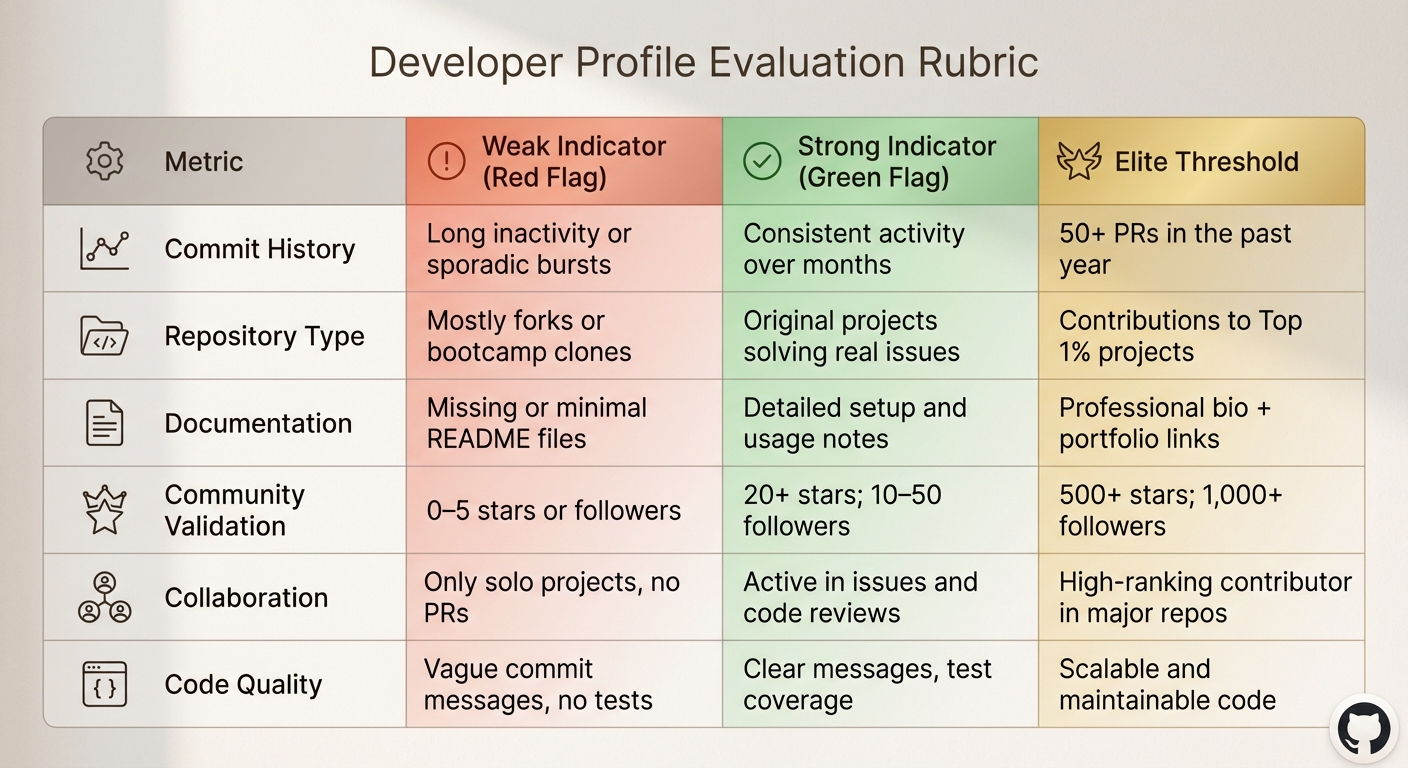 {GitHub Developer Profile Evaluation Rubric for Tech Recruiters}
Once you've identified coding activity using advanced search operators, the next step is to assess the quality and depth of a developer's public work. This is where you separate those with genuine expertise from profiles that might lack substance. While industry surveys suggest that GitHub hosts a wealth of top-tier engineers , not every active profile translates to a strong hire. A structured evaluation process is essential.
Start by examining the contribution graph. Don't just count the green squares; instead, focus on consistent activity over the past 90 days. A steady pattern is more telling than an obsessive streak of daily contributions . Long gaps in activity shouldn't automatically disqualify someone - many experienced developers work in private or client repositories that aren't publicly visible. The key is whether their recent public work reflects hands-on coding skills.
Next, review their pinned repositories. These are the projects developers highlight as their best work. Open each one and evaluate the README file, the date of the last commit, and whether the repository has stars or forks. Repositories with 100+ stars suggest community recognition, while 20+ forks indicate that others are actively building on their work . Sorting repositories by stars or forks can help you quickly identify standout projects .
Pay close attention to commit messages. Clear, descriptive messages that explain the reasoning behind changes are hallmarks of professional developers. Avoid profiles with vague messages like "fixed stuff" or "update." Also, check if their repositories include tests - unit or integration tests signal a focus on code quality and reliability.
Collaboration is another critical factor. Contributions to major open-source projects - like meaningful pull requests - demonstrate the ability to work within established codebases and collaborate effectively . Look for engagement in issue threads, thoughtful code reviews, and contributions to repositories with active communities. Data shows that teams hiring active GitHub contributors (defined as 3+ weekly commits) experience 68% higher retention rates, and developers with merged pull requests in three or more repositories tend to perform 40% better in reviews .
Developer Profile Evaluation Rubric
A systematic rubric can help you assess key aspects of a developer's GitHub profile.
| Metric | Weak Indicator (Red Flag) | Strong Indicator (Green Flag) | Elite Threshold |
|---|---|---|---|
| Commit History | Long inactivity or sporadic bursts | Consistent activity over months | 50+ PRs in the past year |
| Repository Type | Mostly forks or bootcamp clones | Original projects solving real issues | Contributions to Top 1% projects |
| Documentation | Missing or minimal README files | Detailed setup and usage notes | Professional bio + portfolio links |
| Community Validation | 0–5 stars or followers | 20+ stars; 10–50 followers | 500+ stars; 1,000+ followers |
| Collaboration | Only solo projects, no PRs | Active in issues and code reviews | High-ranking contributor in major repos |
| Code Quality | Vague commit messages, no tests | Clear messages, test coverage | Scalable and maintainable code |
Red Flags and Green Flags in Developer Profiles
Understanding the signals in a GitHub profile can help you identify promising developers while steering clear of weaker candidates.
Red flags include profiles with long-term inactivity or empty repositories . Developers who only fork projects without making meaningful contributions may lack the ability to create or improve code. Similarly, repositories filled with basic exercises like to-do apps, website clones, or algorithm practice often reflect bootcamp assignments rather than real-world problem-solving. Non-descriptive commit messages further suggest a lack of professional discipline.
On the other hand, green flags highlight developers worth pursuing. A consistent contribution graph indicates regular coding activity. Developers who submit meaningful pull requests to major projects show they can navigate complex codebases and collaborate effectively. Repositories with detailed README files - including setup instructions and API documentation - demonstrate strong communication skills . Look for developers who respond thoughtfully to bug reports or feature requests, signaling professionalism and responsiveness. Finally, repositories with 20+ stars or forks reflect work that others find useful or inspiring .
"GitHub recruiting is most effective when you focus on relevance and relationship-building, not volume." – Laura Clayton, Content Writer, Warmup Inbox
It's also worth noting that a sparse contribution graph doesn't necessarily mean a developer lacks skills. Many experienced engineers work in private or enterprise repositories that aren't publicly visible. If other indicators - like documentation, commit messages, and community engagement - are strong, consider discussing their private work during follow-ups.
These evaluation methods set the stage for identifying top talent. In the next section, we'll explore how to craft outreach messages tailored to a developer's actual contributions.
Writing Outreach Messages That Reference Actual Work
Generic outreach often gets ignored, but referencing specific GitHub work can dramatically improve response rates. Research shows that mentioning a specific commit or pull request can boost response rates to as high as 60% . Personalized messages that highlight concrete GitHub contributions are five times more effective than generic ones . By pointing to a particular commit or pull request, you show that you’ve taken the time to understand their work. This not only demonstrates respect for their expertise but also makes it clear why your opportunity aligns with their skills and interests.
Below are some templates to help you craft messages that feel personal and relevant. Before reaching out, take a moment to explore a developer’s pinned repositories, recent commits, and issue discussions. This extra effort will make your message stand out.
Once you’ve reviewed their profile, it’s time to write a message that connects directly to their work.
Template 1: Referencing Recent Commits
This method works well when a developer has recently made impactful updates to a project. Look at their contribution graph, find a recent commit, and review the commit message and code changes to craft your outreach.
Subject: Your recent work on [repository name]
Hi [Name],
I came across your commit on [specific date] where you refactored the authentication flow to use JWT tokens. The way you handled [specific technical detail] really stood out because we’re addressing a similar challenge at [Company Name].
We’re currently hiring a [Job Title] to work on [brief description of relevant project], and your experience with [technology/framework] makes me think you’d be a fantastic fit. Would you be open to a quick conversation?
[Your Name]
Why it works: Referencing a specific commit and technical detail shows you’ve done your homework and genuinely appreciate their work.
Template 2: Acknowledging Repository Success
This approach is ideal when a developer maintains a repository that has gained significant recognition. Review the repository’s README, issues, and pull requests to understand its impact.
Subject: Impressed by [repository name]
Hi [Name],
I noticed that [repository name] has received notable attention from the community. The [specific feature or approach] you implemented is especially impressive and aligns closely with the work we’re doing at [Company Name].
We’re building [brief project description] and are looking for someone with your expertise in [technology]. If you’re open to exploring new opportunities, I’d love to share more details.
[Your Name]
Why it works: Highlighting a specific feature or achievement validates their efforts and creates a meaningful connection to your project.
Template 3: Connecting Through Shared Technical Interests
This template is best when you want to emphasize collaboration and shared problem-solving. Referencing their pull requests, issue resolutions, or insightful comments can help establish common ground.
Subject: Your contribution to [project name]
Hi [Name],
I came across your pull request on [project name] where you tackled a memory leak in the caching layer. Your approach to solving [technical detail] really aligns with the problem-solving mindset we value at [Company Name].
We’re working on [brief description of project], and I believe your expertise in [relevant technical area] could play a key role in what we’re building. Would you be interested in a conversation?
[Your Name]
Why it works: This approach highlights their collaborative skills and contributions to the broader developer community.
| GitHub Element | What It Signals | Why Mention It in Outreach |
|---|---|---|
| Commit Messages | Documentation habits and clarity | Shows you value their attention to detail and standards. |
| PR Comments | Collaboration and receptiveness to feedback | Highlights their teamwork and communication skills. |
| Pinned Repos | Personal technical interests and pride | Connects your opportunity to their passions. |
| Stars/Forks | Community validation and project impact | Acknowledges their influence in the developer space. |
| Issue Solving | Problem-solving and bug-fixing skills | Reflects their ability to handle practical challenges. |
Using these insights in your outreach shows that you value their tangible contributions, which strengthens the credibility of your message.
One last tip: if you don’t get a response after your initial message, it’s okay to send one follow-up. However, if there’s no reply after that, it’s best to move on. Persisting beyond two attempts can hurt your credibility .
These personalized strategies naturally lead into using advanced tools that make GitHub sourcing even more efficient.
Tools That Make GitHub Sourcing More Efficient
Digging through GitHub manually can eat up a lot of time, especially when you're trying to scale your efforts. The right tools can not only save you hours but also give you a deeper look into developers' skills and availability. These tools work alongside GitHub's search features, making it easier to vet candidates and reach out effectively. Below, let's dive into some browser extensions and platforms that can streamline your tech hiring stack and GitHub sourcing process.
Browser Extensions for GitHub Search
Chrome extensions can completely change how you evaluate GitHub profiles. Here are a few that stand out:
- OctoHR and GitHub User Languages: These extensions analyze repositories to show a developer's main programming languages and tech stack directly on their profile.
- GitHub Hovercard: Hover over a GitHub link, and this tool pops up details like user info, repositories, and commits - no need to click through.
- EmailOnGitHub and Github Email: These automate the process of finding verified email addresses and flag profiles that are "available for hire."
- Git-Awards: Perfect for location-based sourcing, this tool ranks developers by region.
- OctoHunt: Offers insights into hiring status and provides analytics like follower counts and repository metrics.
- Refined GitHub: Enhances the GitHub interface by adding useful features like showing full names of comment authors and highlighting known followers.
These extensions make it easier to assess profiles and gather contact information, setting the stage for more advanced platforms like daily.dev.
Using daily.dev for Developer Engagement Data
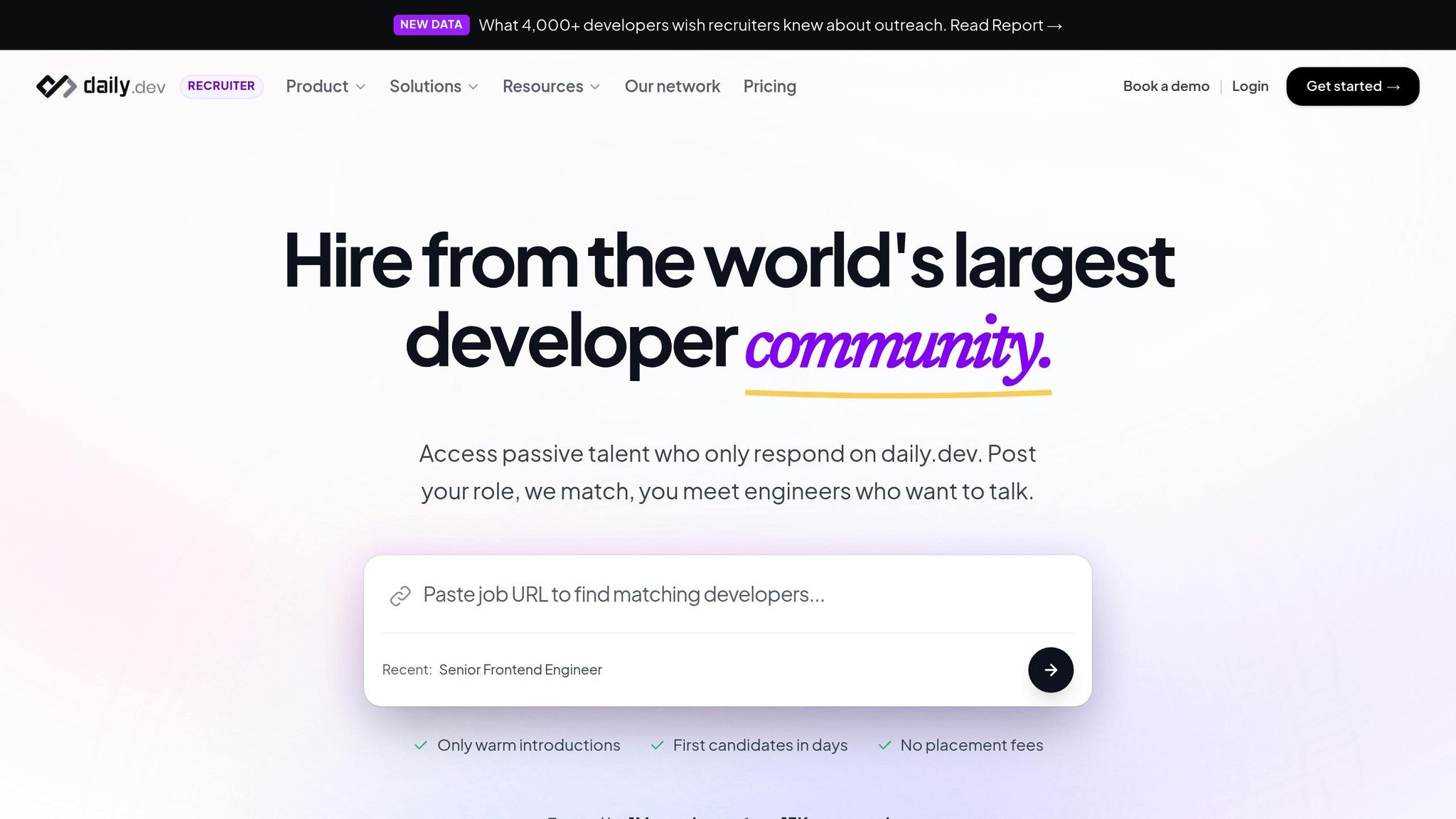
While GitHub focuses on code contributions, daily.dev provides a window into a developer's learning habits and current interests. It tracks real-time engagement with tech content - like articles read and topics followed - giving you a sense of what developers are curious about right now.
For example, a developer actively engaging with content on emerging technologies might be open to roles in that area, even if their GitHub activity hasn’t caught up yet. daily.dev complements GitHub by revealing the mindset behind continuous learning. Plus, its double opt-in introduction model ensures you're connecting with developers who are genuinely open to conversations.
Privacy and Ethics in GitHub Sourcing
GitHub profiles are public by design, but that doesn’t mean recruiters can bypass privacy laws or ignore ethical boundaries. For instance, the GDPR in the EU and UK requires a legitimate legal basis - usually explicit consent or legitimate interest - for processing candidate data. In the U.S., California’s CCPA emphasizes transparency in how data is collected and used. Meanwhile, Illinois demands explicit consent for AI video analysis, and New York City enforces bias audits and notifications for AI-driven evaluations. These laws create a framework for responsible sourcing practices.
Navigating the line between accessible public information and invasive behavior is tricky. For example, extracting emails from commit metadata through URL modifications can feel intrusive and should be approached cautiously . Before reaching out, check if the developer’s profile explicitly states they are "hireable" - this signals their openness to opportunities . If no such indication exists, your outreach should be personalized and considerate. Striking this balance is critical when using public GitHub data to source talent.
Ethical sourcing also extends to how recruiters present themselves. A trustworthy GitHub profile is key. Use a legitimate account with your real photo, full name, and a clear explanation of why you’re on the platform . When contacting developers, reference specific contributions - like a repository, commit, or pull request - to show you’ve genuinely reviewed their work and avoid the appearance of bot-written outreach . This thoughtful approach can increase response rates to as high as 60% and demonstrates respect for the developer’s time and expertise.
| Regulation | Key Requirement for Recruiters | Candidate Rights |
|---|---|---|
| GDPR (EU/UK) | Legal basis (Consent/Legitimate Interest) | Access, correction, deletion, portability |
| CCPA (California) | Transparency in data collection and use | Right to know, delete, and opt-out |
| Illinois (BIPA/AI) | Explicit consent for AI video analysis | Protection of biometric/video data |
| NYC (AEDT) | Bias audits and AI notifications | Notification of automated evaluations |
The ethical approach to GitHub sourcing emphasizes relationship-building over data extraction. Collect only what’s necessary, disclose your source, and honor candidates’ responses. Platforms like daily.dev set an example by allowing developers to explicitly signal their openness to conversations, rather than relying on scraped data. By following these principles, recruiters can ensure their outreach is both respectful and effective.
Conclusion
GitHub offers recruiters a unique window into a developer's coding skills - something LinkedIn simply can't match. With over 100 million developers on the platform and 68% of top engineers accessible through it , learning how to navigate GitHub effectively is essential for tech recruitment. Using advanced search filters like language:, location:, or followers: can help you zero in on the right candidates while also evaluating their technical expertise.
When it comes to outreach, avoid generic messages that developers ignore. Instead, reference specific contributions, like saying, "I was impressed by your work on the caching layer in PR #247." This kind of detailed acknowledgment can boost response rates to as high as 60% . Also, make sure your own GitHub profile is polished, including a photo, your role, and a company bio. Developers are likely to check your profile before deciding to reply .
To refine your sourcing strategy, focus on quality over quantity. A great approach is starting with repositories - identify standout open-source projects and reach out to their top contributors . Tools like daily.dev can provide insights into what developers are reading and discussing, giving you extra ways to connect on a meaningful level.
Ethical sourcing is just as important as technical evaluation. Always respect privacy laws like GDPR and CCPA by collecting only necessary data and being upfront about your methods. Before reaching out, check if a developer has marked themselves as "hireable", and steer clear of using GitHub Issues for recruitment - they're meant for project collaboration, not hiring . The ultimate goal is to build trust and foster long-term relationships, not just gather data.
FAQs
How do I tell if a GitHub profile reflects real work or just tutorials?
To figure out if a GitHub profile reflects genuine work, pay attention to consistent and meaningful contributions across a variety of projects, especially those that are complex or collaborative. Look for signs like well-organized code, active involvement in issues and pull requests, and contributions to recognized repositories.
On the other hand, profiles filled with mostly tutorial-based code, repetitive or minor commits, or surface-level activity might indicate less original work. Reviewing the quality of repositories and patterns of activity can help you separate authentic skills from those built primarily on tutorials.
Which GitHub search filters find active developers fast?
To locate active developers on GitHub, try using the pushed filter. For example, pushed:>2024-01-01 will show users who have made recent commits. You can narrow your search even further by combining this with other filters, such as followers:>100, preferred programming languages, or specific locations. These search tools make it easier to find developers who align with your needs and are actively contributing.
What’s the safest way to contact developers from GitHub without privacy issues?
The best way to reach out to developers on GitHub is through the contact information they've explicitly provided on their profiles. Respect their privacy by steering clear of sending unsolicited messages or sharing any sensitive information. Always follow GitHub’s privacy policies and guidelines to ensure your communication remains both ethical and lawful.
.png)


