

Hiring developers on Slack can work well if done right. Slack is where developers already engage in discussions, making it a great place to connect. But jumping in without a developer hiring checklist can lead to clutter and a bad experience for candidates. Here’s how to do it effectively:
- Find Developer Communities: Join relevant Slack groups based on programming languages, roles, or interests. Respect their rules and observe how members interact before posting jobs.
- Organize Internal Recruitment: Use private Slack channels for each role or candidate. Pin key documents and integrate tools like Applicant Tracking Systems (ATS) for real-time updates.
- Engage Without Spamming: Post jobs in designated channels, keep messages clear, and avoid sending generic direct messages. Build trust by contributing to the community.
- Streamline Processes: Use Slack threads for feedback, real-time scheduling, and centralized communication to keep everything organized and efficient.
- Scale with Integrations: Connect ATS tools and promote employee referrals through Slack to expand your reach while keeping things manageable.
Slack can simplify hiring if you focus on respectful communication, clear organization, and leveraging tools to save time. Small adjustments can lead to faster hiring and better candidate experiences.
::: @figure 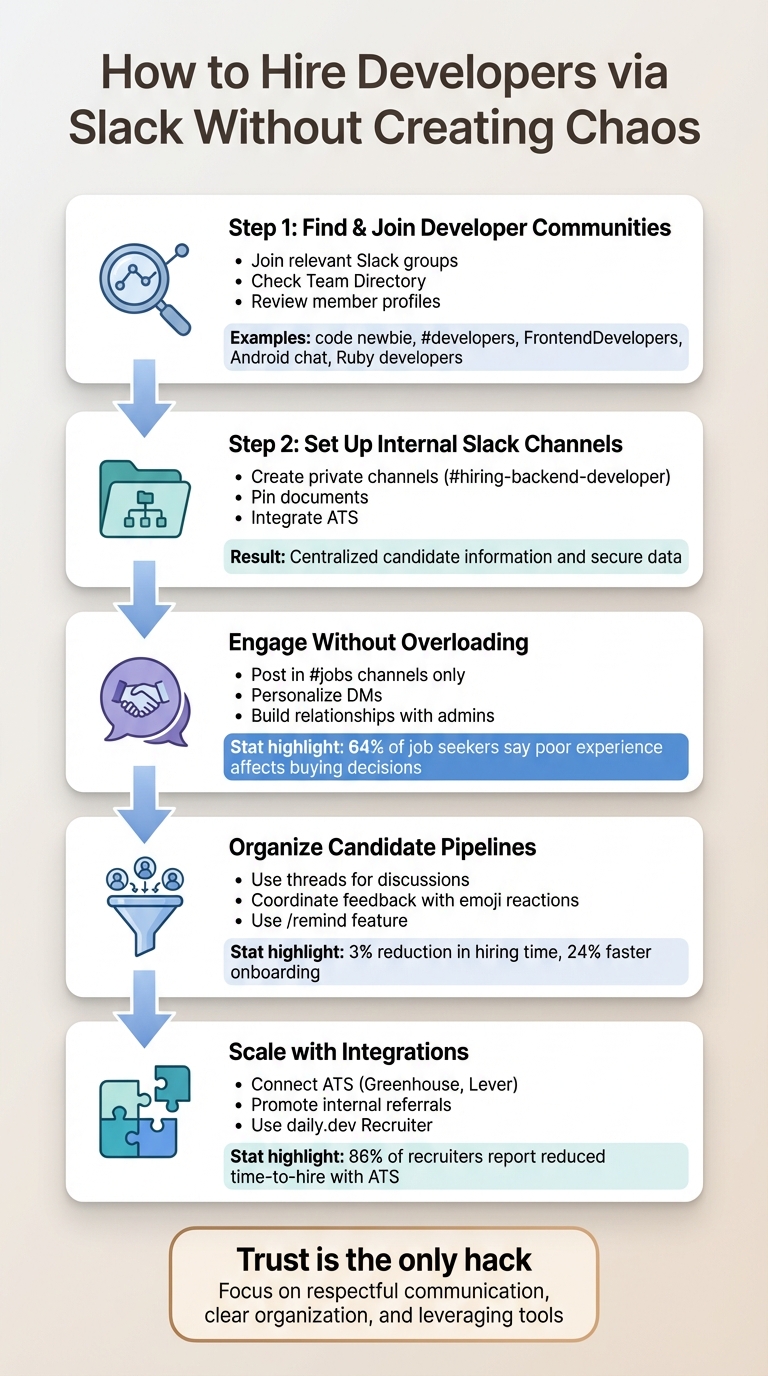 {5-Step Process for Hiring Developers on Slack Without Creating Chaos}
Step 1: Find and Join Developer Communities on Slack
Before diving into recruitment, it’s crucial to figure out where developers spend their time on Slack. Many communities are built around specific programming languages, frameworks, or professional interests. The key is finding the right ones and approaching them with respect.
How to Identify Developer Slack Channels
Start by exploring community directories to locate active Slack workspaces. These directories often categorize groups by their focus, making it easier to connect with developers who have the skills you’re looking for.
When assessing a community, check the Team Directory to see who’s part of it. Reviewing member profiles can help you determine if the group aligns with your hiring goals . Most developer communities are open to join with a simple email request, though some specialized ones may require a subscription fee .
| Community Category | Example Slack Communities |
|---|---|
| General Developers | code newbie, #developers, Global Developers |
| Front-End/JS | #frontendDevelopers, FEDs, WeLearnJS, emberJS, angularJS |
| Mobile Development | Android chat, Android United, iOS developers |
| Specific Languages | Ruby developers, Laravel (PHP), Python community |
| Specialized Roles | #testing (QA), botmakers, Game devs, DevOps |
“My recruiting experience shows that the highest paid employees in the technology industry, including developers, spent very little time on LinkedIn and checking InMails... Slack... allows you to engage in a more private real-time conversation with people you're interested in.”
- IT Recruiter Angela Bortolussi from Recruiting Social
Once you’ve identified the right channels, the next step is to familiarize yourself with what developers want and how each community operates.
Learn Community Guidelines and Expectations
After joining relevant communities, take some time to review their rules and pinned messages. Each Slack workspace has its own culture and guidelines, especially when it comes to recruiting. Some allow job postings in designated channels, while others may prohibit them entirely.
Your conduct in these spaces speaks volumes about your company’s reputation. Developers communicate with one another, and word spreads quickly about recruiters who spam channels or ignore community norms.
Spend time observing how members interact. Use Slack’s search feature to look through past conversations and identify members who regularly share insightful technical knowledge . This kind of preparation not only helps you understand the community’s vibe but also establishes your credibility before you bring up job opportunities.
Step 2: Set Up Internal Slack Channels for Recruitment
Once you've gathered insights from external communities, it's time to refine your internal processes. A well-organized Slack workspace can centralize candidate information and safeguard sensitive data, making recruitment smoother and more efficient.
Create Private Recruitment Channels
For every open position, set up a private Slack channel with a clear and consistent naming format (e.g., #hiring-backend-developer). These channels act as a hub for storing resumes, interview notes, and other confidential materials, accessible only to approved team members.
To keep everything organized, pin essential documents like job descriptions, interview rubrics, and candidate resumes. Leverage Slack canvases to create live checklists, timelines, and evaluation tools. Once the role is filled, archive the channel to declutter your workspace while maintaining a searchable record of past activity.
"Our recruiting team uses Slack to facilitate a more seamless and effective interview process. This helps us optimize interviewing candidates, which makes that process easier for us internally." - Slack
For candidates who advance further in the process, create dedicated channels (e.g., #interview-[candidate-name]) to handle scheduling, feedback, and other details. These specialized channels keep everything focused and streamlined, especially when combined with automation tools.
Use Slack Integrations for Automation
Integrating your Applicant Tracking System (ATS) or alternatives like hireEZ with Slack can save time by delivering real-time updates on new applications, referrals, and offer approvals directly to your workspace. Some ATS tools even allow hiring managers to approve or decline offers through interactive Slack buttons, speeding up decision-making.
Set up these integrations to ensure sensitive information is routed privately - using Slackbot, for instance - rather than shared in public channels. Additionally, use Slack’s /remind feature or your ATS integration to send automated reminders for interviews, ensuring interviewers are prepared 10–30 minutes before sessions. This keeps the recruitment pipeline moving without unnecessary delays.
Step 3: Engage Developers Without Overloading Channels
When reaching out to developers in Slack communities, it’s essential to strike the right balance - engage meaningfully without dominating the conversation. These communities exist for learning, collaboration, and sharing knowledge, not for relentless job pitches. Respecting this purpose ensures your messages are received positively.
Post Clear and Concise Job Briefs
Always stick to the #jobs or #hiring channels for job postings to avoid being flagged as spam . Developers are bombarded with messages daily, so clarity is your best friend. Avoid vague language and focus on specifics. Include the exact tech stack (e.g., React, TypeScript, AWS, PostgreSQL), the challenges they’ll work on (like scaling backend systems for 10M+ users), and a transparent compensation range (e.g., $130,000 - $160,000 + equity).
Leverage Slack’s formatting tools to make your post easy to skim. Use bold text for key details and bullet points for requirements. To keep the main channel organized, encourage candidates to ask questions in a thread. Also, don’t forget to update your Slack profile with a clear photo and details about your recruiting role - people often check profiles before engaging .
"The whole point is (for Slack) to be simple and easy to understand and get into for new people or people on a project - they've got the whole history right there." - Jeremy Mack, Director of Engineering, Postlight
Use Direct Messages Responsibly
Sending unsolicited direct messages (DMs) can backfire if done poorly. Before reaching out privately, take time to establish yourself in the community. Participate in public discussions, answer questions, or share helpful insights. When you do send a DM, personalization is a must. Reference the developer’s work - whether it’s their GitHub projects, open-source contributions, or blog posts - to show you’ve done your research.
Keep your message brief - three to four paragraphs max. Introduce yourself, explain why you’re reaching out, describe the role, and suggest a short call. Avoid using overused buzzwords like "rockstar" or "ninja." If you’re not technical, be upfront about your role rather than pretending to be an expert.
It’s worth noting that 64% of job seekers say a poor candidate experience makes them less likely to buy from the company . Even if a developer isn’t interested, keep them updated on their status to build trust and safeguard your company’s reputation.
Build Relationships with Community Admins
Admins play a crucial role in Slack communities - they can either amplify your reach or block your efforts. To earn their trust, focus on contributing value first. This could mean sponsoring meetups, sharing useful resources, or offering constructive feedback. Only after building rapport should you ask for recruiting support.
Once trust is established, admins can become valuable allies. They often know which members might be open to new opportunities and can make introductions that carry more weight than cold outreach. Some admins may even pin your job posts or feature them in community newsletters if the role genuinely benefits their members. By collaborating with admins, you turn recruiting into a shared effort rather than an intrusion.
Next, you’ll learn how to streamline candidate pipelines using Slack threads.
Quick Reference: Effective Job Brief Elements
| Feature | Disorganized/Generic Brief | Clear and Concise Brief |
|---|---|---|
| Tech Stack | "Modern web technologies" | "React, TypeScript, AWS, PostgreSQL" |
| Role Description | "Work on exciting new features" | "Scaling backend systems for 10M+ users" |
| Requirements | "5+ years experience for entry-level" | "Skilled in Python; ML experience is a plus" |
| Compensation | "Competitive salary" | "$130,000 - $160,000 + Equity" |
| Culture | "Fast-paced, rockstar team" | "Prioritizes code reviews and focus time" |
Step 4: Organize Candidate Pipelines Using Slack Threads
Once you've gotten developers interested, the next hurdle is keeping everything organized. Slack threads and private channels can transform the platform into a recruitment powerhouse. In fact, companies using Slack report a 3% reduction in hiring time , thanks to the way it keeps conversations structured and essential details easy to find. This setup makes it simpler to transition from initial contact to managing candidates more effectively. This is a critical component of a broader remote developer hiring strategy.
Use Threads for Candidate-Specific Discussions
Set up private channels for each shortlisted candidate (e.g., #interview-jane-smith) to centralize all communication. These channels can house everything from feedback to scheduling details, ensuring sensitive information remains private. Pin key resources - like the candidate's resume, job description, and interview scorecard - at the top of the channel. This way, team members can access everything they need without digging through endless messages.
For quick team input, use emoji reactions. A 👍 or 👎 from interviewers provides an instant snapshot of group sentiment before diving into detailed feedback. By sticking to a consistent process, you reduce common hiring mistakes and create a searchable record of every candidate. This can be a game-changer if you need to revisit discussions for similar roles in the future.
Integrate Slack with your ATS (Applicant Tracking System) to keep updates flowing smoothly as candidates move through the hiring stages. You can also use Slack's /remind feature to send timely nudges about upcoming interviews or overdue feedback.
Coordinate Feedback Across Stakeholders
While Slack threads keep conversations neat, timely feedback from stakeholders keeps the process moving. Encourage interviewers to jot down their thoughts in the Slack thread right after the interview - while everything is still fresh. This aligns with the preferences of 94% of office professionals, who favor real-time feedback over delayed reviews .
Reserve threads specifically for debriefs and follow-up questions to prevent clutter in the main channel. For scheduling, propose several interview slots in one message and let stakeholders use color-coded emoji reactions to indicate their availability. This simple system makes coordination effortless. Using Slack for recruitment and onboarding even helps businesses get new hires up to speed 24% faster , largely because decisions happen in hours, not days.
"Our recruiting team uses Slack to facilitate a more seamless and effective interview process. This helps us optimize interviewing candidates, which makes that process easier for us internally." - Slack
Hiring engineers?
Connect with developers where they actually hang out. No cold outreach, just real conversations.
Step 5: Scale Recruitment with Integrations and Referrals
After fine-tuning your Slack-based recruitment process, the next step is scaling it efficiently without creating unnecessary chaos. By integrating your tools and leveraging employee networks, you can significantly expand your candidate pool while keeping everything well-organized. With the right integrations, Slack can evolve from a simple messaging app into a powerful recruitment hub that syncs seamlessly with your hiring systems.
Connect Your ATS with Slack
If you’ve already set up internal Slack channels for recruitment, integrating your ATS (Applicant Tracking System) can take your process to the next level. These integrations help streamline candidate management by sending applications directly into Slack in real time. For example:
- Greenhouse allows recruiters to approve or reject job offers directly in Slack.
- Lever can send automated interview reminders 10 minutes before a session and prompt interviewers to provide immediate feedback.
These automations save time and effort. In fact, 86% of recruiters report that using an ATS has reduced their time-to-hire . Many Fortune 500 companies have seen their average cost-per-hire drop to as low as $150 to $300, saving about $1,500 per candidate .
For added efficiency, invite your ATS bot to private channels and set up triggers to automatically post candidate summaries. This ensures that your team stays updated without needing to switch between platforms.
Promote Internal Referrals Using Slack
Employee referrals are one of the most effective sources for finding quality hires, consistently delivering the best candidate-to-hire conversion rates . Slack makes it simple to scale a referral program. Create a dedicated channel - like #internal-jobs or #referrals - to share open roles and highlight referral bonuses. When employees see their peers earning rewards for successful referrals, participation naturally increases.
To make the process even easier, connect your referral channel to your ATS. Tools like Boon allow employees to submit referrals in seconds with commands like /refer, while the system tracks referral statuses automatically . Celebrate each successful referral hire in the channel to reinforce the program’s value and encourage ongoing participation.
"Feedback is the oxygen every hiring process needs." - Jitendra Sheth, Founder of Cosmos Revisits
With a streamlined ATS and an active referral program, you’re well-positioned to explore additional tools like daily.dev Recruiter for even better results.
Get Better Results with daily.dev Recruiter
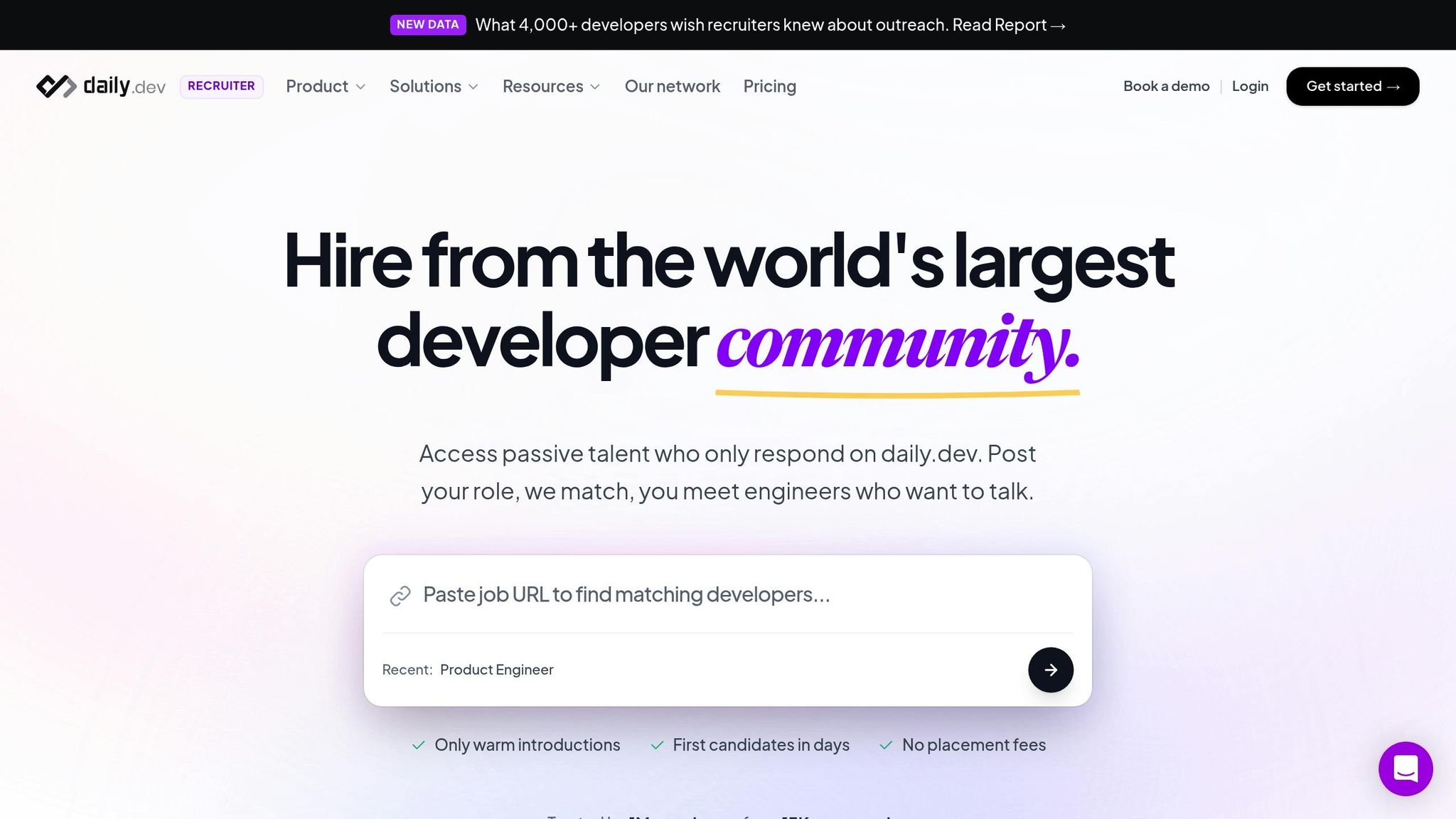
While ATS integrations and internal referrals are excellent for scaling recruitment, they primarily rely on your existing network and inbound applications. That’s where daily.dev Recruiter comes in. This platform connects you with pre-qualified, passive candidates who are already engaged on daily.dev. Every introduction is warm and double opt-in, meaning candidates have shown interest before you even reach out.
This approach reduces the noise of cold outreach in Slack communities. Instead of broadcasting job posts to a wide audience, you’re matched with candidates who meet your criteria and are actively open to new opportunities. By integrating daily.dev Recruiter into your Slack workflows, you can extend your streamlined recruitment process to include passive candidates while maintaining the organized, high-quality engagement you’ve built.
For teams tired of low response rates and wasted outreach, this developer-focused strategy offers meaningful connections that lead to better hires.
Best Practices vs. Common Mistakes
Building on earlier strategies for organizing Slack recruitment, this section highlights how structured practices can outperform scattered approaches.
The gap between a smooth and chaotic Slack recruitment process often boils down to a few key decisions. Disorganized teams tend to scatter candidate details across emails, DMs, and spreadsheets, making it nearly impossible to track progress or coordinate feedback effectively. On the other hand, well-organized teams centralize all information in dedicated Slack channels with clear naming conventions like #hiring-frontend-dev or #interview-jane-smith. This setup keeps conversations searchable and ensures everyone involved stays on the same page. This distinction lays the groundwork for understanding common mistakes and how to avoid them.
One frequent misstep is leaving candidates in the dark. A staggering 74% of job seekers report never receiving feedback after interviews - a practice that not only harms your employer brand but also wastes valuable time. To counter this, organized teams leverage Slack threads and automated reminders to prompt interviewers to provide timely feedback. This approach reduces miscommunication and creates a faster, more respectful experience for candidates.
Another critical consideration is privacy. Sensitive discussions, such as compensation or personal details, should always occur in private channels to maintain confidentiality.
Comparison Table: Disorganized vs. Organized Approaches
| Feature | Disorganized Approach | Organized Approach |
|---|---|---|
| Communication | Mass DMs and fragmented email chains | Dedicated role-specific channels and threads |
| Scheduling | "Calendar Tetris" via phone and email | Real-time coordination with /remind nudges |
| Document Management | Files scattered across folders and emails | Pinned job descriptions and resumes in channels |
| Candidate Feedback | Delayed or nonexistent; redundant meetings | Instant feedback using threads and emoji reactions |
| Privacy & Security | Sensitive info shared publicly or scattered | Private channels for confidential discussions |
These comparisons reinforce the importance of structured Slack workflows to streamline recruitment efforts.
Companies with inconsistent interview processes are over five times more likely to make poor hiring decisions. By adopting organized Slack practices - such as pinning essential documents, using threads for candidate-specific discussions, and integrating your ATS for automated updates - you can avoid the pitfalls that often derail recruitment and ensure a smoother, more efficient hiring process.
Conclusion
Recruiting developers through Slack can be made more efficient with a structured and thoughtful approach. Start by setting up dedicated channels with clear and specific names like #hiring-frontend-dev or #interview-jane-smith. This keeps your conversations organized and easy to search. Use threads for candidate-specific discussions, pin key documents at the top of channels for quick access, and connect your ATS to Slack for seamless updates. These small adjustments not only help keep things in order but also speed up your hiring process and fix pipeline drop-offs.
In a competitive hiring landscape, speed matters more than ever. A significant 74% of recruiters anticipate that hiring will become even more challenging this year . Leveraging Slack’s real-time communication to provide quicker feedback not only enhances your employer brand but also helps you secure top talent. After all, 64% of job seekers admit that a poor candidate experience would deter them from buying products or services from that company .
The strategies outlined in this guide - from respectfully joining developer communities to coordinating feedback among stakeholders - form a recruitment process that developers value. For teams looking to take their Slack-based hiring to the next level, daily.dev Recruiter offers a unique solution: warm, double opt-in introductions to pre-screened developers who are already engaged and open to opportunities. This method eliminates the need for cold outreach, replacing it with targeted connections to developers who are actively involved in the industry .
Ultimately, successful developer recruitment isn’t about shortcuts or gimmicks. As Nimrod Kramer, CEO and Co-Founder of daily.dev, wisely states: "Trust is the only hack" . By fostering trust through organized and respectful communication on Slack, hiring developers becomes a smoother and more effective process. Incorporating these best practices ensures your recruitment process is not only efficient but also built on a foundation of trust and respect - key elements for long-term success.
FAQs
What’s the best way to find Slack communities for hiring developers?
To tap into Slack communities for hiring developers, start by pinpointing groups where developers gather to collaborate and exchange ideas. Seek out communities tailored to specific programming languages, frameworks, or particular industry sectors. You can often find these groups through developer forums, social media platforms, or announcements at industry events.
Once you join, aim to genuinely engage rather than just dropping job postings. Contribute to conversations, share insights, and build meaningful connections. This strategy not only helps you understand potential candidates' skills and interests but also makes Slack an effective platform for discovering talented developers.
How can I effectively connect with developers on Slack without being intrusive?
To connect with developers on Slack in a way that feels both effective and respectful, focus on genuine, tailored communication. Skip the mass messages or generic follow-ups - these often come across as impersonal and can push people away. Instead, take the time to align your outreach with each developer's specific skills and interests, demonstrating a real appreciation for their expertise.
Be thoughtful in your engagement by actively participating in relevant channel discussions, sharing helpful resources, and fostering meaningful conversations. Keep your messages short and to the point, respecting their time and preferences. Prioritizing quality over quantity in your interactions builds trust and creates a more positive experience, paving the way for stronger, lasting connections.
How can I connect my Applicant Tracking System (ATS) with Slack to simplify hiring?
To streamline your hiring process by connecting your Applicant Tracking System (ATS) with Slack, you have a couple of options: automation tools or built-in integrations. Many ATS platforms come with Slack integrations that let you receive updates in real time. Think notifications for new applications, interview schedules, or candidate status changes, all delivered straight to designated Slack channels. Setting this up usually involves authorizing Slack through your ATS settings and picking the specific channels where these updates should appear.
If your ATS doesn’t offer a built-in Slack integration, tools like Zapier can step in to bridge the gap. With Zapier, you can automate triggers for actions like new applications or candidate updates, ensuring Slack notifications are sent instantly. This not only reduces the need for manual updates but also keeps your team in sync throughout the hiring process.
.png)


