

Looking to hire top developers? GitHub is where 68% of top-tier engineers are discovered. Unlike LinkedIn, GitHub showcases real coding skills, collaboration, and problem-solving abilities. But with developers receiving over 50 recruiting messages monthly, spammy outreach won’t work.
Here’s how to connect with passive developers effectively:
- Use GitHub search operators to filter by language, location, activity, or influence (e.g.,
language:python location:"San Francisco"). - Evaluate profiles based on quality contributions like detailed pull requests, clear documentation, and collaborative work.
- Send personalized messages referencing specific projects or repositories. Include key details like salary and tech stack upfront.
- Avoid common mistakes like generic templates, excessive follow-ups, or mismatched roles.
Key takeaway: Respectful, research-driven outreach can boost response rates to 30–60%, compared to 5–8% on LinkedIn. Focus on relevance and transparency to build trust with developers.
GitHub Search Techniques

With GitHub hosting profiles for 100 million developers as of 2026 , finding the right talent can feel like searching for a needle in a haystack. That’s where precise search techniques come in. GitHub’s built-in search operators let you filter by programming language, activity level, location, or even community engagement. These tools help you zero in on candidates who meet your exact needs.
Learning how to use these techniques effectively is the first step toward identifying developers who align with your goals and reaching out to them in a thoughtful way.
Advanced Search Operators
GitHub’s search qualifiers act like fine-tuned filters. For example:
- Use
language:to specify a programming language (e.g.,language:typescript). - Use
location:to target developers in a specific area (e.g.,location:"Austin"). - Use
followers:to measure a developer’s influence (e.g.,followers:>=100). - Use
pushed:to find profiles with recent activity (e.g.,pushed:>2025-01-01).
By combining these operators, you can craft highly targeted searches. For instance:
language:python location:"San Francisco" topic:machine-learning pushed:>2025-06-01
This query identifies Python developers in San Francisco working on machine learning, with recent activity. Similarly, range queries like stars:10..50 help you find up-and-coming talent by focusing on repositories with moderate popularity. If you prefer a visual interface, GitHub’s advanced search form at github.com/search/advanced is another great option.
"LinkedIn shows you what developers claim they can do. GitHub shows you what they've actually built." - GitHunt Blog
These operators are just the starting point for crafting more complex Boolean queries tailored to specific tech needs.
Boolean Search for Specific Tech Stacks
GitHub also supports Boolean operators like OR and NOT (or the - prefix) to refine searches further. The AND operator is implicit, so typing language:javascript react automatically searches for both terms.
Here are some practical examples:
Netflix’s Approach: In February 2025, Netflix’s talent team used this query:
org:netflix language:go followers:>100This helped them identify and hire 15 senior engineers within two months, cutting their hiring time by 33% .
Berlin Fintech Strategy: A fintech startup in Berlin used:
language:rust stars:>20 pushed:>2024-06-01With this approach, they built their engineering team in just eight weeks and achieved a 90% retention rate after 18 months .
Here’s a quick reference table for common tech stacks and roles:
| Tech Stack / Role | Search String |
|---|---|
| Python / ML | language:python "machine learning" OR "data scientist" stars:>50 |
| React / Frontend | language:javascript location:"New York" followers:>50 topic:react |
| Go / Backend | language:go OR "golang" "backend engineer" pushed:>2025-01-01 |
| DevOps / K8s | "devops" (terraform OR kubernetes OR docker) "infrastructure" stars:>100 |
| Rust / Web3 | language:rust (web3 OR blockchain OR "smart contract") |
To exclude irrelevant results, use the - operator. For instance, adding -language:javascript removes JavaScript entries from your search. You can also expand your search using Google X-ray queries like:
site:github.com "senior software engineer" (react OR typescript) inurl:profile
Finding Contributors Through Repository Searches
Sometimes, searching for repositories instead of individual profiles can reveal active contributors who’ve demonstrated their skills on real projects. Start by identifying repositories tied to your target tech stack, then analyze their contributors to find developers who’ve submitted pull requests or collaborated effectively.
Use the topic: qualifier to locate repositories tagged with specific technologies, like topic:kubernetes or topic:django. You can also search for repositories under specific organizations with the org: qualifier (e.g., org:airbnb). From there, check the "People" tab to find active team members and their specialties. For popular repositories, the "Contributors" list is a goldmine for discovering developers with tangible contributions.
Other strategies include looking for developers who have starred or forked relevant repositories - this often signals genuine interest or hands-on experimentation. To dig even deeper, the in:readme qualifier can help you find repositories mentioning niche tools or frameworks in their documentation. For example:
kubernetes in:readme
Hiring engineers?
Connect with developers where they actually hang out. No cold outreach, just real conversations.
Evaluating Developer Profiles and Contribution Signals
Finding a developer’s profile is just the beginning. The real challenge lies in assessing its quality. GitHub provides concrete proof of coding skills and problem-solving abilities, but the trick is knowing which signals matter and which are just noise.
Key Contribution Signals to Look For
Start by examining pull request (PR) depth. High-quality PRs often feature clean, well-organized code and detailed descriptions explaining why changes were made. Look for examples of developers solving complex bugs in prominent repositories . Check pinned repositories for meaningful, original projects rather than cloned templates or class assignments. Repositories with clear setup instructions or usage examples stand out. Developers who contribute thoughtful PRs to major open-source projects and write descriptive commit messages (instead of vague notes like "fixed stuff") show they can handle complex codebases and collaborate effectively .
Collaboration is equally important. Developers who participate in issue threads, contribute PRs to others' projects, and provide constructive feedback during code reviews demonstrate strong teamwork skills . To quickly evaluate a profile, open their top repositories, sort by stars, and check the last commit date to confirm they’re actively contributing . For sourcing local talent, use Ctrl+F in the "People" tab of a company’s GitHub organization to filter bios by location .
| Signal | High Quality | Red Flag |
|---|---|---|
| Commit Messages | Explains the "why" and "how" | Vague (e.g., "update", "fix") |
| Documentation | Detailed README, API docs, tests | Missing README or empty file tree |
| Project Type | Original tools, complex libraries | Bootcamp assignments, to-do apps |
| Collaboration | Contributions to major open-source projects | Only solo work in private/personal repos |
By combining these signals with data from learning platforms, you can create a well-rounded picture of a developer’s engagement.
Combining GitHub Data with daily.dev Activity
While GitHub highlights coding expertise, pairing it with daily.dev activity can reveal a developer’s commitment to staying current. GitHub shows what developers build, while daily.dev highlights what they’re learning. Together, these insights create a stronger picture of a developer’s intent and engagement.
For example, a developer actively contributing to Kubernetes repositories and simultaneously reading daily.dev articles on container orchestration clearly demonstrates a deep interest in that field. This combined approach helps identify not just skilled developers but those who are actively growing in their expertise.
Interestingly, response rates for double opt-in introductions on daily.dev are 6-10x higher than cold emails vs. warm intros . That’s because you’re reaching developers who’ve already signaled their interest in growth. Look for patterns: developers who consistently push code and engage with technical content in the last 90 days are far more likely to be open to opportunities .
Profile Evaluation Checklist
Use these metrics to quickly differentiate between top-tier talent and less active profiles. Before reaching out, verify that the README includes specific skills and portfolio links, and check for recent commit activity (within the last 90 days) . Are PR descriptions thorough? Is the code clean? Are they solving bugs in well-known open-source projects? Does their tech stack align with modern frameworks?
Be mindful of red flags: long-term inactivity, empty profiles, or repositories filled with cloned boilerplate . Sparse contribution calendars don’t always indicate low activity, as many developers work in private repositories . Focus on the quality of public contributions rather than the quantity of “green squares.”
| Metric | Notable Threshold | Elite Threshold | What It Indicates |
|---|---|---|---|
| Stars on Repos | 20+ | 500+ | Community validation and utility |
| Followers | 10-50 | 1,000+ | Industry influence and expertise |
| Forks | 20+ | 100+ | Others building on their work |
| PRs per Year | Active engagement | 50+ | Current activity and collaboration |
Respectful Outreach Strategies for GitHub Developers
::: @figure 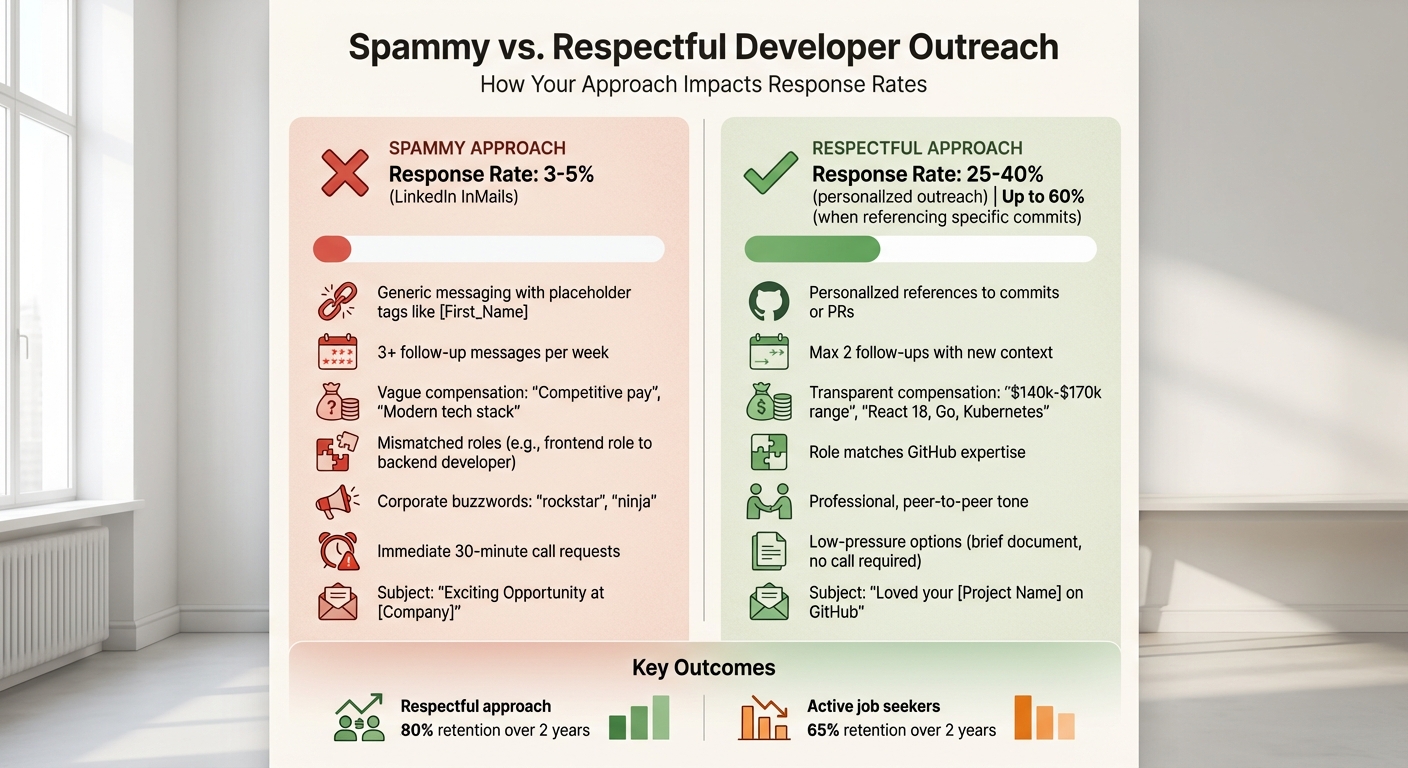 {Spammy vs Respectful Developer Outreach: Key Differences and Response Rates}
Once you've assessed a developer's contributions, the next step is reaching out - thoughtfully. You've found someone with impressive skills, but now you need to connect in a way that feels genuine, not spammy. The key? Reference a specific project detail to show you're serious.
Crafting Personalized Messages
Start by referencing specific work. Skip vague lines like, "I noticed your work on [specific repository/feature]." Instead, mention something concrete, like a repository, commit, or pull request. For instance:
"I noticed your README for kubernetes-config-manager includes detailed setup instructions for multi-cluster deployments - that's exactly the kind of infrastructure challenge we're tackling."
This proves you've done your homework and aren't just cold-emailing everyone.
Keep messages short - developers value brevity. Include relevant technical challenges, your tech stack, and compensation details upfront. Codility's tech recruiting team has seen a 30% response rate on GitHub outreach by having hiring managers (not recruiters) send tailored messages. These messages include specifics like engineering challenges and growth opportunities, which help establish technical credibility .
Next, focus on how to highlight contributions and opportunities in a way that stands out.
Highlighting Challenges and Growth Opportunities
Generic perks won't catch the eye of developers. They care about what they'll build and learn. Be specific:
"We're architecting a real-time payment system handling $100M daily" is far more appealing than something generic like, "exciting fintech opportunity" .
Mention your tech stack clearly - whether it's Rust, Kubernetes, or GraphQL. You can even link to your team's GitHub profiles so they can see the skill level of their potential colleagues . Tailor your pitch based on your company's size. For startups, emphasize fast career progression (e.g., "18 months to lead engineer" [2]). For larger companies, highlight the complexity and stability of large-scale systems.
Compensation transparency also matters. Passive candidates often expect a 10–20% salary bump to consider switching roles . Sharing a salary range upfront (e.g., $140,000–$170,000) builds trust and saves time.
Below is a comparison of how personalized outreach stacks up against generic messaging.
Templates for Transparent Communication
Here's how personalized outreach compares to generic messaging:
| Outreach Element | Generic | Personalized |
|---|---|---|
| Subject Line | "Exciting Opportunity at [Company]" | "Loved your [Project Name] on GitHub" |
| Opening | "I saw your impressive profile..." | "I noticed your commit in [repo] on [feature] - here's how it aligns with our [challenge] using [stack]." |
| Value Prop | "We are a fast-growing startup with perks." | "We're solving [Specific Challenge] using [Tech Stack]." |
| Transparency | Salary hidden until 4th call | "$140k–$170k range + Tech Stack included upfront" |
| CTA | "Send me your resume today." | "Open to a brief 15‑min chat next week?" |
Common Mistakes to Avoid When Sourcing on GitHub
When it comes to sourcing developers on GitHub, even the most precise search techniques can fall flat if outreach is mishandled. The difference between a standard cold outreach response rate (around 3–5%) and a much higher response rate from personalized, community-driven outreach (25–40%) often lies in avoiding a few key mistakes.
Avoid Generic Messaging
Nothing gets ignored faster than a message that feels impersonal or mass-produced. Here's a quick test: remove the recipient's name from your message. If it could be sent to anyone else without losing meaning, it’s too generic. Rewrite it.
Instead of relying on buzzwords or placeholder tags, focus on specifics. Reference technical achievements visible in their GitHub activity - like a clever Docker setup or a challenging Redis caching solution. This not only shows you’ve done your homework but also establishes a connection based on their expertise. And don’t pitch roles that don’t match their skills. For instance, offering a frontend position to someone with a clear backend focus signals a lack of effort and research.
Beyond the content of your message, it’s just as important to respect the developer’s time and privacy.
Respect Developer Time and Privacy
Overdoing follow-ups can harm your reputation. Stick to one or two follow-ups per week, and make sure each one adds new information instead of simply repeating your previous message. Developers are busy, and understanding why they ignore recruiters is key to avoiding outreach that comes across as harassment.
Transparency is another key factor. Vague phrases like "competitive pay" or "modern tech stack" waste time. Be upfront about critical details, such as a salary range (e.g., "$140,000–$170,000") and the specific technologies involved. Instead of pushing for a lengthy call right away, offer a low-pressure alternative, like sharing a brief document about the role. This allows developers to assess the opportunity without feeling rushed or overwhelmed. If their GitHub activity suggests they value focused, uninterrupted work, this approach will resonate even more.
Spammy vs. Respectful Outreach: A Quick Comparison
| Outreach Element | Spammy Approach (Avoid) | Respectful Approach (Adopt) |
|---|---|---|
| Follow-up Frequency | 3+ messages per week | Max 2 follow-ups with new context |
| Transparency | "Competitive pay", "Modern tech stack" | "$140k–$170k range", "React 18, Go, Kubernetes" |
| Call to Action | Request a 30-minute call | Offer a brief document - no call required |
| Technical Alignment | Pitch a frontend role to a backend developer | Match role to their GitHub expertise |
| Message Automation | Placeholder tags like [First_Name] | Personal references to commits or PRs |
| Tone | Corporate buzzwords ("rockstar", "ninja") | Professional, peer-to-peer, transparent |
The numbers back it up: cold LinkedIn InMails hover around a 3–5% response rate, while personalized, respectful outreach can hit 25–40%. It’s not about luck - it’s about showing developers that you genuinely value their time and skills.
Conclusion
Finding passive developers on GitHub requires a thoughtful approach built on research, respect, and transparency. It starts with using advanced search techniques, like Boolean logic and specific operators, to pinpoint developers whose skills truly match your needs. Prioritize verified technical contributions - like commits and pull requests - over surface-level metrics. This groundwork ensures your outreach has a solid foundation.
Referencing a specific commit or pull request during your outreach can lead to response rates as high as 60%. Instead of pushing for an immediate call, offer low-pressure options, such as sharing a brief role description. This makes the process less intimidating and more inviting.
The benefits of respectful engagement go beyond the initial interaction. Developers who are approached with care and professionalism tend to stay longer - about 80% retention over two years, compared to 65% for active job seekers. This process is not just about filling a position; it’s about fostering a genuine, long-term professional relationship.
To succeed, avoid common mistakes like using generic templates, sending excessive follow-ups, or pitching roles that don’t align with the developer’s expertise. Instead, approach developers as equals, combining technical accuracy with an understanding of developer norms and values. This strategy transforms GitHub from a challenging recruitment space into a reliable and respectful talent pipeline.
FAQs
How can I find developers who are active but not job hunting?
To locate active developers on GitHub who aren’t currently job hunting, pay attention to behavioral cues such as recent commits, pull requests, and contributions to repositories. GitHub's advanced search can be a powerful tool here - try filtering activity with queries like pushed:>2024-01-01 to find developers actively working on projects. You can also look at engagement metrics like the number of followers or stars on their repositories. When reaching out, make sure to respectfully reference their work. This approach helps establish trust and avoids coming across as spammy.
What are the best signs a GitHub profile reflects real senior-level impact?
A standout GitHub profile that reflects senior-level expertise usually highlights regular contributions to well-maintained repositories and involvement in challenging, high-impact projects. It often includes a varied portfolio of open-source work, showcasing versatility and depth in different areas. Additionally, such profiles often demonstrate leadership through activities like reviewing pull requests, providing constructive feedback, or mentoring less experienced contributors. Look for signs of meaningful collaboration and active participation across multiple projects to gauge their influence and teamwork.
Where should I message a developer from GitHub without being intrusive?
If you want to connect with a developer on GitHub, the key is to approach them with respect and genuine interest in their work. Start by referencing something specific they've done - whether it’s a repository, a commit, or a project they’ve contributed to. This shows that you’ve taken the time to understand and appreciate their efforts.
Avoid sending generic or mass messages. Instead, craft a personalized note that ties directly to their activity or interests. This type of thoughtful outreach goes a long way in building trust.
Another effective approach is to engage gradually. For example, leave meaningful comments on their projects or share relevant opportunities over time. This feels much more natural than a cold message and increases the likelihood of a positive response.
.png)


