

LinkedIn InMail response rates are low - typically under 13% - because most messages are too long, generic, or poorly timed. Developers, in particular, face inbox overload, which is one reason developers ignore recruiters and make it hard for messages to stand out. However, short, personalized messages (under 400 characters) and better targeting can improve responses by up to 40%. Timing also matters - avoid Fridays and Saturdays, and focus on mid-week mornings for higher engagement. For even better results, consider connecting with candidates through communities like GitHub or double opt-in platforms like daily.dev Recruiter, which achieve response rates of 18–25%.
Key takeaways:
- Keep messages concise: Under 400 characters improves response rates by 22%.
- Personalize outreach: Reference mutual connections or specific profile details to boost replies by 40%.
- Time it right: Send messages mid-week mornings, not Fridays or Saturdays.
- Explore alternatives: Warm outreach through communities or opt-in platforms outperforms cold InMails.
Focus on trust-building and thoughtful outreach to stand out in a crowded inbox.
Why Are LinkedIn InMail Response Rates So Low?
Developers are inundated with InMail messages, leading to inbox fatigue. This flood of outreach often results in messages being ignored or treated as spam, making it harder for recruiters to stand out. Interestingly, campaigns targeting smaller, more focused groups of 50 or fewer recipients achieve reply rates three times higher than mass outreach campaigns . Let’s break down how excessive volume, generic messaging, and poor timing contribute to low response rates.
Too Many InMail Messages
When developers are bombarded with high volumes of unsolicited messages, they tend to filter out anything that doesn’t offer immediate value. Individualized InMails perform about 15% better than bulk messages , but many recruiters still favor quantity over quality. This approach not only reduces response rates but can also harm the employer's reputation, making future outreach even tougher.
Generic, Copy-Paste Messages
Using templates without personalization can quickly damage credibility. Stacy Zapar, a Talent Leader, highlights the importance of tailoring messages:
Whatever stands out to me at first glance, that's what I talk about in my outreach... Just show them that you actually read their profile and that your message is intended only for them .
This personal touch matters - customized InMails can boost acceptance rates by 40% . Yet, many recruiters fall back on buzzwords and generic phrases, which make their messages feel impersonal and easy to dismiss.
Wrong Timing
Timing plays a critical role, both in when messages are sent and how they’re structured. For instance, 46% of InMails exceed 800 characters, often burying key details . Shorter messages - those under 400 characters - achieve a 22% higher response rate, while messages over 1,200 characters see an 11% drop . Divy Menghani, a Data and AI specialist at Databricks, emphasizes:
The shorter and more personalized the InMail, the higher the response rate .
Developers want the essentials upfront. Details like the tech stack, salary range, and work model should be immediately visible, not hidden in lengthy paragraphs. Keeping messages concise and to the point is vital for grabbing their attention.
How to Improve LinkedIn InMail Responses
Refining your LinkedIn passive candidate strategy can lead to a noticeable boost in response rates. By focusing on three key areas - message length and personalization, targeting the right candidates, and timing - you can make your outreach more effective. These strategies are supported by data and expert insights.
Write Shorter, Personalized Messages
Keep your InMails concise. Messages under 400 characters see a 22% higher response rate than average . Aim for 3–4 short sentences and stick to subject lines with 3–5 words (16–27 characters) to ensure they’re fully visible on mobile devices .
Personalization is a game-changer. Customized messages lead to a 40% increase in acceptance rates and a 30.5% bump in overall responses . Mentioning mutual connections or shared past employers in your opening line can improve response chances by 27% .
Maria Mencias, Lead Recruiter at Okta, emphasizes the importance of this approach:
A few personalized touches really help make your message feel tailored to them .
Avoid generic phrases. Instead, reference specifics like a shared connection or a former employer to establish trust and show genuine interest.
Target the Right Candidates
Not all candidates are equally likely to respond, so focus on those who exhibit clear interest signals. For example, developers who follow your company page are 81% more likely to reply . Similarly, candidates marked "Open to Work" are 35% to 37% more likely to engage . LinkedIn’s "Recommended Matches" feature can also identify candidates who are 35% more likely to accept your InMails compared to those found through general searches .
Calvin Liu-Navarro, Recruiter at ClassDojo, advises:
Make sure to use your network first by checking if you have a connection in common .
Utilize LinkedIn Recruiter’s filters like "Company Followers", "Open to Work", and "Recommended Matches" to narrow your search. The "Likelihood of Interest" feature combines these signals to help you identify the most responsive candidates .
Send Messages at the Right Time
While personalization and message length have the greatest impact, timing still matters . Avoid sending InMails on Fridays and Saturdays, as response rates dip by 4% on Fridays and 8% to 16% on Saturdays . Sundays, however, are underutilized, with only 2% of InMails sent, making it a good time to stand out . If you draft a message late on a Friday, consider scheduling it for Monday morning instead .
Greg Lewis, Data-Driven Content Strategist at LinkedIn, explains:
If you're about to send that InMail on a Friday afternoon, consider scheduling it for Monday morning instead .
For the best results, send InMails between 9:00–10:00 AM on weekdays . Keep in mind that 65% of responses come within 24 hours, and 90% arrive within a week . These timing adjustments can give your outreach the extra edge it needs to succeed.
What Works Better Than Cold InMail?
Even with the best-crafted InMails, the reality is that most go unanswered - about 75–90% of them, to be exact. This has led many recruiters to move away from cold InMail strategies and focus instead on intent-based outreach. The idea is simple: connect with candidates who have already shown some level of interest, rather than sending unsolicited messages that interrupt their day.
Connect with Developers in Their Communities
One of the most effective ways to reach developers is by engaging with them where they already spend their time - on platforms like GitHub, Stack Overflow, daily.dev, or even Discord servers. This strategy has resulted in response rates between 8–15% for connection requests .
What makes this approach stand out? Developers who are familiar with your reputation are far more likely to engage - up to 81% more . Spend a week or two participating in these communities before reaching out directly. When you do, reference specific contributions like a GitHub project or a technical blog post to demonstrate that you’ve done your homework. Building relationships within these spaces not only boosts your credibility but also sets the stage for a warmer, more meaningful introduction.
Leverage Warm, Double Opt-In Introductions
Warm outreach flips the script on cold messaging. Double opt-in platforms connect you only with developers who have actively expressed interest. These individuals first join a professional community and then opt in to being contacted by recruiters. This targeted approach achieves response rates of 18–25% in recruiting , ensuring that every interaction starts on a foundation of mutual interest.
A great example of this is daily.dev Recruiter. Developers on this platform opt in twice - first to access daily tech news and again to receive job opportunities. This setup provides recruiters with access to activity data, enabling them to craft concise, tailored messages under 400 characters. Nimrod Kramer, CEO & Co-Founder of daily.dev, puts it best:
The recruiters who win are the ones who break the pattern: honest, specific, respectful .
This approach shifts recruiting from random outreach to thoughtful matchmaking, connecting you with developers who are genuinely open to engaging.
Hiring engineers?
Connect with developers where they actually hang out. No cold outreach, just real conversations.
How Does InMail Compare to Other Outreach Methods?
::: @figure 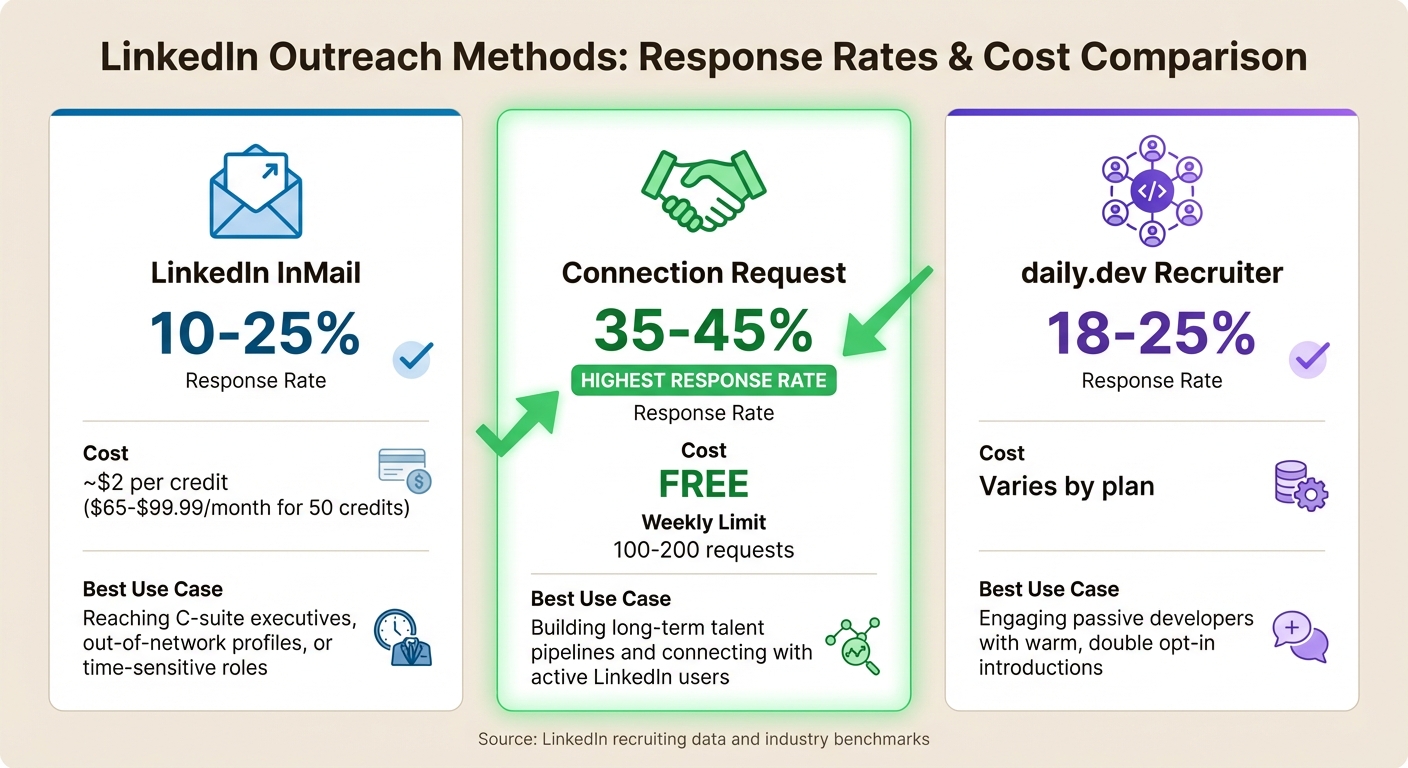 {LinkedIn InMail vs Connection Requests vs daily.dev Recruiter: Response Rates and Costs Comparison}
Are all outreach methods equally effective? Not quite. LinkedIn InMail generally sees response rates ranging from 10–25% for personalized messages. Meanwhile, connection requests that include a personalized note boast higher response rates, typically between 35–45% . Why the gap? It comes down to perception. InMails often feel impersonal or resemble sponsored content, while connection requests align more closely with natural professional networking .
The cost difference is just as notable. A subscription to LinkedIn Sales Navigator costs between $65 and $99.99 per month and provides 50 InMail credits . On the other hand, connection requests are completely free , though they come with weekly limits of about 100–200 requests . Given this, connection requests are often the go-to starting point for most recruiting efforts.
When it comes to personalized outreach, there’s also the option of daily.dev Recruiter. This tool sets itself apart by focusing on warm, double opt-in connections. Developers first opt in to join the platform and then opt in again to receive job opportunities. This approach results in response rates of 18–25%, similar to InMail but without the spammy feel.
Comparison Table: InMail vs. Connection Requests vs. daily.dev Recruiter
| Method | Response Rate | Cost | Best Use Case |
|---|---|---|---|
| LinkedIn InMail | 10–25% | ~$2 per credit | Reaching C-suite executives, out-of-network profiles, or time-sensitive roles |
| Connection Request | 35–45% | Free | Building long-term talent pipelines and connecting with active LinkedIn users |
| daily.dev Recruiter | 18–25% | Varies by plan | Engaging passive developers with warm, double opt-in introductions |
These insights make it clear that free, personalized approaches often outperform more expensive, impersonal methods. As Eliott Pleeck, Recruitment Content Specialist at Leonar, explains:
The best recruiting teams treat InMails as a last resort, not a first move .
Reserve InMail for harder-to-reach prospects where the additional cost is justified.
Conclusion
Generic, impersonal InMails are falling flat with developers. Why? Because developers face a flood of copy-pasted messages that lack technical depth and skip over crucial details like the tech stack, salary range, and work model. This approach erodes trust and fails to respect their time. No wonder LinkedIn InMail response rates remain stubbornly low.
To stand out, keep your messages concise - under 400 characters - and include the details developers care about. Timing matters too; mid-week afternoons can boost response rates by 22% . Leading with transparency - highlighting the tech stack, salary, and work model - not only shows respect but also builds trust, setting the stage for more meaningful connections.
For a better approach, consider moving away from cold InMails and exploring community-driven, warm outreach. Platforms like daily.dev Recruiter make this shift possible by connecting recruiters with developers who have already shown interest. These double opt-in introductions ensure developers feel valued, not spammed, while recruiters engage with candidates eager to connect.
As Nimrod Kramer, CEO & Co-Founder of daily.dev, wisely says:
In tech recruiting, attention isn't earned by volume. It's earned by trust.
Save InMails for reaching executives or filling urgent roles. When it comes to hiring developers, focus on trust, not mass messaging, and watch your response rates improve.
FAQs
What should I include in a short InMail?
To write a strong short InMail, stick to fewer than 400 characters and focus on being clear and personal. Reference something specific about the recipient - like a recent accomplishment or a mutual connection - to make it feel relevant. Keep the tone friendly and align your message with their interests. A brief, customized note can greatly increase the likelihood of getting a response.
When is the best time to send InMails?
The ideal time to send InMails isn’t tied to a specific hour but rather to when candidates are most likely to respond. That said, messages sent between Sunday and Thursday - especially on Sunday - tend to get better responses. Why? There’s less competition from other messages during this time. Interestingly, response rates stay relatively steady throughout the day, so timing within those days is less critical.
How do I pick candidates most likely to reply?
To boost your reply rates, prioritize reaching out to candidates who show higher levels of activity on LinkedIn. Keep your InMails concise - messages with 400 characters or fewer tend to get a 22% higher response rate. When sending connection requests, personalization makes a big difference. Requests that highlight mutual connections or shared groups achieve a 45% acceptance rate. Craft your outreach to reflect the candidate’s profile details and past interactions, as this tailored approach significantly improves your chances of getting a response.
.png)


