

Passive technical candidates - those not actively job hunting - make up 70–75% of the workforce. These professionals are often highly skilled but selective about opportunities. Traditional job postings won’t reach them, so if your hiring strategy doesn’t target this group, you’re missing out on most of the talent pool.
LinkedIn is the most effective platform to connect with passive candidates. Why? It allows direct outreach, advanced searches for niche skills, and a professional environment that encourages higher response rates. This guide explains how to:
- Optimize your recruiter profile to stand out.
- Use Boolean search and filters to find passive developer candidates.
- Write personalized messages that get responses.
- Build long-term relationships with passive candidates.
::: @figure 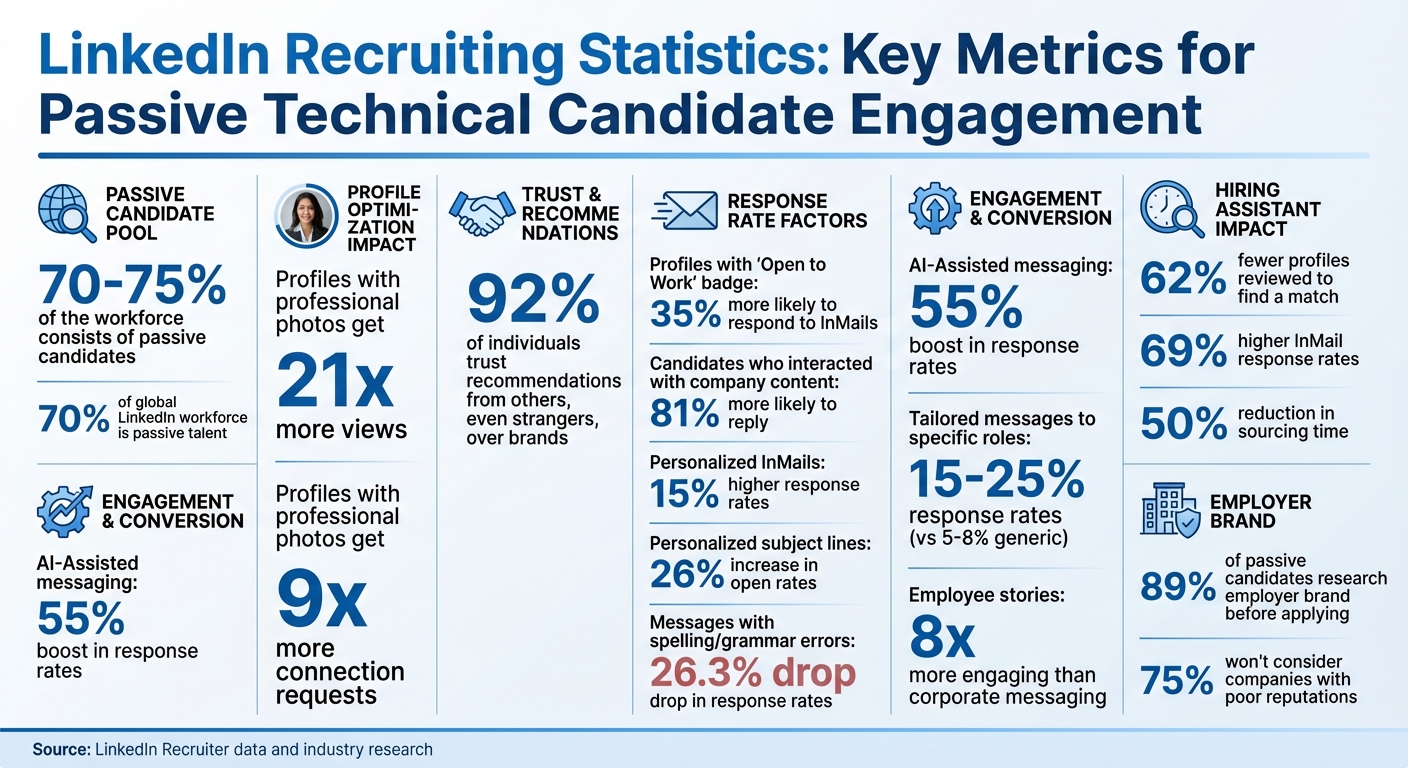 {LinkedIn Recruiting Statistics: Passive Candidate Engagement Metrics}
How to Build a Credible LinkedIn Profile as a Tech Recruiter
Your LinkedIn profile speaks volumes when reaching out to passive technical candidates. Developing a comprehensive LinkedIn strategy for passive talent is essential for long-term success. Did you know that profiles with a professional photo get 21 times more views and 9 times more connection requests than those without? Developers who aren't actively job hunting will often check out your profile before deciding whether to respond. That means your profile needs to highlight your expertise in tech recruitment. Start by fine-tuning your headline and summary to clearly showcase your specialized skills.
Write a Clear Headline and Summary That Highlights Your Tech Hiring Expertise
Your headline is one of the first things people notice, and you've got 220 characters to make it count. Avoid generic phrases like "Recruiter at [Company]." Instead, be specific about your focus. For instance, a headline like "Helping Companies Find Top AI/ML Talent | Specialized in Cloud & DevOps Hiring | Let's Connect!" immediately conveys your niche and expertise.
The About section is your chance to tell your story - 2,600 characters to be exact. Use this space wisely to share your background in tech recruitment and emphasize your achievements. Include measurable results to make your expertise tangible. For example, statements like "Successfully placed 50+ senior engineers in top-tier companies" or "Reduced time-to-hire by 30% through strategic talent acquisition" can help demonstrate the impact you've made in your field.
Add Keywords That Developers Search For
To make your profile more discoverable, sprinkle technical keywords throughout. Think of terms like "Talent Acquisition", "Tech Hiring", "Executive Search", and the specific technologies you focus on, such as "Python", "Kubernetes", or "Agile." Including these keywords naturally in your headline, summary, and experience sections will make it easier for developers to find you when they search for recruiters who truly understand their domain.
Include Success Stories and Recommendations
People trust recommendations - 92% of individuals trust recommendations from others, even strangers, over brands . Reach out to hiring managers or candidates you've placed and ask for recommendations. These testimonials add credibility and help establish trust. Additionally, use your experience section to highlight quantifiable achievements . Social proof turns your LinkedIn profile into more than just a resume - it becomes a showcase of your proven success in tech recruitment.
How to Use LinkedIn Search to Find Passive Technical Candidates
Once your LinkedIn profile is optimized, the next step is to find the right talent. Interestingly, over 70% of the global workforce on LinkedIn consists of passive talent - professionals who aren’t actively seeking jobs but might consider the right opportunity . To connect with these individuals, you’ll need a strategic approach to your searches. One of the most effective methods? Mastering Boolean search techniques.
Use Boolean Search for Precise Results
Boolean search allows you to craft specific search strings using operators to fine-tune your results. For example:
- AND: Ensures all specified keywords appear (e.g., "Python AND Java AND SQL").
- OR: Broadens results by including profiles with any of the keywords (e.g., "Software Engineer OR Developer OR Programmer").
- NOT: Excludes unwanted terms (e.g., "Software Engineer NOT Junior").
You can refine further by using quotation marks for exact phrases (e.g., "Cloud Architect" AND "AWS Certified") or group terms with parentheses. Wildcards also come in handy for variations of a word. These techniques make it easier to pinpoint the talent you’re seeking .
Narrow Your Search with Filters
After running your Boolean search, LinkedIn’s filters can help you zero in on the most relevant candidates. You can filter by location, industry, current or past employers, school, and experience level . For LinkedIn Recruiter users, additional filters like seniority level, job functions, years at the current company, and field of study are available, giving you even more control over your search .
Spot Strong Developer Profiles
Once you’ve filtered your results, it’s time to identify top candidates. Look for engagement signals that indicate a higher likelihood of response. For example:
- Profiles with the “Open to Work” badge are 35% more likely to respond to InMails.
- Candidates who have interacted with your company’s content are 81% more likely to reply .
Recent activity, such as updates within the past 30 days, suggests the candidate is actively using LinkedIn. Don’t stop there - check for links to GitHub, Stack Overflow, or personal blogs to gauge their technical skills and passion . Recommendations, endorsements, and shared connections can also provide insights into their credibility and influence in the tech community, helping you make informed decisions .
How to Write Personalized Messages That Get Responses from Developers
Getting candidates to respond is no small feat. Top tech professionals often receive more than 20 InMails a week, many of which they dismiss as spam . To break through the noise, your outreach needs to grab their attention and feel genuinely tailored.
Research What Motivates Each Developer
Start by diving into their professional footprint. Check out their GitHub, Stack Overflow contributions, blog posts, or even Twitter threads. These platforms can reveal what they’re working on, certifications they’ve earned, or open-source projects they’re passionate about. Maybe they’re experimenting with a new technology, speaking at conferences, or sharing insights on industry trends. These details are gold - they give you specific talking points and show you’ve done your homework. This kind of research is the backbone of effective outreach and ensures your message feels personal and relevant.
Structure an Effective InMail Message
Once you’ve gathered your insights, craft a message that highlights why their expertise stands out. Start with the subject line - this is your first impression. Personalized subject lines can boost open rates by 26% compared to generic ones . Instead of something vague like "Exciting Opportunity", try "Your React Project at [Company Name] Really Stood Out" or "Loved Your Take on GraphQL in Your Recent Post."
In the opening, keep it short and personal. Mention how you found them and what specifically caught your attention - whether it’s a project they worked on, a blog post they wrote, or a contribution on GitHub. Then, pivot to what’s in it for them. Highlight opportunities that align with their interests, like working with cutting-edge technologies, tackling exciting challenges, or joining a team that values their skills.
Wrap up with an easy, low-pressure question like, "Would you be open to a quick 15-minute chat?" or "Can I share more about the tech stack and role?" This makes it simple for them to respond without feeling overwhelmed or obligated.
Write Authentic Messages and Avoid Generic Language
Attention to detail matters. Messages with spelling or grammar errors see a 26.3% drop in response rates . Proofread your message, but keep the tone conversational and approachable - nobody wants to read something that feels robotic or overly stiff.
Also, avoid generic or impersonal approaches. Don’t use email addresses like info@company.com or noreply@company.com, as they can make you seem detached. Stick to LinkedIn messaging, and steer clear of using candidates’ work emails - it’s a quick way to lose trust.
Finally, don’t rush things. Avoid asking for resumes or formal applications right off the bat. Building trust takes time, and a thoughtful, respectful approach will go much further in creating a meaningful connection.
Hiring engineers?
Connect with developers where they actually hang out. No cold outreach, just real conversations.
LinkedIn Tools for Sourcing and Engaging Technical Candidates
LinkedIn offers a suite of tools designed to simplify the process of finding and connecting with passive technical talent. These tools not only save time but also improve the efficiency of your recruitment efforts. Below, we’ll dive into three key tools that can elevate your sourcing, engagement, and performance tracking.
Leverage LinkedIn Recruiter for Advanced Talent Searches
LinkedIn Recruiter gives you access to the entire LinkedIn network - not just your immediate connections. With over 40 advanced filters, including job titles, skills, locations, languages, and network relationships, you can pinpoint the exact type of developer you’re looking for. The platform’s AI-Assisted search highlights relevant skills and experiences on profiles, helping you identify top candidates in just minutes. In fact, it’s possible to find and engage a qualified candidate in under five minutes .
The "Open to work" feature is particularly useful for reaching out to passive candidates, allowing you to focus on developers who are more likely to be open to new opportunities. Additionally, the "Projects" feature lets you track candidates, collaborate with your team, and manage interactions - all of which are invaluable for building talent pipelines. By integrating LinkedIn Recruiter with your ATS, you can streamline your workflow and avoid the hassle of toggling between platforms .
AI-Assisted messaging through LinkedIn Recruiter can boost response rates by 55% . Each seat includes 100–150 InMails per month, with options for automated follow-ups and bulk messaging to scale your outreach efforts . For high-volume hiring, the Hiring Assistant add-on is a game-changer. It aligns your hiring goals with sourcing strategies, uncovers overlooked talent, and even drafts personalized messages. Recruiters using this tool review 62% fewer profiles to find a match and achieve 69% higher InMail response rates compared to traditional methods . Vincent Mercandetti, Sr. Talent Acquisition Partner at Siemens, shared:
"[Hiring Assistant] cut our sourcing time by at least half, allowing us to focus on other critical tasks" .
Engage Developers Through LinkedIn Groups
LinkedIn groups tailored to developers provide a unique opportunity to build meaningful connections. These communities are hubs for professionals to share content, discuss trends, and network with peers. By joining relevant groups, you can gain insights into what developers care about while positioning yourself as someone invested in their industry - not just as a recruiter.
In these groups, contribute by sharing articles, asking questions, or posting insights that demonstrate your expertise . Consistent and thoughtful participation helps establish credibility, making developers more likely to respond when you reach out directly. Many groups also feature "Jobs" sections where you can post opportunities in a context that feels more natural and less intrusive . The key is to approach these spaces with genuine curiosity and a willingness to engage, as relationships built this way often lead to better results than cold outreach.
Monitor Progress with LinkedIn Analytics
LinkedIn Recruiter includes built-in analytics tools that allow you to track and measure your recruitment efforts. You can generate usage reports, create custom reports tailored to your needs, and gain insights to optimize your recruitment funnel . These metrics help you identify which search filters, message templates, and strategies deliver the best results.
How to Build Long-Term Relationships with Passive Candidates
Once you've fine-tuned your profile and mastered personalized outreach, the next step is creating lasting relationships with passive candidates. These connections are essential because they can turn into some of your best hires over time. For technical talent, like developers who are constantly inundated with messages, trust-building is key. The goal? Stay visible and offer value without crossing the line into being intrusive.
A great way to start is by sharing content that resonates with developers without spamming them.
Share Content That Developers Find Useful
Your LinkedIn activity should go beyond just posting job openings. Developers appreciate resources that contribute to their professional development - think industry trends, technical deep dives, or case studies. Sharing this kind of material regularly shows that you understand their interests and challenges, making you more than just another recruiter.
Stories about your employees can also make a big impact. In fact, employee stories are eight times more engaging than standard corporate messaging. Highlight your team’s successes, introduce new hires, or write thoughtful articles on LinkedIn's publishing platform. These personal touches humanize your brand and show that you value your people. Considering that 89% of passive candidates research a company’s employer brand before applying - and that social media is their go-to source - this strategy is a no-brainer.
Once you've built a reputation as a helpful resource, the next step is maintaining regular, meaningful contact.
Follow Up Regularly Without Being Pushy
Keeping in touch doesn’t mean overwhelming candidates with messages. Instead, focus on follow-ups that add value. For instance, you could share an article related to their expertise, congratulate them on a recent milestone, or send updates about your company that align with their interests. These small, thoughtful gestures ensure you stay on their radar.
To make your follow-ups feel personal, segment candidates based on skills, location, and experience level. Tracking engagement metrics - like who’s opening your messages or clicking on links - can also help you adjust your strategy. And if someone doesn’t respond after a couple of attempts, give them some breathing room. You can always circle back in a few months with something fresh and relevant.
Know When to Present Job Opportunities
Timing is everything when introducing a job opportunity. Bring it up too soon, and it might feel pushy; wait too long, and you could miss your chance. When the moment feels right, make your message personal. Reference earlier conversations, explain how the role aligns with their career goals, and clearly outline why the opportunity stands out. By laying the groundwork with consistent, meaningful engagement, these discussions will feel natural and welcome.
Conclusion
Recruiting passive technical candidates on LinkedIn is all about delivering the right message at the right time. The key takeaway? Personalization and building trust always beat sending out mass messages.
Start with a strong foundation. Your LinkedIn profile should clearly highlight your technical hiring experience - it’s your first impression and sets you apart. Use tools like Boolean search and advanced filters to pinpoint developers whose skills and interests align with your roles. Keep in mind that 70% of professionals are passive candidates, meaning there’s a huge pool of potential talent waiting to be tapped.
When reaching out, make it personal. Generic messages tend to get ignored, while personalized InMails yield 15% higher response rates. Messages tailored to specific roles or interests can boost response rates from 5–8% to an impressive 15–25%. Take the time to research each developer’s work, career path, and motivations before messaging. Keep your outreach concise - ideally under 400 characters - and include a clear, low-effort call to action to make it easy for them to respond.
Focus on building relationships rather than just filling roles. Share content that’s relevant to their interests, follow up thoughtfully, and stay visible without being pushy. Trust is critical - 75% of professionals won’t consider companies with poor reputations. Consistent, genuine engagement helps establish the trust needed to make candidates open to your opportunities.
FAQs
How can I optimize my LinkedIn profile to attract passive technical candidates?
To attract passive technical candidates on LinkedIn, start by creating a headline that clearly reflects your tech expertise. This is your first impression, so make it count. Then, craft a brief but impactful summary that emphasizes your skills, key accomplishments, and what sets you apart in the tech world. Sprinkle in relevant keywords to ensure your profile aligns with what technical professionals are searching for.
Don’t underestimate the power of visuals - upload a professional photo to convey credibility. In the experience section, go beyond job titles. Dive into the details of your projects, the technologies you’ve worked with, and the results you’ve achieved. Lastly, showcase endorsements and recommendations from colleagues or clients. These add a layer of trust and authenticity that can make your profile more appealing to tech talent.
What are the best Boolean search strategies to find specialized technical talent?
To track down specialized technical talent effectively, mastering the basics of Boolean search is a great starting point. Boolean operators like AND, OR, and NOT help you tailor your search results for precision. For instance, use AND to combine all must-have skills (e.g., Kubernetes AND Terraform AND AWS). OR works well for including synonyms or related terms (e.g., "React" OR "ReactJS" OR "React.js"). Meanwhile, NOT helps you exclude irrelevant candidates or roles (e.g., NOT "intern" or NOT "junior"). To keep your search organized, group terms in parentheses and use quotation marks for exact phrases, like this: (“machine learning” OR “deep learning”) AND (Python OR R) AND NOT “entry-level”.
For harder-to-find candidates, advanced Boolean techniques can take your search to the next level. Use wildcards (*) to account for variations of a word, proximity operators (~) to locate terms close to each other, or site-specific filters to zero in on platforms like GitHub or Stack Overflow (e.g., site:github.com or site:stackoverflow.com). You can also narrow your focus by adding location filters (e.g., AND "San Francisco Bay Area") or excluding unrelated job titles (e.g., NOT "consultant").
A well-constructed Boolean string doesn’t just save time - it sharpens your results, making it easier to connect with highly skilled technical professionals, even those who aren’t actively job hunting.
How can I write personalized LinkedIn messages that developers are more likely to respond to?
To get better response rates from developers on LinkedIn, focus on creating messages that are personal and relevant to them. Start by doing a little homework - check out their recent LinkedIn posts, GitHub contributions, or portfolio projects to find something specific you can mention. Begin your message with their name and a thoughtful compliment, like: "Hi [First Name], I really admire your work on [specific project or technology]." This small effort shows you’ve taken the time to understand their expertise.
Make the message about them, not you. Instead of diving into details about your company or role, focus on how their skills align with a particular challenge or opportunity. For instance: "Your experience with React and Node.js would be an excellent match for a high-impact microservices project we’re starting." Be sure to highlight what’s in it for them - whether it’s leadership roles, equity options, or flexible remote work. Wrap up with a clear and concise call-to-action, such as: "Would you be open to a quick 15-minute chat this week to explore this further?"
Keep your message short - ideally under 150 words - and, if you don’t get a reply, send a personalized follow-up. Messages that are brief, thoughtful, and respect their time are far more likely to grab their attention.
.png)


