

Recruiting without an Applicant Tracking System (ATS) is possible, but it depends on your hiring needs. If your company hires fewer than 20 people annually or manages fewer than 100 applicants per role, manual tools like Google Sheets, Gmail, and Airtable can be effective. These tools are budget-friendly, easy to set up, and flexible for small-scale hiring. However, once your hiring volume grows - such as managing 5+ roles per month or scaling beyond 20 hires annually - manual processes become inefficient, error-prone, and time-consuming. At that point, investing in an ATS can save time, reduce errors, and improve candidate management.
Key Takeaways:
- When an ATS isn't needed: Small teams, low-volume hiring, tight budgets, or filling niche roles through referrals.
- Tools for manual workflows: Google Sheets, Gmail filters, Airtable, and automation tools like Zapier.
- When to adopt an ATS: Hiring 20+ people annually, managing 3+ open roles at once, or dealing with 500+ candidates.
- Drawbacks of manual processes: Time-intensive, prone to errors, and difficult to scale.
Quick Comparison:
| Factor | Manual Workflows (Spreadsheets) | ATS Integration |
|---|---|---|
| Cost | Free or low-cost | $300–$850/month |
| Setup Time | Minutes | 15 minutes to weeks |
| Time per 100 Resumes | 10 hours | 1 hour |
| Scalability | Limited to small volumes | Handles thousands |
| Collaboration | Risk of version conflicts | Real-time updates |
If you're a small team hiring sporadically, manual tools can work. But as hiring demands grow, switching to an ATS can save time, reduce inefficiencies, and improve the candidate experience for technical roles.
::: @figure 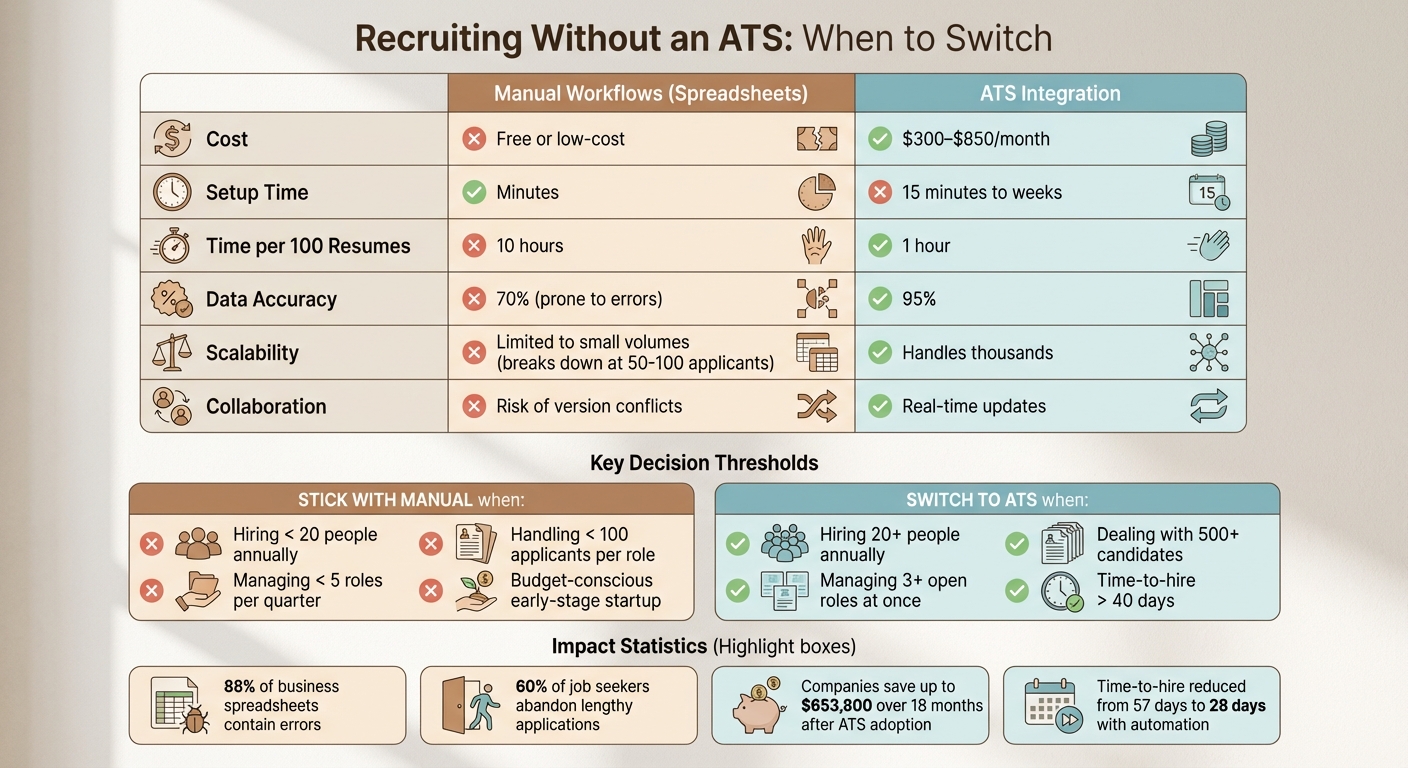 {Manual Recruiting vs ATS: Cost, Time & Scalability Comparison}
When You Don't Need an ATS
Not every hiring scenario calls for a full Applicant Tracking System (ATS). In fact, there are plenty of situations where manual tools like spreadsheets or no-code platforms can get the job done just as well - especially if you're hiring in smaller volumes, working with tight budgets, or filling roles through personal networks. Let’s break down when manual workflows might actually be the better option.
Low-Volume Hiring: Fewer Than 5 Roles Per Quarter
If your hiring needs are modest - less than 5 roles per quarter or about 3–10 people annually - an ATS might be more than you need . For this scale, a simple Google Sheet can track key details like candidate names, application statuses, interview dates, and notes. When you're managing fewer than 100 applicants per role, spreadsheets remain practical and efficient .
The key is to establish a repeatable process. Define your hiring stages - from job posting to final feedback - so you’re not starting from scratch each time. As Peter Sanders from Identifi Global explains:
You don't need a system to do the work for you. You need a structure so you don't reinvent the wheel every time .
Budget-Conscious Teams and Early-Stage Startups
For teams sourcing candidates on a tight budget, manual tracking tools provide a budget-friendly alternative. Early-stage startups, for instance, often prioritize conserving funds. Spending hundreds - or even thousands - of dollars annually on an ATS doesn’t make sense when free or low-cost tools like Google Sheets, Airtable, or Notion can handle candidate tracking .
Caroline Syrup, a no-code consultant, works with founders who hire just a handful of people each year. She shares:
Most my clients are founders who only plan to hire 1-3 new people each year. Setting up a traditional ATS would be overkill!
Instead, her clients often use lightweight setups, such as Airtable forms for applications and Zapier to send automated confirmation emails - all for less than $20 a month . The money saved can then be invested in sourcing candidates or improving their overall experience.
Straightforward Processes for Niche Roles
When hiring for niche or specialized positions, especially through referrals or personal networks, a formal ATS can feel like overcomplicating things . Many founders rely on their own professional circles, reaching out to trusted former colleagues or friends who already understand the company’s culture and goals.
For technical roles, recruiters often turn to [free platforms like GitHub or Stack Overflow for sourcing](https://recruiter.daily.dev/resources/coding-focused-candidate-sourcing-tools) . If you’re filling just one senior developer role every few months and working with a small pool of candidates, a spreadsheet can be quicker and more flexible than setting up ATS workflows.
Manual tools also offer adaptability. You can tweak your process on the fly - adding an interview stage or changing evaluation criteria - without being tied to the rigid structure of an ATS . For specialized or niche hires, this flexibility often outweighs the benefits of automation. In these cases, manual workflows can be a smart and efficient choice.
Hiring engineers?
Connect with developers where they actually hang out. No cold outreach, just real conversations.
Managing Recruitment Without an ATS: Practical Alternatives
If you're handling low-volume hiring and have opted to skip using an ATS (Applicant Tracking System), don't worry - there are ways to stay organized and efficient. With tools like Gmail and Google Sheets, you can create workflows that work well for small startups or solo recruiters. Here's how to set up a system that keeps things manageable.
Gmail + Google Sheets Workflow
The backbone of a manual recruitment system is email organization. To prevent your inbox from becoming a chaotic mix of applications and regular emails, use Gmail aliases. For example, set up unique addresses like yourname+jobs@company.com or yourname+developer@company.com for specific roles. Then, create Gmail filters to sort these emails automatically. Filters can skip the inbox, archive messages, and apply labels, saving you from manual sorting.
A nested label structure is another key step. For instance, you can organize labels like this:
- Recruiting > Senior Developer > Interview
- Recruiting > Senior Developer > Rejected
This approach keeps your inbox neat and provides a clear overview of each candidate's progress. As Ajay Goel, Founder of GMass, puts it:
Using Gmail as your ATS can save you a lot of the time, money, and headaches that come with recruiting new employees.
On the Google Sheets side, create a "Raw Data" sheet where each row represents a candidate. Include columns for details like Candidate ID, Application Date, Source (e.g., LinkedIn or referrals), Current Status, Resume Link, and Notes. Use dropdown menus for the Status column (e.g., "Screening", "Interview", "Offer", "Rejected") to reduce errors, and apply Conditional Formatting to highlight statuses - green for hires, red for rejections, and yellow for in-progress interviews.
For automation, Google Apps Script can be a game-changer. You can set it to scan Gmail every 30 minutes, extract candidate details from resumes, save files to Google Drive, and log data into your spreadsheet automatically.
To save time on repetitive tasks, use Gmail's template feature for standard emails like interview invites, rejection notices, or status updates. Pair this with tools like GMass to send threaded replies, keeping the conversation history intact. For tracking metrics, consider a separate "Calculations" tab in your spreadsheet. Use formulas like COUNTIF to monitor and optimize your recruitment funnel without cluttering your main dashboard.
This setup is ideal for small teams, but if you’re looking for even more automation and collaboration, lightweight platforms might be worth exploring.
Spreadsheets vs. Lightweight Platforms: Notion and Airtable
If your team needs something more robust than spreadsheets, lightweight platforms like Notion or Airtable can be a great next step. These tools offer relational databases to link candidates with specific jobs and interview stages, real-time collaboration to avoid version conflicts, and automated reminders for follow-ups. However, they do require a bit more time to set up and learn.
| Feature | Spreadsheets | Lightweight Platforms |
|---|---|---|
| Setup Time | Quick; familiar interface | Longer; involves database setup |
| Cost | Free with Google/Microsoft | Free tiers; paid for advanced features |
| Collaboration | Risk of overwriting data | Real-time updates for teams |
| Automation | Manual updates needed | Auto-emails and workflow triggers |
| Workflow Efficiency | Best for solo recruiters | Optimized for team coordination |
For solo recruiters or very small teams, spreadsheets remain the quickest and easiest option. As the Graphed Blog notes:
A Google Sheets dashboard is a fantastic, no-cost starting point that punches well above its weight.
However, if you're juggling multiple roles or working with a team of interviewers, platforms like Notion or Airtable can help you stay organized and ensure a smoother hiring process for everyone involved.
Pros and Cons of Recruiting Without an ATS
Choosing to recruit without an Applicant Tracking System (ATS) comes with its own set of benefits and challenges. The right choice depends on factors like your team size, hiring needs, and the time you can dedicate to managing the recruitment process.
Advantages of Going ATS-Free
One of the biggest perks? It’s free. Small teams can skip the expense of ATS subscriptions and rely on tools they already have, like Excel or Google Sheets. This means no annual contracts or per-user fees, which can be a game-changer for startups or businesses with tight budgets.
Another plus is complete flexibility. Want to track something unique like referral sources or test scores? Just add a column. You're not limited by a software’s design or workflow. Raj Patel from Reczee puts it well:
Starting your recruitment with sheets isn't just acceptable - it's smart. It allows you to move fast, stay organized, and understand your early hiring patterns without heavy investments.
Quick setup is another win. You can create a manual tracking system in no time - no need for demos, training sessions, or lengthy onboarding. If you need to fill a role ASAP, this speed can be crucial.
But these benefits don’t come without drawbacks.
Disadvantages of Manual Hiring Processes
The biggest downside? It’s time-consuming. Manual updates can feel like a "time vacuum":
Every hour spent babysitting a spreadsheet is an hour you could have spent placing candidates and actually making money.
Using automated tools for screening resumes is much faster, as manual reviews take significantly longer, and HR teams relying on spreadsheets often spend over 10 hours a week just coordinating tasks. That’s time that could be better spent speaking with candidates.
There’s also the issue of errors and data conflicts. With multiple people editing the same spreadsheet, accidental deletions, outdated versions, and missed follow-ups are common. In fact, research shows that up to 88% of business spreadsheets contain errors.
Scalability is another challenge. Spreadsheets start to lag when they exceed 500–1,000 rows, and managing more than 50–100 applicants per role becomes overwhelming. On top of that, storing sensitive candidate information in unencrypted files creates security risks - a major concern under data protection regulations.
While manual systems might work for small-scale hiring, they struggle to keep up with the demands of growing teams. An ATS, with its automation and reliability, becomes essential when scaling up.
Here’s a quick comparison of manual workflows versus ATS integration:
| Factor | Manual Workflows | ATS Integration |
|---|---|---|
| Cost | Free or very low | $400–$800/month for small teams |
| Setup Time | Minutes | 15 minutes to several weeks |
| Time per 100 Resumes | 10 hours screening | 1 hour with automation |
| Data Accuracy | 70% (prone to errors) | 95% |
| Scalability | Breaks down at 50–100 applicants | Handles thousands of applications |
| Collaboration | Version conflicts common | Real-time updates for teams |
If you’re hiring for just a few roles and working solo, a manual system might suffice. But as hiring demands grow, the inefficiencies of manual processes - missed candidates, longer vacancies, and lost time - can outweigh the initial cost savings of skipping an ATS.
When You Must Adopt an ATS: Scaling Thresholds
Recruitment can feel manageable at first, but as hiring needs grow, manual processes quickly become a roadblock. Martina Di Gregorio, Global Content Strategist at Tellent, sums it up perfectly:
Hiring rarely feels broken at first. It just slowly turns into one long, endless, disorganized email chain.
Recognizing when it’s time to switch to an Applicant Tracking System (ATS) can save you from months of inefficiency, missed opportunities, and frustrated candidates.
Signs Your Manual Hiring Process Is Breaking Down
One of the clearest signs? Managing more than three open roles at once or hiring 20+ people annually. At this point, spreadsheets and manual coordination start to crumble under the pressure . If your team is trying to fill five or six roles per month, the sheer amount of coordination can eat up valuable hours.
Sanat Hegde, founder of Hirevire, experienced this firsthand in 2025. While scaling his company from 15 to 60 employees, he found himself dedicating 35 hours per week to recruitment coordination. His time-to-hire stretched to 57 days. Reflecting on the experience, he shared:
I'm spending 35 hours/week on recruiting coordination. That's $14,000/month of my time. These tools cost $8,000/year. The math was obvious. I'd been penny-wise and pound-foolish.
Other warning signs include losing candidates due to duplicate outreach or misplaced interview notes. Companies with hiring cycles longer than 40 days face a 12% increase in candidate drop-off rates . These inefficiencies highlight the urgency of addressing process breakdowns before they spiral out of control.
The Cost of Delaying ATS Adoption
The longer you wait to adopt an ATS, the more the inefficiencies pile up. Delays increase administrative burdens and disrupt candidate engagement. Instead of focusing on meaningful conversations with applicants, your team ends up bogged down in scheduling interviews and chasing feedback. This reactive approach often leads to poor hiring decisions and higher turnover rates.
The numbers speak for themselves. After investing $10,200 annually in an ATS, Hegde cut his time-to-hire from 57 days to 28 days and slashed his weekly recruitment hours from 35 to just 8 . These changes saved his company an estimated $653,800 in opportunity costs and labor.
Livestorm, a software company, saw comparable results in 2024. Under the guidance of Marie-Agnès Deharveng, VP of People, they transitioned from manual processes to an ATS and reduced their time-to-hire from 60 days to 25 days . Deharveng remarked:
Our time-to-hire has been reduced 2.5 times over (25 days versus 60) since we started using Tellent Recruitee.
Beyond operational efficiency, there’s the candidate experience to consider. 60% of job seekers abandon applications due to lengthy or overly complex processes , while 41.2% drop out because of redundant data entry . Every day you delay adopting an ATS increases the risk of losing top candidates to competitors with faster, more streamlined hiring workflows. And with costs for small teams typically ranging from $300 to $850 per month, the investment is minimal compared to the expense of prolonged vacancies and lost talent.
These signs and statistics make it clear: as your hiring demands grow, transitioning to an ATS becomes not just helpful, but essential.
Horror Stories and Success Stories from ATS-Free Recruiting
Spreadsheet Chaos: When Manual Workflows Fail
In 2024–2025, Sanat Hegde, founder of Hirevire, tried scaling his startup from 15 to 60 employees using only Google Sheets and email. By the seventh month, this manual system hit its breaking point. The fallout? Missed opportunities. One standout engineering candidate slipped through their fingers because interview notes vanished due to a spreadsheet conflict. Another promising hire accepted a competitor's offer after their drawn-out six-week process lost out to a more efficient three-week timeline. Hegde summed it up perfectly:
Lost to a faster process, not a better offer.
Another cautionary tale comes from a recruiting company working with Marinext AI. They juggled hiring data across 30+ interconnected Excel sheets. Disaster struck when a recruiter deleted what looked like a duplicate row. This action broke VLOOKUP chains across all 30 sheets, misdirected salary calculations, and froze status updates. It took three employees two full days to manually piece the data back together .
These stories highlight the risks of relying too heavily on manual systems, especially as hiring demands grow. But not every manual recruiting story ends in chaos.
Lean Startup Wins: Hiring Top Developers Without an ATS
Sometimes, a lean, manual approach can still deliver results. In June 2025, Dana Bozich, an HR professional at Relay Fire and Safety in Maryland, successfully hired a new Controller for the accounting department - without using an ATS. Her tools? Spreadsheets, pivot tables, and the tracking features built into platforms like Indeed and LinkedIn. She even used ChatGPT as her "virtual assistant" to craft job descriptions and screening questions .
What set her process apart was its simplicity. Bozich only tracked candidates who directly responded to her outreach, avoiding the administrative overload that often plagues manual systems. Her approach was so effective that she outperformed a candidate personally referred by the CFO, showing that lean methods, when executed with precision, can still attract top talent .
Manchester-based retailer BrightStyle also saw success in 2025. By moving from manual tracking to a free, lightweight recruitment platform, they cut their time-to-hire by 40% using basic funnel analytics - tools that were completely absent in their old spreadsheet system . Similarly, London startup TechFlow managed to triple its engineering hires by adopting another free recruitment solution. This enabled them to handle applicants across both EU and US markets without the data fragmentation they previously struggled with in their manual logs .
These examples show that while manual workflows can work well for small-scale hiring, their limitations become glaringly obvious as hiring needs grow.
Lightweight Alternatives to Enterprise ATSs
Why daily.dev Recruiter Works for Small Teams
If you're tired of dealing with spreadsheet chaos but find enterprise ATSs too overwhelming, daily.dev Recruiter might be the perfect middle ground. Designed with developers in mind, this tool removes the clunky overhead of traditional ATSs while solving the inefficiencies of manual workflows.
Here's the kicker: unlike enterprise ATSs that lock your data in silos and require weeks for setup , daily.dev Recruiter gets you started in just 2–3 hours. No placement fees, no binding contracts, and the flexibility to cancel anytime . With a simple setup and a flat monthly fee per active role, it keeps costs predictable and admin work minimal.
What makes it stand out? It uses a warm, double opt-in introduction model. Instead of relying on cold emails that developers often ignore, you connect with engineers already active on daily.dev. This approach transforms recruiting from impersonal outreach into trust-based matchmaking. Plus, you can skip initial screening calls by accessing detailed candidate briefs that cover the same ground as discovery conversations .
This streamlined solution bridges the gap between manual hiring workflows and complex ATS systems. For small teams hiring developers, this means no more rigid keyword-based filters or tedious training sessions . It also taps into passive talent pools within active technical communities .
daily.dev Recruiter vs. Manual Workflows: Feature Comparison
| Feature | Manual Workflows (Spreadsheets/Gmail) | daily.dev Recruiter |
|---|---|---|
| Sourcing | Manual searching on LinkedIn/GitHub | Real-time behavioral activity signals |
| Outreach | Cold emails/InMails (low response) | Warm, double opt-in introductions |
| Screening | Manual resume review | Automated custom qualifying questions |
| Setup Time | Instant | 2–3 hours |
| Data Entry | Manual copy-pasting | One-click sync or standalone |
| Pricing | Free/low cost | Flat monthly fee per active role |
This table makes it clear why lightweight alternatives like daily.dev Recruiter stand out. From faster setup to a better candidate experience and predictable costs, the benefits are hard to ignore. For instance, mid-sized companies hiring 100 positions annually could save up to $10,000 in recruitment costs with ATS automation . By adopting daily.dev Recruiter, small teams can streamline their hiring process and lay the groundwork for future growth.
Conclusion: Is Recruiting Without an ATS Right for You?
Recruiting without an ATS can work well if you're hiring on a small scale. For example, if you're making 3–10 hires annually and handling fewer than 100 applicants per role, tools like spreadsheets and Gmail might be enough to get the job done . But as your hiring needs grow, the cracks in manual methods start to show.
Take the experience of Sanat Hegde, founder of Hirevire, as an example. In July 2025, his company scaled from 15 to 60 employees. By the seventh month, he was spending 35 hours each week on recruitment tasks, and the time-to-hire had ballooned to 57 days. Realizing the inefficiency, he opted to invest $10,200 annually in recruitment tools. The result? His team cut their time-to-hire for technical roles to just 28 days and saved an estimated $653,800 over 18 months .
"I'm spending 35 hours/week on recruiting coordination. That's $14,000/month of my time. These tools cost $8,000/year. The math was obvious. I'd been penny-wise and pound-foolish."
If you're managing more than 5–6 hires per month or tracking over 500 candidates, it's probably time to make the switch to automation . Similarly, if manual processes start taking precedence over meaningful candidate interactions, it's a clear signal to upgrade .
Once hiring volume outgrows what manual workflows can handle, lightweight recruitment solutions become indispensable. For developer-focused teams struggling between spreadsheet overload and overly complex enterprise ATSs, daily.dev Recruiter offers a middle ground. With features like pre-qualified developer introductions, a simple 2–3 hour setup, and flat-rate pricing, it transforms recruiting into a streamlined, trust-driven process. The real question isn't whether you can recruit without an ATS - it's whether the time you're losing is worth the money you're saving.
FAQs
What’s the simplest ATS-free workflow that won’t fall apart?
For a straightforward hiring process without an ATS, tools like Google Sheets or Notion can do the trick. Set up a well-organized database with dropdown menus to update candidate statuses, visual indicators to show progress, and dashboards to monitor hiring stages. This keeps all your information centralized, reduces the need for manual input, and is ideal for smaller hiring operations. You can always switch to an ATS later when your hiring needs become more complex or the volume increases.
How do I know when I’ve outgrown spreadsheets and email?
When managing recruitment starts to feel chaotic, error-filled, or like it’s eating up too much time, you’ve probably outgrown spreadsheets and email. Common signs include losing track of candidates, dealing with endless manual updates, or running into collaboration headaches - like multiple people making conflicting edits. If these inefficiencies are dragging down your hiring process or impacting the quality of your hires, it’s a clear signal that you need a more efficient system to handle the increasing complexity and volume.
What should I track to avoid losing candidates without an ATS?
Tracking candidates without an ATS can be tricky, but staying organized is key. Keep essential details like contact information, application status, interview feedback, follow-up dates, and engagement notes in one place. Tools like spreadsheets or Notion work well for this.
By consistently updating follow-ups and keeping clear notes, you’ll ensure timely communication. This approach minimizes the chances of losing out on top candidates while keeping your hiring process smooth and efficient.
.png)


