

Recruiters are overwhelmed by juggling too many tools. Companies waste $17 million annually on unused software, while recruiters lose 5 work weeks per year switching between platforms. Worse, 60% of candidates abandon long or disorganized hiring processes.
Here’s the solution: optimize the tools you already have - like your ATS, email, and spreadsheets - to automate repetitive tasks, reduce errors, and focus on candidates. This guide shows you how to:
- Audit your workflow to identify bottlenecks and inefficiencies.
- Use ATS automations to eliminate manual tasks like scheduling and screening.
- Improve email outreach with personalization and follow-ups.
- Leverage spreadsheets for tracking pipelines and team collaboration.
- Standardize screening processes with templates and scorecards.
- Track performance metrics like time-to-fill and drop-off rates.
::: @figure 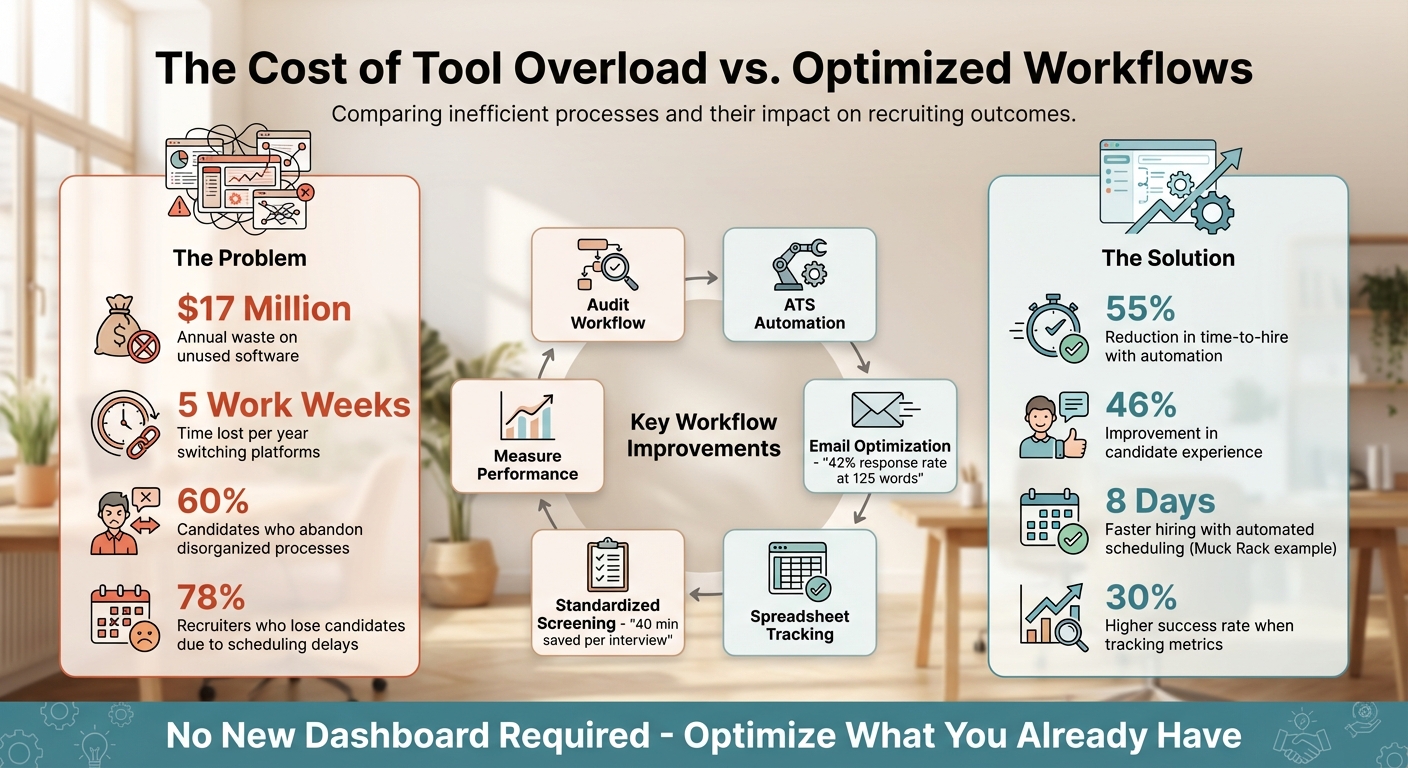 {Traditional vs. Optimized Recruiting Workflows: Key Metrics Comparison}
Review Your Current Workflow
Every recruiter knows the frustration of inefficiencies - endless emails, misplaced candidates, and wasted time. But figuring out exactly where things are going wrong? That’s the tricky part. A closer examination of your workflow might be just what you need.
Run a Workflow Audit
Start by mapping out your entire hiring process. Whether you use paper or a spreadsheet, document each step - from the moment a requisition is received to the final candidate acceptance. While a typical hiring process might seem to have 8–10 stages , when you factor in all the back-and-forth, the number often balloons.
Track important metrics to get a clearer picture. Tools like Google Sheets can help you monitor data like time-to-hire, qualified candidates per opening, and source-to-close speed . For example, if your average time-to-hire is 38 days and a significant chunk of that time is spent waiting for hiring manager feedback, you've just uncovered a bottleneck.
Don’t forget to examine the quality of your data. Are you consistently capturing key details like candidate sources, reasons for rejection, or the time spent in each stage? If many candidates are listed as "source unknown" or lack rejection reasons, it’s a sign your data might not be reliable enough to provide actionable insights.
The goal here is to use this information to identify where inefficiencies are happening and where candidates are dropping out of the process.
Find Your Biggest Problems
Once you’ve got your audit metrics, it’s time to dig deeper. Are candidates abandoning the process at a particular stage? A drawn-out hiring process can cause frustration and lead to significant drop-offs. For instance, if you’re losing candidates during the application or screening phase, simplifying these steps might be the solution.
Take a close look at communication between your team and hiring managers. It’s worth noting that 40% of candidates report being asked irrelevant questions during interviews . This often signals poor coordination or a lack of shared feedback. On the flip side, if hiring managers are unhappy with candidate quality despite a strong pipeline, there may be a mismatch in expectations.
Another area to scrutinize is repetitive manual tasks. Are you spending hours copying and pasting candidate details between LinkedIn, your ATS, and spreadsheets? Or are you manually scheduling interviews? These tasks are perfect candidates for automation, especially with tools you likely already have. As Shayleen Stuto from Recruiter.com wisely says:
"If you can identify the symptoms, then you can treat the cause" .
Lastly, tracking rejection reasons can reveal deeper issues, like misaligned job requirements or poor candidate matches . By addressing these inefficiencies, you can create a smoother, more effective hiring process.
Get More from Your ATS and Email Tools
Chances are, you already have tools at your disposal that can drastically cut down on manual tasks - they just might not be fully utilized. By building on your workflow audit, you can maximize the potential of your existing tools. Most Applicant Tracking Systems (ATS) and email platforms come loaded with features that can automate repetitive work and enhance candidate engagement, but they often go overlooked.
Set Up ATS Automations
ATS automation operates on a simple "trigger, condition, and action" logic. For example, a trigger could be an application submission or a stage change in the hiring process, which then prompts an automated action . You could configure your system to send a personalized "thank you" email right after someone applies or notify hiring managers on Slack when a candidate progresses to the next stage .
One highly effective automation is adding "knock-out" questions to your application forms. These questions - like asking about work authorization or years of experience - can help your ATS automatically archive candidates who don't meet your criteria . This simple step can save hours of manual screening each week. Automations can also streamline internal processes. For instance, when a candidate reaches the "Hired" stage, you can trigger an email to IT or HR to kick off onboarding tasks .
Take Muck Rack as an example. In September 2023, Talent Operations Specialist Odlenika Joseph implemented automated scheduling workflows that let candidates book interviews directly on the appropriate team member's calendar. This change reduced Muck Rack's time-to-hire by 8 days and freed up 80% of Joseph's time previously spent on manual scheduling . Erica Raphael, VP of People at Muck Rack, explained:
"Leveraging [automation] has enabled everyone on my team to take on a ton of projects that are really impactful to the recruiting team and the organization at large."
Scheduling delays are a common issue - 78% of recruiters report losing candidates because of them . Self-serve scheduling links in your ATS can completely eliminate this bottleneck.
Once your ATS is handling repetitive tasks, you can shift your attention to crafting better email outreach for stronger candidate connections.
Improve Your Email Outreach
Email remains one of the most effective tools for reaching tech talent, but the trick lies in personalizing your messages at scale. Using templates with customizable fields allows you to make every email feel tailored without spending hours on each one .
Keep your emails short and to the point. Response rates climb to 42% when the body is under 200 words, with the ideal length being 125 words or less . Break up text with bullet points to make it easier to skim, and focus on a single call-to-action - whether it’s scheduling a meeting or connecting on LinkedIn - to avoid overwhelming recipients .
Rachel Saunders, a recruiter at Yahoo, discovered that emails showcasing genuine research get response rates of 60-70%, compared to just 25% for less personalized messages . The secret? Using auto-text tokens like {{candidate_first_name}}, {{current_company}}, or {{job_title}} in templates. This approach maintains a personal touch while enabling high-volume outreach . It’s a simple way to upgrade your current tools without investing in new platforms.
Don’t forget to automate follow-ups. A well-designed three-step email sequence can keep candidates engaged . Research shows that most successful outreach campaigns include three to four email steps - fewer might get overlooked, while more than four can feel excessive . Make sure your system stops follow-ups automatically when someone replies.
Technical details also matter for email success. Keep subject lines under 30 characters to ensure they display correctly on mobile devices . Use plain text signatures without heavy images or complex HTML, which can trigger spam filters . And avoid misleading tactics like starting subject lines with "Re:" or "Fwd:" in your initial outreach - this erodes trust .
Small adjustments to your email strategy can yield significant results. Between 2020 and 2021, Talking Rain overhauled its outreach approach by refining job descriptions and expanding where they posted openings. The outcome? Female applicants increased from 22% to 50%, and BIPOC representation rose from 32% to 41% . Sometimes, even minor changes in how you communicate can make a big difference in who responds.
Use Spreadsheets and Shared Documents for Team Collaboration
You don't need fancy software to keep your team on the same page when tracking candidate progress. Tools like Google Sheets and Excel are already familiar to most teams and come packed with features perfect for managing recruitment pipelines. A well-structured tracker lets you focus on finding the right candidates instead of chasing scattered details.
Set up your spreadsheet with key columns such as candidate name, job title, application date, source, current stage, and next steps. Use dropdown menus for the "Stage of Process" (e.g., Applied, Phone Screen, Interviewing, Offer Made, Hired) to ensure consistent data entry. Structured spreadsheets not only provide a clear overview of the pipeline but also help centralize feedback from your team.
Create a Candidate Pipeline Tracker
Take advantage of formulas to make your tracker more efficient. For example, use =TODAY() - [Application Date Cell] to calculate how long a candidate has been in the pipeline. Or try =COUNTIF(range, criteria) to generate real-time summaries, such as the number of candidates currently at the interview stage or how many offers have been extended.
Color-coding can make your pipeline easier to scan at a glance. Highlight candidates ready for onsite interviews in green, mark those who have withdrawn in yellow, and flag overdue follow-ups in red. Conditional formatting can automate this process. For instance, use a formula like =AND(NOT(ISBLANK(FollowUpDate)), FollowUpDate < TODAY()) to automatically turn cells red when a follow-up date has passed. Lock the header row to make navigation smoother.
You can also build a hiring scorecard directly into your tracker. Add columns where interviewers rate candidates on a scale of 1–5 for skills like communication, technical abilities, and teamwork. Then calculate an overall score using =AVERAGE(ScoreRange). This creates a standardized and objective way to compare candidates. With your pipeline organized, it's easier to move on to gathering structured feedback from your team.
Gather Feedback with Shared Documents
Shared documents are a great way to centralize feedback and streamline decision-making. Use a single Google Doc or an extra spreadsheet tab where your team can drop their notes in real time. Features like @mentions in comments can help loop in specific team members or alert them when their input is needed.
Structure feedback by interview round and include predefined rating criteria, such as problem-solving or teamwork, instead of relying only on open-ended comments. This ensures everyone is using the same standards to evaluate candidates. You can also attach resumes, interview notes, and evaluation forms directly to the candidate's row or record, keeping all relevant information in one place.
Recruiters who track their hiring metrics are 30% more likely to make successful hires within three months . The best part? Using spreadsheets and shared documents doesn’t require extra logins, training, or costs - just leverage the tools you already have through Google Workspace or Microsoft 365.
Connect with Developers Through daily.dev Recruiter
Finding passive developers doesn’t have to mean adding another platform to your toolkit. daily.dev Recruiter works seamlessly with the tools you already use, offering warm, double opt-in introductions to developers. Instead of scraping LinkedIn profiles or sending out cold InMails that often go unanswered, this platform connects you with developers who’ve already shown interest in hearing about opportunities that match their skills.
It integrates directly with popular ATS systems like Greenhouse, Workday, and Lever, ensuring all your sourcing activity is logged automatically . No need to juggle multiple logins or manually transfer candidate details. When a developer opts in, their profile flows straight into your existing workflow - saving time and effort. This smooth integration helps you focus on building meaningful connections with candidates.
How daily.dev Recruiter Fits into Your Workflow
As recruitment trends shift toward connecting existing tools into unified systems (especially by 2025-2026), daily.dev Recruiter is designed to complement your current setup . It routes candidate data directly into your ATS and email tools. Here’s how it works: you post a job, developers who match your criteria see it in their daily.dev feed, and when they opt in, you get notified through the tools you already use.
There’s no need for extra dashboards or redundant processes. Your spreadsheets, email templates, and tracking systems remain in place, now with a pipeline of higher-quality candidates. By integrating seamlessly, daily.dev Recruiter helps you focus on what matters: connecting with developers who are genuinely interested in your roles.
Why Warm Introductions Outperform Cold Outreach
Cold outreach often falls flat, with low response rates and limited engagement. Warm introductions through daily.dev Recruiter take a different approach. Developers control the process - they see your job description, decide if it’s relevant, and opt in to connect. This means you’re only engaging with people who actually want to hear from you.
| Feature | Conventional Outreach | daily.dev Recruiter |
|---|---|---|
| Outreach Type | Cold emails/InMails | Warm, double opt-in introductions |
| Data Source | Scraped/static databases | Active, self-provided developer data |
| Workflow | Manual entry/new dashboard | Integrated with ATS & auto-routing |
| Candidate Status | Often active job seekers | Primarily passive, high-intent talent |
This approach flips the script on traditional recruiting. Instead of chasing down passive candidates who may not even be interested, you’re engaging with developers who’ve already expressed interest. The result? Higher response rates and more productive conversations from the very first interaction.
Hiring engineers?
Connect with developers where they actually hang out. No cold outreach, just real conversations.
Create Standard Screening Processes
Once you’ve streamlined your workflows, the next step is to standardize your candidate screening process. This ensures a consistent, fair, and efficient approach to evaluating every applicant. By using the same set of questions and scoring criteria for all candidates, you not only save time but also make hiring decisions that are more objective. Research backs this up, showing that structured interviews are far better predictors of job performance than unstructured ones. Plus, using pre-designed questions and rubrics can save you about 40 minutes per interview .
Build Templates for Screening Calls
Screening calls are your chance to confirm basic qualifications, and they shouldn’t take more than 10–15 minutes. To make this process efficient, create a reusable template in your favorite document tool. Start every call with the same opening script: set expectations, mention the 15-minute limit, and outline the agenda .
Focus your questions on two key areas: behavioral and hypothetical. Behavioral questions, like “Tell me about a time your actions positively impacted your team,” help uncover past achievements. Hypothetical questions, such as “How would you handle a competitor introducing a similar product with a fee?” gauge problem-solving skills . Avoid brainteasers - they’ve been shown to have no connection to job performance .
In your template, include a 1–5 scoring rubric to evaluate responses. For example, 1 = no evidence, 3 = adequate evidence, and 5 = exceptional evidence . This anchored scale helps maintain consistency and reduces bias. Google applies a similar structured approach, focusing on four areas: general cognitive ability, leadership, team alignment, and role-specific expertise. This method has led to better predictions of job performance .
Also, include early knock-out questions to quickly filter out unqualified candidates. Yes/no questions about required licenses, certifications, or work authorization can save time for everyone involved . Additionally, maintain a "do-not-ask" list to avoid legally sensitive topics like age, marital status, religion, or salary history .
Once your calls are standardized, use integrated tools to capture feedback immediately.
Use Google Forms to Collect Feedback
After screening calls, don’t waste time chasing hiring managers for feedback. A Google Form can simplify this step by collecting standardized responses and organizing them in a shared spreadsheet . This approach is free, widely known, and eliminates the hassle of follow-up emails.
Design your form with specific question types for clarity and efficiency. Use Multiple Choice for straightforward decisions like “Yes/No/Maybe,” Linear Scale (1 to 5) for scoring attributes such as communication or technical skills, and Paragraph fields for detailed comments . Keep the form brief - five to seven questions max - to ensure it gets completed.
Enable email notifications in the form’s "Responses" tab so you’re alerted whenever feedback is submitted . To prevent accidental edits, share the spreadsheet with "Can comment" permissions . This setup creates a centralized, easy-to-use feedback system without the need for additional platforms.
"Structured interviews are one of the best tools we have to identify the strongest job candidates (i.e., predictive validity). Not only that, they avoid the pitfalls of some of the other common methods." – Dr. Melissa Harrell, Hiring Effectiveness Expert, Google People Analytics
Structured screening processes don’t just help you make better hiring decisions - they also leave a good impression on candidates. In fact, applicants who go through structured interviews report being 35% more satisfied with their experience, even when they don’t get the job . That positive experience strengthens your employer brand and keeps your talent pool engaged for future opportunities.
Measure Your Workflow Performance
Once you've standardized your screening process, it's time to track how your workflow is improving. You don’t need fancy analytics software - your ATS exports and spreadsheets can do the job. In fact, 82% of companies say data is critical for making talent acquisition decisions . With just the tools you already have, you can start measuring your progress.
Which Metrics to Track
Focus on three essential metrics to assess your hiring process: time-to-fill, email reply rates, and drop-off rates at each stage of the funnel. These metrics will help you identify where your process is thriving and where it needs work .
- Time-to-fill: Tracks the time from job approval to offer acceptance. Delays in this metric often point to bottlenecks in internal approvals or sourcing .
- Email reply rates: Measures how well your messaging resonates with candidates. Low reply rates could mean your outreach needs tweaking .
- Drop-off rates: Pinpoints the stages where candidates are leaving your process. This helps you zero in on areas creating friction .
Instead of focusing on total applicants, measure qualified candidates per opening - the number of people who make it to your initial screen. This gives a clearer picture of how effective your sourcing channels and job descriptions are . For example, if 100 people apply but only 5 are qualified, the issue likely lies in your attraction strategy, not the screening process.
Lastly, track your offer acceptance rates to evaluate the end result of your workflow. Research shows that 60% of candidates quit applications they find too long or complicated . Monitoring where candidates drop off will help you identify and fix areas where your process creates unnecessary hurdles. Export your ATS data weekly or monthly for consistent analysis .
Once you’ve gathered these metrics, the next step is to dig into the data to uncover trends and actionable insights.
Use Pivot Tables to Analyze Your Data
When you export your ATS data into a spreadsheet, pivot tables can be a powerful tool for spotting trends without needing complex dashboards. Amy Wood, Senior Director of Recruiting Operations at Gem, highlights their value:
"Creating a well-thought-out hiring dashboard will allow you to visualize trends, gather insights, spot bottlenecks, and optimize your recruiting process" .
You don’t need specialized software - Excel or Google Sheets can do the trick.
Use pivot tables to break down your time-to-fill data by department, recruiter, or seniority level. For instance, you might find that senior-level roles take significantly more time to fill than entry-level ones, or that one sourcing channel consistently delivers quicker hires . Conditional formatting can also help you flag stages where timelines exceed targets, making bottlenecks more visible .
Before diving into analysis, ensure your data is clean. Every candidate should have an assigned source and a recorded rejection reason . Regular reporting is key - 71% of recruiters generate reports at least every two weeks . Teams with solid analytics practices are twice as likely to improve their recruiting efforts and three times more likely to cut costs . Christina Schmit, Director of Talent & Culture at Renewal by Andersen, sums it up well:
"It's not about perfection. It's about reviewing the data, adjusting accordingly, and keeping the train on the track" .
Conclusion
Streamline your recruiting process by fine-tuning your ATS, email systems, and spreadsheets. Start with a workflow audit to pinpoint inefficiencies, then automate repetitive tasks wherever possible. Maximize the potential of your existing tools - use email templates, shared candidate trackers, and standardized screening tools like Google Forms or scorecards to keep things organized and efficient.
Finding the right candidates goes beyond internal optimization. While your ATS manages applications and spreadsheets track metrics, tapping into passive candidates - those not actively job hunting - can be a game-changer. That’s where tools like daily.dev Recruiter come in. It integrates seamlessly with your current setup, providing warm, double opt-in connections with developers who are already engaged and open to opportunities, without the need for yet another platform.
Automation isn’t just about saving time - it delivers results. Recruitment automation can reduce time-to-hire by 55% and improve candidate experience by 46% . These improvements come from better use of your existing tools through automation, standardization, and cleaner data. As Emma Clary, Senior Content Marketing Manager at Employ, puts it:
"Every hour spent on admin tasks is an hour you're not building relationships with top candidates or making strategic decisions" .
To refine your process, track key metrics like time-to-fill, reply rates, and drop-off points. Use pivot tables in Excel or Google Sheets to identify bottlenecks by department or role, and ensure every candidate entry includes a source and rejection reason before diving into trend analysis .
Finally, make continuous improvement a priority. Regularly evaluate your workflow, automate where possible, and connect with developers through smarter, more effective channels. With these steps, you can significantly boost your recruiting efficiency using the tools you already have.
FAQs
How can I spot inefficiencies in my current recruiting workflow?
To spot inefficiencies in your recruiting workflow, start by breaking down each step of the process. Pay close attention to areas like candidate outreach, interview scheduling, and resume screening. These are common spots where delays or unnecessary complications tend to crop up.
Get your team involved by asking for their input on pain points they encounter. For example, they might highlight time-consuming back-and-forth communication with candidates or issues with selecting the right applicants. Their feedback can help you zero in on the root causes of inefficiencies and figure out where to focus your efforts.
Lastly, make the most of the tools and integrations you already have. Use them to monitor the performance of each stage in your workflow. This approach allows you to tackle problem areas and streamline your recruitment process without the hassle of adding new platforms.
How can I automate tasks using my current ATS and email tools?
You can simplify your workflow by using the automation features built into your current ATS and email tools. Many ATS platforms let you handle repetitive tasks like updating candidate statuses, scheduling interviews, or sending follow-up emails automatically based on specific triggers you set up.
Email tools also come in handy for automation, especially when it comes to creating personalized email sequences for reaching out to candidates. This is particularly useful for engaging passive candidates without needing to spend hours crafting individual messages. By taking advantage of these tools, you can cut down on time-consuming admin work and dedicate more energy to forming genuine connections with candidates.
How can I boost candidate engagement without investing in new tools?
You can improve candidate engagement by fine-tuning your communication approach and simplifying the application process with the resources you already use. Start by personalizing your messages to align with each candidate's unique skills and interests. Avoid sending generic outreach - tailored messages show candidates that you’re genuinely interested in them and make your communication stand out.
On top of that, make the application process as straightforward as possible. Cut out unnecessary steps to save candidates time and effort. Keep them in the loop with regular updates on their application status and set clear expectations from the start. Transparent and consistent communication not only builds trust but also keeps candidates actively engaged - all without the need for new tools or software.
.png)


