

GitHub is home to over 100 million developers, making it a goldmine for finding skilled talent. But here’s the catch: most developers on GitHub aren’t actively job hunting. They’re “passive candidates” who are open to the right opportunity but often ignore generic recruitment messages. To stand out, you need to focus on respectful, personalized outreach that highlights their contributions and aligns with their interests.
Here’s what you’ll learn:
- How to find developers: Use GitHub’s advanced search tools and filters to identify candidates based on skills, location, and activity.
- What signals to look for: Evaluate repositories, pull requests, and contributions for quality, not just quantity.
- How to avoid spammy outreach: Personalize your messages by referencing specific projects or contributions, and avoid using GitHub’s collaboration tools for recruitment.
- Building long-term relationships: Engage thoughtfully with developers over time rather than pushing for quick hires.
How to Find Developers on GitHub
When searching for developers on GitHub, dig deeper than surface-level metrics. Instead of focusing on follower counts or flashy profiles, pay attention to meaningful signals like contribution patterns, repository quality, and how they engage with the community.
Start by exploring pinned repositories, which highlight the projects developers want to showcase. A well-written README with setup instructions can indicate professionalism and attention to detail . Check whether the repositories are original work or forks, and verify their contributions through commits or pull requests .
The contribution heatmap (those green squares) can give you a sense of activity, but don’t jump to conclusions. Keep in mind that 82% of contributions happen in private repositories . For example, a senior engineer working primarily on private code may seem inactive on their public profile, so don’t assume gaps in public contributions mean a lack of skill.
Once you’ve identified potential candidates, focus on specific signals that showcase their expertise.
Reading Contribution Signals
Quality matters more than quantity. Look at their pull requests, documentation, and how they collaborate with others. Pull requests can reveal how they respond to feedback during code reviews and whether they document changes clearly . High pull request counts, thorough code reviews, and repositories with significant stars and forks (e.g., 500+ stars, 100+ forks) are strong indicators of impact .
Top developers often submit over 50 pull requests annually and contribute to highly popular projects . For example, in 2024, a Berlin-based fintech startup used the search query language:rust stars:>20 pushed:>2024-06-01 to find active Rust developers. By targeting contributors with community-recognized work, they built their engineering team in just eight weeks and achieved a 90% retention rate after 18 months .
Using GitHub Search and Filters
To narrow your search, leverage GitHub’s advanced search operators. These filters can help you pinpoint candidates based on their technical skills and activity level. For instance, a query like language:typescript location:"San Francisco" followers:50..500 pushed:>2025-01-01 can identify active TypeScript developers in a specific area who are less likely to be inundated with recruiter messages .
| Search Operator | Purpose | Example |
|---|---|---|
language: |
Find developers skilled in specific languages | language:python |
location: |
Search by geographic area | location:"Austin" |
followers: |
Gauge community influence | followers:50..500 |
pushed: |
Filter for recent activity | pushed:>2025-01-01 |
stars: |
Identify projects with notable recognition | stars:>100 |
topic: |
Target specific domains or interests | topic:kubernetes |
You can also use Google X-Ray searches like site:github.com "senior software engineer" (react OR javascript) inurl:visitor to find profiles that might not appear in regular searches . Another useful approach is checking the "Contributors" tab of popular open-source libraries your team already uses. These contributors often have proven expertise in the tools and technologies you need .
Public vs. Private Repositories: What You Need to Know
While public repositories provide valuable insights, remember that much of a developer’s work happens in private repositories. Developers can enable a setting to display anonymized private contribution counts as green squares, but the specifics of their work remain hidden .
This distinction creates an ethical boundary: only evaluate what developers have chosen to share publicly. Check the "Organizations" section of their profile - membership in a well-known company’s GitHub organization can signal professional experience, even if their public contributions seem sparse . Many skilled developers focus on private projects and don’t have the time to maintain an active open-source presence.
When evaluating public repositories, prioritize communication and problem-solving skills over the sheer volume of code. Always respect ethical boundaries by focusing solely on publicly shared work.
Hiring engineers?
Connect with developers where they actually hang out. No cold outreach, just real conversations.
What Makes GitHub Outreach Spammy?
Spammy outreach not only damages credibility but also wastes valuable time. Developers can easily recognize generic, impersonal messages, and instead of engaging, they’re more likely to block or ignore you. Successful recruiting on GitHub requires respecting developers' time, acknowledging their work, and adhering to the platform's community norms.
Ashley Wolf, GitHub’s Director of Open Source Programs, highlighted in February 2026 that the platform is grappling with a "spam crisis." This surge in low-quality, AI-generated contributions has led to increased scrutiny of unsolicited interactions . As a result, developers are now particularly cautious about outreach that feels impersonal or disruptive.
Generic and Bulk Messaging
Sending out mass, cookie-cutter messages with minimal personalization is a quick way to alienate developers. Templates that lack specificity - like "Exciting Opportunity at [Company]" - come across as generic and insincere. On the other hand, a subject line such as "Question about your [Project Name] on GitHub" shows that you’ve put in the effort to learn about their work. Including only basic details, like a developer’s name or current employer, feels transactional. Instead, referencing a specific pull request, repository, or technical talk can demonstrate genuine interest and significantly boost your chances of a response.
Ignoring Developer Context and Preferences
Failing to consider a developer’s current projects or interests makes your outreach irrelevant. As mentioned earlier, understanding a developer’s contributions and context is crucial. For instance, if someone’s GitHub profile highlights active involvement in a personal project or an open-source library, ignoring these signals means missing an opportunity to connect meaningfully. Vague phrases like "modern tech stack" or "competitive pay" are less compelling than specifics. For example, mentioning technologies like "React 18, Go, Kubernetes" alongside a clear salary range - such as "$140,000–$170,000" - helps developers quickly evaluate whether the opportunity aligns with their skills and goals.
Violating GitHub's Community Guidelines
GitHub’s collaboration tools, such as Issues and Pull Requests, are designed for project discussions - not recruitment. Using these features for outreach often gets flagged as spam and can harm your reputation . A notable example is the September 2025 "Git Coin" phishing campaign, which exploited GitHub’s notification system. This incident underscored how off-channel, inappropriate outreach can lead to spam flags and damage trust .
To avoid these pitfalls, stick to proper channels like email or LinkedIn for recruitment efforts. Additionally, if you encounter spam or abuse on GitHub, use the platform’s official reporting tools rather than responding directly .
Up next, we’ll explore how to craft outreach messages that respect developers’ time and highlight their work effectively.
How to Write Respectful Outreach Messages
When reaching out to developers, your message should reflect their genuine contributions and align with ethical sourcing practices. A well-crafted message that feels authentic and relevant can make the difference between being ignored and starting a meaningful conversation. The key lies in preparation and clearly showing mutual value.
Personalizing Messages Based on Their Work
Generic templates are a quick way to lose a developer's attention. Instead, reference something specific, like a repository, pull request, or technical decision they've made. For instance, a subject line like "Question about your [Project Name] on GitHub" signals genuine interest and can increase response rates to 60% . If they've recently contributed to an open-source project or given a talk, mention it. Highlighting a particular commit or asking a thoughtful question about their approach shows you've done your homework. This kind of personalization shifts your message from impersonal outreach to a meaningful, peer-level conversation.
Showing Mutual Benefits
Developers are drawn to opportunities that align with their skills and career goals. Vague phrases like "exciting challenges" or "competitive compensation" often fall flat. Be specific - mention the tech stack (e.g., React 18, Go, Kubernetes) and include a salary range, such as $140,000–$170,000. Transparency helps them quickly determine if the role is a good fit. Tailor the opportunity to their interests by connecting their current work to the role you're offering. Replace generic calls to action like "Apply here" with something more engaging, such as "Would you be open to a quick 15-minute technical chat?"
When and How Often to Follow Up
Developers may not reply right away, so patience is crucial. Overly frequent follow-ups can harm your credibility and even damage your employer's reputation . Start with a follow-up 2–3 days after your initial message, keeping it concise and adding value - like a link to a technical blog post they might find interesting. If there's still no response, wait 5–7 days before trying a different approach, such as sharing a video about your team’s culture or explaining the impact of a specific project. A third follow-up 10–14 days later can be a polite "break-up" email, acknowledging their busy schedule while closing the conversation gracefully. For passive talent, consider checking in every 4–8 weeks with helpful updates to nurture the relationship over time .
With these respectful outreach strategies in place, we can now explore how to build long-term connections on GitHub.
Best Practices for GitHub Recruiting
::: @figure 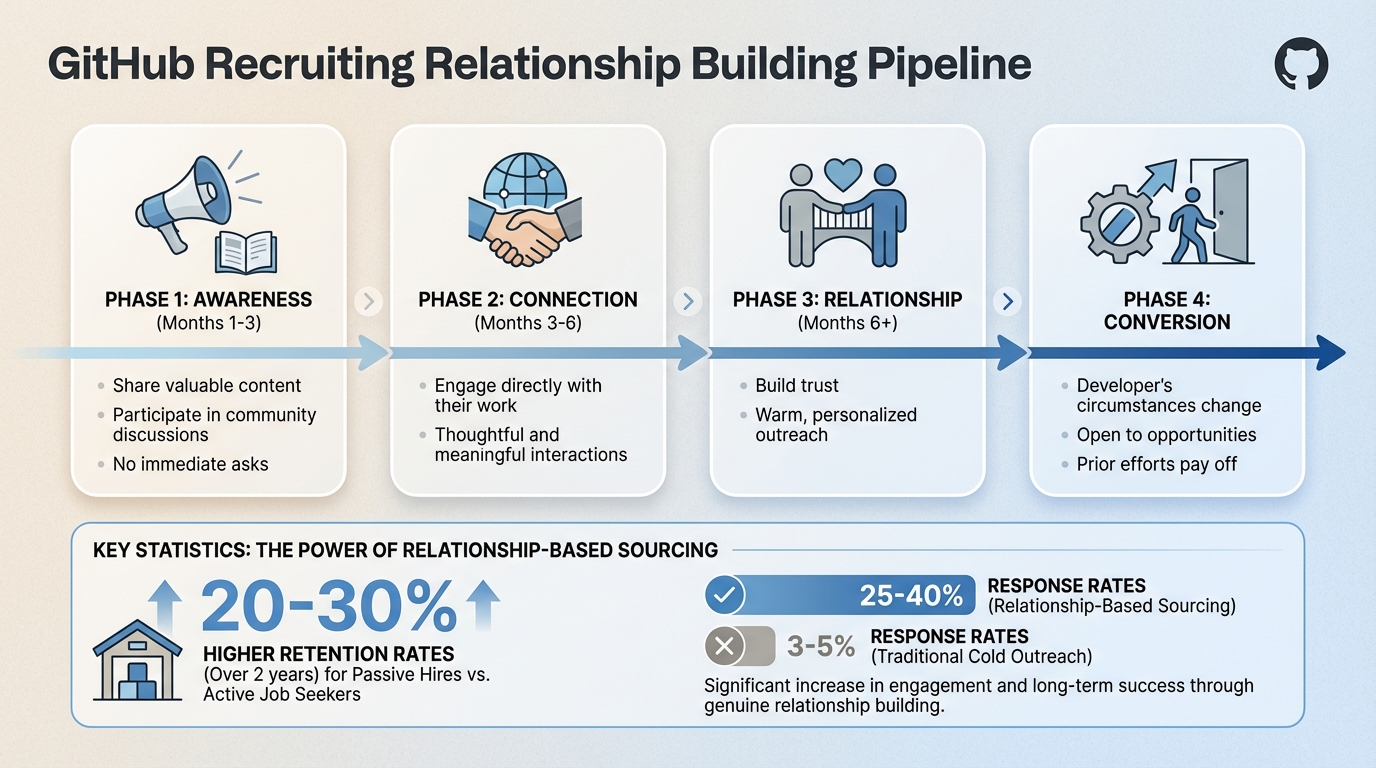 {4-Phase GitHub Developer Relationship Building Pipeline}
To move beyond simple outreach, the focus should shift to building genuine relationships with developers. Success in GitHub recruiting isn’t about quick hires - it’s about fostering trust and creating connections within the developer community. Many top-tier developers aren’t actively job hunting, which means the key lies in prioritizing long-term engagement over short-term results. While this approach requires patience, it pays off: passive hires tend to have 20-30% higher retention rates over two years compared to active job seekers .
Building Relationships vs. Immediate Hiring
Developing a relationship pipeline involves four main phases:
- Awareness (Months 1-3): Share valuable content and participate in community discussions without any immediate asks.
- Connection (Months 3-6): Start engaging directly with their work in a thoughtful and meaningful way.
- Relationship (Months 6+): Build trust through warm, personalized outreach.
- Conversion: When the developer’s circumstances change, they’ll be more open to opportunities thanks to your prior efforts .
If you need to fill positions quickly - within four weeks, for example - combine this long-term strategy with active sourcing. Keep an eye on trigger events like leadership changes, layoffs, or project completions, as these can signal when a developer might be ready to consider new opportunities . This is when the time you’ve invested in relationship-building pays off.
Once you’ve established a connection, GitHub’s community tools can help solidify these relationships.
Engaging Through GitHub's Community Features
Instead of diving straight into direct messages, start by interacting with developers where they’re already active. For example, you can set up a Discussions tab on your company’s repositories to participate in technical conversations. Show interest in their work by starring relevant repositories, leaving thoughtful comments on issues or pull requests, or even offering helpful fixes. This approach mirrors how successful open-source maintainers build communities - by being responsive and making contributors feel valued .
You can also use GitHub labels like "good first issue" or "help wanted" to encourage contributions and create natural collaboration opportunities . Include a CONTRIBUTING.md file to guide participation and promote community code reviews. These efforts not only distribute workload but also help build rapport. When developers see your company actively contributing to open-source projects and fostering collaboration, they’re more likely to respond positively to future outreach. Consistent engagement can also boost repository stars and participation in Discussions, further strengthening your presence on GitHub .
Conclusion
Effective GitHub recruiting is about quality over quantity. By sending fewer, more thoughtful messages, you show respect for developers' time and work. And the numbers speak for themselves: relationship-based sourcing achieves response rates of 25–40%, compared to the meager 3–5% from traditional cold outreach . Plus, passive hires tend to stick around longer, fostering better retention .
When you shift from a transactional approach to one that prioritizes relationships, everyone benefits. Developers receive opportunities tailored to their skills and interests instead of generic job offers. Meanwhile, recruiters cultivate a pool of engaged candidates who are more likely to respond positively when the right opportunity arises.
Start small - respect developers' time by making low-pressure requests, like sharing a brief role description rather than pushing for an immediate call . Stay connected with consistent, low-effort touchpoints, like sharing relevant content every 4–8 weeks, using GitHub's community features to keep the engagement authentic .
As highlighted in earlier sections on finding developers and crafting respectful outreach, every interaction lays the groundwork for better recruiting results. Passive talent isn’t looking for just any job - they’re holding out for the right one. By investing in genuine connections and honoring their work, you improve your chances of being the recruiter they turn to when the timing aligns.
This method isn’t just ethical - it’s effective. Think of GitHub recruiting as a way to build a future talent pipeline, not merely a quick fix for current vacancies. Focus on long-term relationships, and your outreach efforts can evolve into meaningful, lasting opportunities.
FAQs
How do I tell if a GitHub developer is senior?
To spot a senior GitHub developer, focus on their track record of contributions, participation in challenging projects, and evidence of leadership or mentorship. Look for signs like a high number of repositories, consistent commit activity, and involvement in major projects. Evaluate the quality of their code, the difficulty of the problems they tackle, and their active role in open-source initiatives to determine their level of expertise.
How can I assess someone with mostly private repos?
Assessing developers who primarily work with private repositories can be challenging, but their public activity can offer valuable insights. Take a closer look at their public repositories, contribution habits, and overall engagement. Pay attention to their involvement in open-source projects, submitted pull requests, and participation in issue discussions. These elements can provide a glimpse into their technical expertise, problem-solving methods, and how they collaborate with others, even if their private work remains out of reach.
What’s the safest way to contact developers from GitHub?
The best approach is respectful, personalized outreach that prioritizes building trust. Start by engaging with their public work - leave thoughtful comments on repositories or participate in discussions to demonstrate genuine interest. When reaching out, be upfront about the role, tech stack, and salary details, and make sure your message reflects an understanding of their work. Steer clear of mass, generic messages, and always respect the boundaries of their community spaces to keep interactions professional.
.png)


