

Developers often ignore outreach emails because most are generic, overly long, and lack personalization. To craft emails they’ll actually respond to, focus on these essentials:
- Keep it short: Aim for 50-125 words.
- Personalize: Reference their specific work, like GitHub projects or blog posts.
- Clear subject lines: Use 1-5 words with personal elements (e.g., their name or company).
- Respect their time: Use bullet points for key details like salary, tech stack, and role impact.
- Low-pressure close: Suggest small next steps, like a quick 15-minute chat.
Follow up thoughtfully, offering new value each time, and avoid sounding pushy. If cold emails aren’t working, tools like daily.dev Recruiter connect you with developers who are already open to opportunities. Tailored, respectful communication is key to better response rates.
Writing Subject Lines That Get Opened
::: @figure 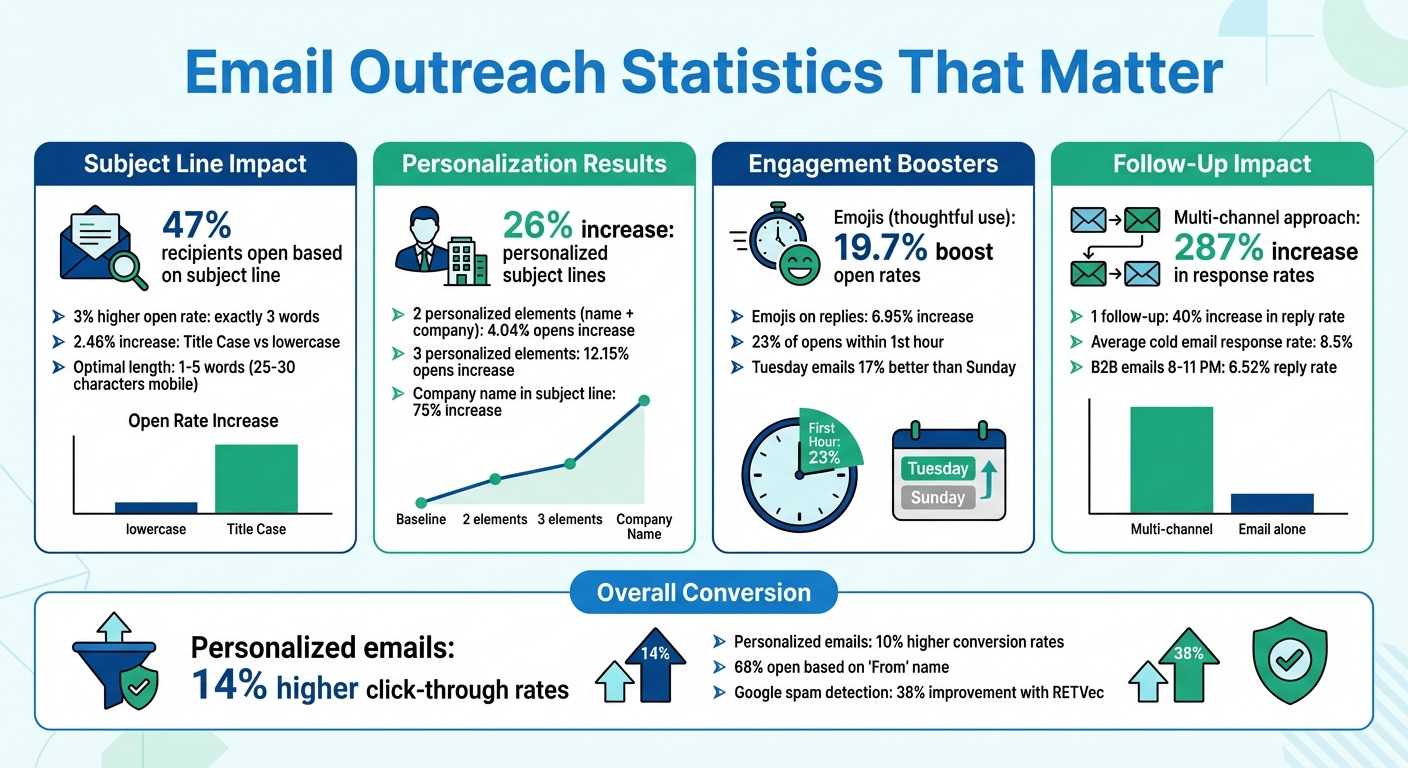 {Email Outreach Statistics: Open Rates, Personalization Impact, and Response Metrics for Developer Recruitment}
Your subject line is the first impression your email makes. In fact, 47% of recipients decide whether to open an email based solely on the subject line . If the subject line doesn’t grab attention, your message risks being ignored.
To make an impact, keep it short - ideally between 1 and 5 words . Mobile devices often cut off text after 25–30 characters, so place the most important information up front. For instance, subject lines with exactly three words tend to see a 3% higher open rate on average . Also, using Title Case instead of all lowercase can increase open rates by 2.46% . But brevity is just one piece of the puzzle - personalization is where the magic happens.
Adding a personal touch to your subject line can significantly boost engagement. Emails that include two personalized elements (like a recipient's first name and company name) see a 4.04% increase in opens, while adding a third variable can drive open rates up by an impressive 12.15% . A great approach is to weave specific, personalized details into the subject line. Shyamal Parikh, founder of Smartlinks, highlights this strategy:
"Our team has found that utilizing the company's name in the subject line with a question increased our open rate by 75%."
And don’t overlook the potential of emojis. When used thoughtfully, emojis can boost open rates by 19.7% and reply rates by 6.95% . The key is to show your audience that you’ve done your homework - avoid generic, cookie-cutter templates and aim for relevance and authenticity.
How to Personalize Emails for Developers
Personalizing emails for developers isn’t just about adding their first name to a template. Developers can immediately spot generic outreach, and most won’t hesitate to delete it. The key to standing out is showing that you’ve done your research. Personalized subject lines alone can increase open rates by up to 26% , but the real difference comes from weaving that personalization into every part of your email.
Research Their Work
Start by exploring the platforms where developers showcase their skills. GitHub is an excellent starting point - check out their repositories, recent commits, and pull requests. Dive into their Stack Overflow contributions, daily.dev activity, or personal blog to uncover their projects and interests.
Follow them on GitHub or Twitter to show genuine interest and confirm their current tech stack. Cross-check their activities across platforms like GitHub and Stack Overflow to ensure your pitch aligns with their expertise. For instance, don’t offer a Java-focused role to someone who’s spent months deep in Python. Look for intent signals like starred repositories, GitHub issues they’ve opened, or interactions with API documentation that hint at what they’re currently learning or building. This level of research allows you to reference specific examples in your email.
Mention Specific Projects or Code
Generic compliments like "I’m impressed by your work" won’t cut it. Developers value specificity. Highlight real projects or contributions they’ve made. For example, mention the open-source React component library they built, their Kubernetes deployment expertise, or a detailed Stack Overflow answer they provided on a tough technical problem. If you’ve noticed a recent commit they made to a repository, bring it up. If their blog post on microservices architecture gave you a fresh perspective, explain how it impacted your thinking.
Start your email with something meaningful - compliment their work or share a relevant resource - before making any requests. When discussing your team or role, focus on technical substance, like challenges your team is tackling (e.g., transitioning from React to Vue), instead of generic perks. Also, double-check their current job title and skills; nothing damages credibility faster than calling someone a "Junior" developer when they’ve already moved into a "Senior" role.
Skip the Generic Buzzwords
Phrases like "rockstar", "ninja", or "exciting opportunity" are overused and scream laziness. Developers have seen these terms countless times, and they don’t resonate. Instead, use precise and technical language. Replace vague perks with specifics, such as "$150,000–$190,000 + equity" instead of "competitive salary", or "flat hierarchy with remote flexibility" instead of "fast-paced environment." Swap out "rockstar developer" for something like "engineer experienced in Rust and Kubernetes." The more tailored and technical your email, the more trust you’ll build.
How to Structure Your Email
Developers tend to skim emails rather than read them word for word. If your email looks like a wall of text, it’s likely headed straight for the trash. That’s why structuring your email is just as critical as the content itself. A well-organized format shows respect for their time and helps them quickly decide if they want to engage with you. Plus, it reinforces those personalized touches you’ve included earlier.
Start With a Brief Introduction
Your opening should answer two key questions: Who are you? and Why are you reaching out? Keep it short - two or three sentences max. Make it personal by referencing something specific about their work to establish credibility immediately. For example:
"I'm Sarah Chen, engineering manager at Acme Labs. I noticed your recent contribution to the open-source Redis client library and thought you might be interested in a backend role we're building around distributed systems."
This kind of introduction connects the dots quickly and skips unnecessary fluff.
Use Bullet Points for Key Details
When it comes to sharing the core information, bullet points are your best friend. They make technical details and other specifics easy to scan. According to Saitej Makhijani from SendX:
"In unique cases where you need to give a lengthy description, ensure you use bullet points and white space to make the text skimmable and less overwhelming" .
Here’s what to include in your bullet points:
- Tech stack: Highlight the tools and frameworks they’d work with (e.g., React, Kubernetes, Node.js).
- Team structure: Mention details like team size or hierarchy (e.g., flat structure, team of eight engineers).
- Compensation: Be transparent with salary ranges (e.g., $150,000–$190,000 + equity).
- Project impact: Share what they’d be working on (e.g., scaling infrastructure for 2 million daily users).
This approach ensures they can quickly spot the most relevant information without feeling overwhelmed.
Close With a Low-Pressure Call-to-Action
Wrap things up with a simple, low-pressure next step. As Ziemek Bućko, Cold Email Evangelist at Hunter.io, puts it:
"In most cold email scenarios, it's crucial to make the initial request as small as possible. Gradually getting your recipient to where you want them to be is easier than making a big request upfront" .
For example, you could suggest a quick chat: "Would you be open to a 15-minute conversation?" Or ask for their input: "Does this align with your current interests?" Providing a self-scheduling link is another great option - it puts them in control. Just avoid demanding resumes or immediate commitments. The goal here is simple: spark a conversation, not close the deal in one email.
How to Follow Up Without Being Annoying
After crafting a strong initial email, a well-thought-out follow-up strategy is key to keeping the conversation alive. It’s normal for developers not to respond to the first email - statistics show that sending just one follow-up can boost your reply rate by 40% . The trick lies in timing your messages, offering something new each time, and knowing when to step back. A good follow-up plan builds on your original email without feeling pushy.
Create a 3-4 Email Follow-Up Sequence
Think of your follow-ups as a continuation of the conversation, not as repetitive "just checking in" notes. Each message should offer fresh value, whether it’s a new perspective, a helpful resource, or a smaller, more approachable request. The Superhuman Team sums it up well:
"The real problem is being too boring. When your follow-up emails disappear into the void, you're getting ignored because you sound like everyone else" .
Here’s a suggested timeline that balances persistence with respect:
| Follow-Up Stage | Timing | Content |
|---|---|---|
| First Follow-Up | 2-3 days after initial email | A gentle reminder with added value, like a link to a relevant technical blog post. |
| Second Follow-Up | 5-7 days after the first | A new angle or resource, such as a video about team culture, Glassdoor reviews, or project details. |
| Third Follow-Up | 10-14 days after the second | A final "break-up" email with a low-pressure call to action (CTA). |
Keep all replies within the same email thread . If your first email focused on exciting features, use your follow-ups to address a specific technical challenge or share something directly relevant to their interests. This approach shows you're considering their needs, not just pushing your own agenda.
Use Automation Carefully
Automation tools can help you stay on top of follow-ups, but they’re no substitute for personal touches. While automation can handle scheduling and reminders, your emails should still feel tailored and thoughtful. For example, if they recently published a blog post or worked on a new project, reference it in your message. Avoid generic, automated sequences that ignore context - they can come across as spammy and impersonal.
Know When to Stop Reaching Out
It’s equally important to recognize when it’s time to stop. If you’ve sent 3-4 follow-ups without a response, it’s best to move on. Continuing beyond that risks annoying the recipient and could lead to spam complaints, which could harm your email deliverability .
Your final email should be polite and acknowledge the end of your outreach, like: "I know you’re busy, so this will be my last email. If your situation changes, feel free to reach out anytime." Surprisingly, this kind of message can sometimes prompt a reply by creating a subtle sense of loss aversion .
If you still don’t hear back, don’t keep emailing. Instead, consider mixing up your approach with LinkedIn messages or a quick phone call. Research shows that a multi-channel strategy can increase response rates by up to 287% compared to email alone .
Hiring engineers?
Connect with developers where they actually hang out. No cold outreach, just real conversations.
Common Email Mistakes to Avoid
Even the most carefully written email can fall flat if common mistakes undermine its effectiveness. With cold outreach response rates averaging just 8.5% , small missteps can ruin your chances before your message even gets read. Let’s break down some key pitfalls and how to avoid them.
Skip the Copy-Paste Templates
Developers can spot mass emails a mile away. Phrases like "I came across your profile" or "I think you'd be a great fit" scream generic and are often ignored. True personalization goes beyond just adding someone’s name - it shows you’ve done your homework .
For instance, mention a specific project they’ve worked on or a recent blog post they’ve written. If they’ve contributed to an open-source project or shared insights on a technical topic, reference it directly. As Matt Janaway, VP of Search & Digital at The Workplace Depot, explains:
"Perception of value is key. You have to provide the person you are reaching out to with the perception that you are helping them out as much as they are helping you out" .
This level of effort makes your email stand out from the flood of generic messages developers receive weekly. But personalization alone isn’t enough - timing is just as crucial.
Time Your Emails Wisely
When you send your email can be as important as what you say. For example, 23% of email opens happen within the first hour . If your message lands in the middle of the night, it risks getting buried under a pile of morning emails. Research shows that emails sent on Tuesdays perform 17% better than those sent on Sundays . Ignoring the recipient’s local time zone can also hurt your chances .
Developers often work in focused blocks, meaning mid-week afternoons - when they’re wrapping up tasks - can be a sweet spot. Some studies suggest that B2B emails sent between 8:00 PM and 11:00 PM achieve a 6.52% reply rate , though this depends on the individual. The key is to align your outreach with the recipient’s time zone and avoid weekends or late nights unless you’re confident it fits their schedule. Of course, none of this matters if your email doesn’t even make it to their inbox.
Make Sure Your Emails Get Delivered
Even the best-crafted email is useless if it never reaches the recipient. With Google’s RETVec spam detection improving by 38% , even legitimate messages can end up flagged as spam. To avoid this, steer clear of public URL shorteners like bit.ly, and ensure your email authentication (SPF, DKIM, DMARC) is in order .
If you’re using a new domain, warm it up by gradually increasing your email volume over several weeks. Using a custom tracking domain can also help maintain your sender reputation . Avoid spammy language - words like "urgent" or "act now", as well as excessive exclamation points, can trigger spam filters. For high-volume campaigns, consider spreading emails across multiple warmed-up inboxes to reduce the risk of being blacklisted .
Finally, keep in mind that 68% of recipients decide whether to open an email based on the "From" name . Make sure your domain and sender address look professional and trustworthy to increase your chances of getting noticed.
Using daily.dev Recruiter for Warm Developer Outreach
Cold emails often feel like shouting into the void - spam filters block them, response rates are dismal, and developers have perfected the art of ignoring impersonal messages. But what if you could sidestep the cold email grind and connect directly with developers who want to hear from you? That’s where daily.dev Recruiter comes in.
How daily.dev Recruiter Stands Out
daily.dev Recruiter flips the traditional recruiting script. Instead of relying on scraping profiles or sending out mass emails, it facilitates warm, double-opt-in introductions. Here’s how it works: both you and the developer agree to connect before any conversation begins. This ensures that every interaction is intentional and mutually welcomed.
This method removes the uncertainty of cold outreach. No more chasing outdated profiles or hoping your email gets noticed in a cluttered inbox. Instead, you’re directly connecting with developers who are pre-qualified and genuinely interested in exploring new opportunities. It’s a smarter, more efficient way to reach the right people.
Connecting Where Developers Already Are
daily.dev Recruiter is built on top of daily.dev, a vibrant platform where developers immerse themselves in technical content and professional growth. It’s not just a tool - it’s a community where developers are already active and engaged. This means your outreach feels natural and aligned with their interests, rather than intrusive.
Since developers are already using the platform to enhance their skills and stay informed, they’re more open to opportunities that match their career goals. Instead of interrupting their day with an unexpected email, you’re meeting them in a space they trust and value.
Save Time and Build Genuine Connections
Traditional cold outreach can be a time sink - hours spent researching potential candidates, crafting personalized messages, and following up, often with little to show for it. With daily.dev Recruiter, you skip the guesswork. The platform ensures that only developers with genuine interest are introduced to you, allowing you to focus on meaningful conversations.
The bottom line? You’ll spend less time chasing unresponsive leads and more time engaging with developers who are already excited to hear what you have to offer. It’s a win-win for both recruiters and developers.
Conclusion
Reaching developers effectively boils down to three key elements: personalization, clarity, and respecting their time. Did you know that personalized emails can boost click-through rates by 14% and increase conversion rates by 10%? . But personalization isn’t just about dropping someone’s name into the email - it’s about showing genuine interest in their work. Reference their specific projects, technical passions, or recent achievements to stand out.
Keep your emails short - ideally between 50 and 125 words. Use clear subject lines and include a low-pressure call-to-action. Skip the buzzwords and make it as easy as possible for developers to reply.
Follow-ups also play a crucial role. Research suggests that five well-timed follow-ups, each offering something new or valuable, can significantly improve your chances of getting a response . As outreach expert Laura Lopuch explains:
"Being relevant is the secret sauce that makes a cold email feel warm" .
If cold outreach feels like a dead end, consider shifting to trust-based connections. Tools like daily.dev Recruiter make this easier by facilitating warm, double opt-in introductions with developers who are already interested in connecting. This approach saves you time on cold emails and focuses your efforts on meaningful conversations with engaged candidates.
Ultimately, treat developers as the skilled professionals they are. Communicate with purpose, focus on building trust, and you’ll not only see better response rates but also foster stronger, lasting relationships with the talent you’re seeking.
FAQs
How can I write an email that developers will actually respond to?
To grab a developer's attention, make your email personal and packed with specific details about their work and interests. Highlight a project, contribution, or skill they’ve demonstrated - like a GitHub repository or a blog post - and explain how it connects to the role you’re offering. For instance: "I came across your react-virtual-list library and was impressed by how you managed to cut render time by 30%."
Be upfront about what you’re bringing to the table, whether it’s a competitive salary (e.g., $130,000–$150,000) or an exciting opportunity like leading the design of a Kubernetes-based platform. Skip the generic phrases - show genuine enthusiasm by referencing their actual work, not just their name. Wrap things up with a clear and simple next step, such as suggesting a quick call or asking them about a recent project. This approach not only makes your email stand out but also boosts your chances of getting a reply.
What makes a great email subject line for developers?
A strong email subject line needs to be short, clear, and directly relevant to the recipient. It should grab attention by sparking curiosity or creating a sense of urgency, all while keeping a professional tone. Personalization goes a long way - mentioning something specific about the recipient, like their skills or interests, can make your email feel much more genuine. Steer clear of vague or misleading phrases, as these can come off as spammy and hurt engagement.
Use action-driven language that emphasizes the value or benefit for the reader. For instance, instead of a generic "Job Opportunity", try something like "Exciting Role Tailored for [Skill/Interest]!" This not only shows you respect their time but also boosts the chances of a response.
How can I write follow-up emails that developers will respond to?
To write follow-up emails that developers are more likely to respond to, focus on personalization, value, and timing. Start by referencing your original email in the subject line to give context, and open with a personalized touch - mention a recent project they worked on or a specific skill they excel at. This small effort shows you’ve done your research and makes your email feel relevant and thoughtful.
Add something new to the conversation, like updated salary details (e.g., $120,000–$150,000), a unique challenge related to the role, or even a link to a technical resource they might appreciate. Keep your email short and to the point - 2–3 brief paragraphs are ideal - and include a clear call to action. For example, ask if they’d be open to a quick 15-minute call. Avoid generic phrases like “just checking in” and instead provide a specific reason to engage, such as discussing how the role aligns with their career goals.
Timing matters too. Sending follow-ups mid-week, ideally in the early afternoon (1–3 PM PST), can increase the chances of a response. Space your emails out by 3–5 business days to avoid overwhelming their inbox. Finally, wrap up with a polite thank-you to show you value their time and consideration.
.png)


