

Boolean search is a powerful tool for recruiters to find skilled developers in a highly competitive job market. It allows you to craft precise search queries using logical operators like AND, OR, and NOT, helping you locate candidates with specific skills and experience. Here's why it matters:
- 77% of employers struggle to find talent, and 67% of recruiters face challenges identifying quality candidates.
- 83% of developers are passive candidates, meaning they aren't actively applying for jobs. Boolean search helps you proactively source them.
- Platforms like LinkedIn, GitHub, and Stack Overflow can be navigated more effectively with Boolean techniques, saving time and improving results.
This guide covers:
- Boolean basics: Operators, syntax, and avoiding common errors.
- Platform-specific strategies for LinkedIn, GitHub, Stack Overflow, and Google X-Ray.
- Ready-to-use Boolean templates for roles like frontend, backend, cloud, and DevOps.
- Limitations of Boolean search and how behavioral signals can fill the gaps.
Boolean search isn’t perfect - it can miss candidates with outdated profiles or unconventional job titles. Combining Boolean with behavioral insights ensures a more effective recruiting strategy.
Boolean Search Basics: Operators and Syntax
::: @figure 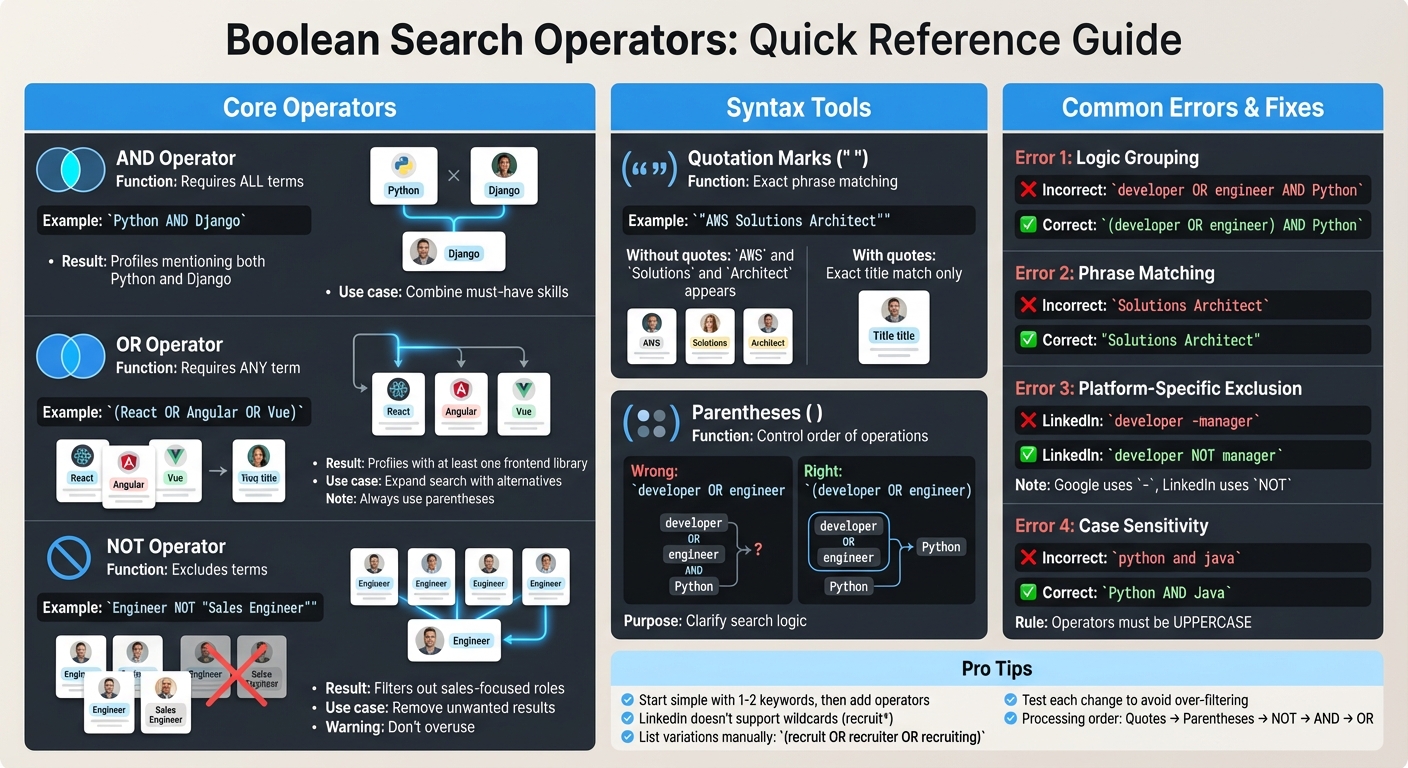 {Boolean Search Operators Quick Reference Guide for Technical Recruiters}
Before diving into complex search strings for platforms like LinkedIn and GitHub, it's essential to grasp the basics of Boolean search. This method uses logical operators to specify exactly what you want to include - or exclude - in your search results. The core operators are AND, OR, and NOT, which work alongside tools like quotation marks and parentheses to create precise queries.
Core Operators: AND, OR, NOT
The AND operator is your go-to for narrowing down results. It ensures that all specified terms appear in the search. For example, searching for Python AND Django will return profiles that mention both the programming language and the framework. Use AND to combine must-have skills or qualifications.
The OR operator, on the other hand, expands your search by including any of the listed terms. For instance, (developer OR engineer OR programmer) will capture profiles with any of these titles, ensuring you don't miss candidates who use different terminology. Always wrap OR statements in parentheses when combining them with other operators for clarity.
The NOT operator helps you filter out unwanted terms. Searching recruiter NOT agency removes agency recruiters from your results, focusing only on in-house talent. However, overusing NOT can backfire. For example, a query like NOT (intern OR junior OR entry) could inadvertently exclude senior candidates who previously held those roles.
| Operator | Function | Technical Recruiting Example | Result |
|---|---|---|---|
| AND | Requires all terms | Python AND Django |
Profiles mentioning both Python and Django |
| OR | Requires any term | (React OR Angular OR Vue) |
Profiles with at least one of these frontend libraries |
| NOT | Excludes terms | Engineer NOT "Sales Engineer" |
Filters out sales-focused roles |
Always type operators in uppercase, as many platforms treat lowercase versions as regular keywords.
Quotation Marks and Parentheses for Exact Matches
Quotation marks are essential for exact phrase matching. Without them, searching for product manager might return profiles where "product" and "manager" appear separately. Using "product manager" ensures the results include only that specific title. This is especially useful for certifications like "AWS Solutions Architect" or "Google Analytics".
Parentheses help control the order of operations in your search. For example, the query developer OR engineer AND Python can be ambiguous. Using (developer OR engineer) AND Python clarifies that you're looking for candidates with Python skills who also have one of the specified titles.
On LinkedIn, search engines process queries in a specific order: quotes first, then parentheses, followed by NOT, AND, and finally OR. This allows for nested strings, such as (Python OR Java) AND (developer OR engineer), which capture multiple skills and job titles in one query.
Common Syntax Errors and Fixes
Even seasoned recruiters can run into syntax errors that disrupt their searches. A common mistake is leaving parentheses unbalanced - every opening parenthesis must have a closing one, or the query won't work.
Another frequent issue involves missing quotation marks around multi-word phrases. For instance, searching for Solutions Architect without quotes might return unrelated results like "Solutions Engineer" or "Cloud Architect." The fix? Simply use "Solutions Architect".
Platform-specific syntax can also trip you up. While Google X-ray searches use a minus sign (-) for exclusions, LinkedIn requires the word NOT. So, developer -manager won't work on LinkedIn; instead, use developer NOT manager.
| Error Type | Incorrect Syntax | Corrected Syntax |
|---|---|---|
| Logic Grouping | developer OR engineer AND Python |
(developer OR engineer) AND Python |
| Phrase Matching | Solutions Architect |
"Solutions Architect" |
| Exclusion | developer -manager (on LinkedIn) |
developer NOT manager |
| Case Sensitivity | python and java |
Python AND Java |
Start simple by testing one or two keywords to see initial results, then gradually add operators to refine your search. Keep in mind that LinkedIn doesn't support wildcards like recruit*. Instead, you'll need to list variations manually, such as (recruit OR recruiter OR recruiting).
With these foundational skills covered, the next section will focus on platform-specific Boolean search techniques to take your recruiting strategy to the next level.
Hiring engineers?
Connect with developers where they actually hang out. No cold outreach, just real conversations.
Platform-Specific Boolean Search Methods
Each sourcing platform has its own quirks when it comes to Boolean search. What works on one platform may not directly apply to another, so knowing these differences and using the best developer sourcing tools can save you time and frustration when building effective searches.
LinkedIn: Boolean for Professional Profiles
LinkedIn processes Boolean operators in a specific order: quotation marks first, followed by parentheses, NOT, AND, and OR. For example, to find professionals with specific skills, you might use (developer OR engineer) AND Python. Keep in mind that LinkedIn doesn’t support wildcards, so you’ll need to list variations explicitly, like (engineer OR engineers OR engineering).
The free version of LinkedIn limits visibility to around 100 profiles, while LinkedIn Recruiter provides access to over 1,000 profiles . If you hit the visibility limit, Google X-Ray (explained below) can help. For instance, a search such as ("software engineer" OR "backend developer") AND (Python OR Java) NOT (intern OR junior) can help filter for mid-to-senior level candidates with the right skills.
If your search yields no results, simplify your terms. Start with one or two keywords and gradually add operators to identify which term is causing the issue. LinkedIn Recruiter also offers Boolean-specific fields for Title, Company, and Skills, which often deliver more precise results than the general search bar.
Next, we'll dive into GitHub's unique tools for finding developers through their code contributions.
GitHub: Finding Developers by Code Contributions
GitHub’s qualifier-based syntax is a powerful way to filter searches for developers based on their code contributions. For example, you can use language:typescript or stars:>10000 to refine your results. A query like react stars:>10000 will return repositories with "react" in their name and over 10,000 stars .
To find active contributors, use the updated: or created: qualifiers. For instance, language:typescript updated:>2024-01-01 will show TypeScript projects updated after January 1, 2024 . You can also identify influential developers with followers:>50, which highlights users with a strong community presence . For highly specific searches, the symbol: qualifier can locate developers who’ve written particular functions, such as symbol:Connection->open() .
Here’s a quick reference table for useful GitHub qualifiers:
| Qualifier | Purpose | Example |
|---|---|---|
language: |
Filters by programming language | language:typescript |
stars: |
Filters by repository popularity | stars:500..1000 |
followers: |
Filters by user reputation | followers:>50 |
updated: |
Filters by recent activity | updated:>2024-01-01 |
location: |
Finds users in a specific location | location:"San Francisco" |
Keep in mind that GitHub searches are case-sensitive and only analyze files smaller than 384 KB .
With GitHub’s code-focused results in hand, let’s look at how Stack Overflow highlights expertise through user reputation and engagement.
Stack Overflow: Finding Experts by Reputation
Once you’ve explored professional profiles and repositories, Stack Overflow offers another angle by showcasing technical expertise. While its native search is somewhat limited, Google X-Ray can help you dig deeper. For example, a query like site:stackoverflow.com/users "Python" "location" can reveal user profiles with specific skills and geographic details .
To pinpoint top experts, look for users with high answer counts and upvotes in specific tags. A search such as site:stackoverflow.com/users "top tags" "kubernetes" can help identify developers recognized as authorities in that area. A strong reputation in a specific tag suggests the developer has consistently provided valuable insights, demonstrating expertise beyond just listing skills on a profile.
Google X-Ray: Searching Beyond Platform Limits
Google X-Ray is a handy tool for bypassing platform restrictions and uncovering hidden profiles. For LinkedIn, use queries like site:linkedin.com/in to target individual member profiles while excluding company pages and job postings . A search such as site:linkedin.com/in "Senior Backend Engineer" Python "San Francisco" -intitle:profiles -intitle:jobs can help you find relevant profiles with less noise.
"X-ray search bypasses platform limits - Google boolean finds candidates LinkedIn hides." – Careery Team
For GitHub, you can refine your searches by excluding repositories, issues, and pull requests with -repositories -issues -pulls, focusing solely on user profiles . Searching site:github.io can also reveal personal portfolio websites hosted by developers .
The filetype: operator is another powerful tool for finding resumes or CVs on personal websites. For example, filetype:pdf "software engineer" resume Python might uncover candidates who aren’t actively using job boards . Additionally, Google’s AROUND(X) operator lets you find keywords within a specific distance of each other. For instance, "Python" AROUND(7) "Django" can locate profiles where these terms appear near one another, even if not in an exact phrase .
Note: Google X-Ray uses - for exclusions, unlike LinkedIn’s NOT.
Building Boolean Strings for Specific Tech Stacks
Creating Boolean strings customized to different tech stacks starts with job titles and core technologies, then incorporates specific frameworks and tools. Below are examples of how to align your Boolean searches with various development roles.
Frontend Developers: React, Angular, TypeScript
Frontend roles often demand searches that consider different frameworks and related technologies. For instance, a search targeting React developers might look like this: ("Frontend Developer" OR "Software Engineer") AND (React OR React.js) AND TypeScript. This will find candidates proficient in React (or React.js) and TypeScript.
If you’re focusing on more specialized roles, include state management libraries and exclude junior-level terms. For example: ("Frontend Developer" OR "Software Engineer") AND (React OR React.js) AND TypeScript AND Redux NOT (intern OR junior OR "entry level"). This narrows the results to mid-to-senior developers with the required expertise. Want to broaden the search to include multiple frameworks? Try this: (React OR Angular OR Vue.js) AND TypeScript AND (Redux OR NgRx OR Vuex). This approach widens the pool while maintaining relevance.
"Boolean search isn't just another recruitment tool - it's your secret weapon in the competitive tech hiring landscape." – Ricardo Batista, FidForward
Backend Engineers: Python, Java, Node.js
When searching for backend engineers, it’s essential to exclude data-focused roles. For Python backend developers, you might use: (developer OR engineer) AND Python AND (Django OR Flask) AND (SQL OR PostgreSQL OR MySQL) NOT ("data scientist" OR "machine learning" OR "data analyst") . This ensures the results focus on backend engineers rather than data specialists.
Looking for senior-level candidates? Add terms that signal experience: ("senior engineer" OR "lead developer" OR "staff engineer") AND Python AND (Django OR Flask) NOT (intern OR junior). For positions requiring full-stack skills, include frontend technologies: Python AND (Django OR Flask) AND (JavaScript OR React OR Vue OR Angular) AND (CSS OR HTML). Teams using these advanced Boolean techniques can cut their hiring time by 34% while boosting the quality of candidates . Using a behavioral hiring platform alongside these strings can further accelerate the process.
Cloud Specialists: Kubernetes, AWS, Terraform
For cloud infrastructure roles, it’s helpful to include tool synonyms and certifications in your search. For example: ("Cloud Engineer" OR "DevOps" OR "SRE") AND AWS AND (Kubernetes OR K8s) AND Terraform. This captures candidates who might use alternate terms for Kubernetes.
If you’re targeting architects or senior specialists, use a more refined string like: ("Cloud Architect" OR "DevOps Engineer" OR "Site Reliability Engineer") AND AWS AND (Kubernetes OR K8s OR EKS) AND (Terraform OR "Infrastructure as Code" OR IaC). This ensures you find candidates with diverse terminology while staying focused on the required stack. Keep in mind that about 83% of developers are passive candidates who aren’t actively job hunting , so well-crafted Boolean strings can help uncover these hidden gems.
These tailored Boolean strings are a powerful addition to your sourcing strategies, allowing you to precisely target the tech stacks you need.
Advanced Boolean Search Methods
Once you've created tech stack-specific search strings, you can take your sourcing to the next level by using advanced filtering techniques. These methods let you refine your searches based on context, timing, and location, helping you zero in on the most relevant candidates while cutting out unnecessary results.
Proximity Operators for Context Matching
Proximity operators are great for finding profiles where keywords appear near each other. This ensures you're identifying candidates with related skills instead of random matches. For instance, platforms like daily.dev Recruiter vs. SeekOut support the tilde operator (~). A search like "senior engineer"~1 finds profiles where "senior" appears within one word of "engineer", avoiding irrelevant results .
On GitHub, you can combine qualifiers to locate developers with specific engagement levels. For example, a query like location:"Austin" language:Python followers:>100 filters for active Python developers in Austin who have a strong presence in the community. This technique ensures you're targeting contributors who are actively engaged in their field .
Location and Recency Filters
Using geographic and timeline filters helps you discover candidates in specific markets and ensures you’re looking at fresh profiles. On GitHub, the created: qualifier is particularly useful. For instance, created:>2024-01-01 retrieves profiles of developers who joined after January 1, 2024 .
On LinkedIn, you can use recency filters like joined:w (for users who joined in the last week) or joined:d (for those who joined in the last day) to quickly identify new talent . Combine these with location filters for more precise results. For example, a query like ccompany:google joined:w country:"united states" zip:94043 radius:100 narrows your search to new LinkedIn users near Mountain View, California. Google's range operator (..) is another handy tool; for example, 02108..02495 targets candidates within Boston-area zip codes . By layering these filters with skill-based refinements, you can pinpoint the right candidates faster.
Skill Prioritization with Roof Operators
Although not all platforms support "roof operators" (^), you can prioritize skills by grouping terms with parentheses. This ensures certain keywords take precedence in your search. For example, "Software Engineer" AND (Java OR Python) focuses on engineers with either of these skills, avoiding unrelated profiles .
Field-specific searches also help refine results. For instance, on SeekOut, a query like skills:(React AND AWS) ensures these technologies appear in the candidate's skills section. This reduces irrelevant matches and confirms the candidate's expertise with the tools you’re looking for .
| Operator/Filter | Platform | Example Syntax | Purpose |
|---|---|---|---|
| Proximity (~) | SeekOut | cur_title:"senior engineer"~1 |
Finds words within a specific distance |
| Location | GitHub | location:"New York" |
Focuses on candidates in a specific area |
| Recency | GitHub | created:>2024-01-01 |
Filters by account creation or contribution date |
| Field Search | SeekOut | skills:(React AND AWS) |
Limits keywords to specific profile sections |
| X-Ray (site:) | site:github.com "Python" |
Searches specific websites for profiles |
Common Boolean Search Mistakes and How to Fix Them
Building on the basics of Boolean search, it's important to avoid common errors that can derail your efforts. Even seasoned recruiters sometimes make mistakes that waste time or exclude qualified candidates. Often, a misplaced parenthesis or an overly restrictive filter can be the culprit. By understanding these frequent missteps, you can craft better search strings that yield the results you need.
Over-Filtering with Too Many NOT Operators
Using too many NOT operators can unnecessarily limit your search results. For example, a query like "software engineer" NOT (intern OR junior OR entry) might unintentionally exclude senior engineers who once held those titles earlier in their careers.
To fix this, focus on limiting exclusions to the essentials. For instance, if you're seeking in-house talent, a query like recruiter NOT agency makes sense. However, avoid creating long exclusion lists. Start by defining your core requirements and only add critical filters as needed. Test each change to ensure you're not over-filtering. If your results are too narrow, it's a sign to scale back.
Missing Alternative Terminology
Not accounting for variations in terminology can prevent you from finding all qualified candidates. For instance, some developers might write "React.js", while others use "ReactJS" or just "React." Since platforms like LinkedIn don’t support wildcard searches (e.g., engineer*), you need to manually include all variations.
Group synonyms together using OR operators. For example:
("full stack" OR "fullstack" OR "full-stack")("AWS Certified Solutions Architect" OR "AWS CSA" OR "Solutions Architect - AWS")
By doing this, you'll capture all common variations for job titles, skills, or certifications, ensuring no potential candidate slips through the cracks.
Improper Grouping and Logic Errors
One of the most frequent mistakes in Boolean search is forgetting to use parentheses, which can completely alter the logic of your query. For example, a search like "software engineer" AND Python OR Java will return all profiles mentioning Java, even if they’re unrelated to the job title. This happens because the search engine interprets it as ("software engineer" AND Python) OR Java.
"Omit parentheses in OR statements and you scramble search logic." - Vicky Liu, Juicebox.ai
The correct version of this query is: "software engineer" AND (Python OR Java). This ensures the results include engineers skilled in either Python or Java. Always use parentheses to group OR statements when combining them with AND or NOT. Also, double-check that your parentheses are balanced - every opening parenthesis should have a matching closing one.
Another common issue is case sensitivity. Platforms like LinkedIn require Boolean operators (AND, OR, NOT) to be in ALL CAPS. Writing python or java instead of Python OR Java will cause the platform to treat "or" as a keyword, not a logic operator. Similarly, multi-word titles like product manager need to be enclosed in quotes ("product manager") to ensure the search matches the exact phrase.
| Error Type | Incorrect Example | Corrected Version |
|---|---|---|
| Missing Quotation Marks | software engineer AND Java |
"software engineer" AND Java |
| Case Sensitivity | Python or Java |
Python OR Java |
| Over-Filtering | NOT (intern OR junior OR student OR entry) |
NOT intern (Keep exclusions minimal) |
Start with a simple query to confirm results exist before adding complexity. Add exclusions, groupings, and additional keywords one step at a time, testing after each change. This method allows you to spot and fix errors quickly, saving you time and frustration.
Template Library: 20 Ready-to-Use Boolean Strings
These Boolean string templates are designed to help recruiters effectively target technical roles. Each template follows a structured approach: OR for alternate titles, AND for required skills, NOT to exclude irrelevant roles, and parentheses to group related conditions .
Frontend & Web Development
Generic Frontend Developer
("front end developer" OR "front end engineer" OR "frontend developer") AND (React OR Angular OR Vue) NOT (junior OR intern)
Covers common job titles and key frontend frameworks.Senior Frontend (TypeScript Focus)
("lead front end developer" OR "senior front end developer" OR "staff frontend engineer") AND TypeScript AND (SASS OR LESS OR "styled components")
Targets experienced developers with TypeScript and modern styling tools.Frontend with UX/UI Skills
("front end developer" OR "UI engineer") AND (React OR Vue) AND (UX OR "user interface design" OR Figma)
Focuses on developers who blend design and development.React Specialist
("React developer" OR "React engineer") AND ("React.js" OR ReactJS) AND (Redux OR "Context API" OR MobX)
Captures developers specializing in React and state management libraries.
Backend & Full-Stack Development
Full-Stack Developer
("Full Stack Developer" OR "Full-Stack Engineer" OR "Software Engineer") AND (React OR Angular OR Vue) AND (Node.js OR Python OR Java)
Requires familiarity with both frontend frameworks and backend languages.Python Backend Engineer
("backend developer" OR "backend engineer" OR "server-side developer") AND Python AND (Django OR Flask OR FastAPI) AND PostgreSQL
Combines Python expertise with popular frameworks and database knowledge.Go/Kubernetes Specialist
("backend engineer" OR "software engineer") AND (Go OR Golang) AND (Kubernetes OR K8s OR Docker) NOT junior
Targets backend developers with a focus on infrastructure.Node.js Developer
("Node.js developer" OR "Node developer") AND (Express OR NestJS OR Fastify) AND (MongoDB OR PostgreSQL)
Covers variations in Node.js frameworks and databases.
Cloud & DevOps
AWS Solutions Architect
("AWS Certified Solutions Architect" OR "AWS CSA" OR "Solutions Architect - AWS" OR "cloud architect") AND (Terraform OR CloudFormation) AND (EC2 OR Lambda OR ECS)
Includes AWS certifications and specific service expertise.DevOps Engineer
(DevOps OR "DevOps engineer" OR SRE OR "Site Reliability Engineer") AND (Kubernetes OR Docker) AND (Jenkins OR "GitHub Actions" OR CircleCI)
Accounts for title variations and CI/CD tools.Cloud Migration Specialist
("cloud engineer" OR "cloud architect") AND (AWS OR Azure OR GCP) AND ("cloud migration" OR "lift and shift") NOT consultant
Targets in-house professionals for cloud migration projects.
Data & Machine Learning
Data Scientist
("data scientist" OR "ML engineer" OR "machine learning engineer") AND Python AND (TensorFlow OR PyTorch OR scikit-learn) AND (SQL OR "data analysis")
Combines data science roles with essential tools and skills.Data Engineer
("data engineer" OR "analytics engineer") AND (Spark OR Airflow OR Kafka) AND (Python OR Scala) AND (AWS OR GCP OR Azure)
Focuses on data pipeline tools and cloud platforms.ML Ops Engineer
("MLOps engineer" OR "ML platform engineer") AND (Kubernetes OR Docker) AND (MLflow OR Kubeflow OR SageMaker)
Targets professionals at the intersection of machine learning and infrastructure.
Mobile Development
iOS Developer
("iOS developer" OR "iOS engineer") AND (Swift OR "Objective-C") AND (SwiftUI OR UIKit) NOT junior
Covers both modern and legacy iOS development tools.Android Developer
("Android developer" OR "Android engineer") AND (Kotlin OR Java) AND ("Android SDK" OR Jetpack) NOT intern
Includes Android development with both Kotlin and Java.React Native Developer
("React Native developer" OR "mobile developer") AND "React Native" AND (iOS OR Android) AND (Redux OR MobX)
Targets cross-platform mobile developers.
Security & Infrastructure
Security Engineer
("security engineer" OR "cybersecurity engineer" OR "infosec engineer") AND (SIEM OR "penetration testing" OR "threat detection") AND (Python OR Go)
Focuses on security professionals with scripting skills.Platform Engineer
("platform engineer" OR "infrastructure engineer") AND (Kubernetes OR "service mesh") AND (Terraform OR Pulumi) AND (AWS OR GCP)
Targets engineers with expertise in modern infrastructure tools.
Google X-Ray Templates
- GitHub X-Ray for Python Contributors
site:github.com "Python" "contributions in the last year" (Django OR Flask)
Identifies active Python contributors on GitHub .
"Boolean search is the single skill that separates recruiters who find candidates from recruiters who wait for them to apply." - Careery Team
These templates can help refine your sourcing strategy and save time. Keep in mind that LinkedIn's free search caps at 1,000 characters, while LinkedIn Recruiter allows up to 2,000 characters .
The Limits of Boolean Search in Passive Talent Sourcing
Boolean search can be incredibly precise, but its rigid structure leaves room for error, especially when sourcing passive talent. It works by matching specific keywords, which means if a passive candidate hasn’t updated their profile with terms like “Kubernetes” or “TypeScript,” they simply won’t show up in your search - even if they’re highly skilled in those areas . This is a common issue since many top developers don’t actively maintain their profiles with the latest buzzwords.
Another challenge lies in the way people describe their roles. For instance, one data analyst might call their work “growth insights,” while another refers to it as “customer storytelling.” These variations in terminology can make it nearly impossible for a Boolean string to account for every possibility unless you manually include an exhaustive list of synonyms.
"The better it aligns with keyword evolution, the less it ensures quality" - Xavier Beal, Senior Talent Operations Specialist at Airbnb
Boolean search also struggles when candidates use nontraditional or creative job titles. For example, someone might list their role in a way that doesn’t match standard titles, or they might scatter their skills across different sections of their profile. This makes it easy for Boolean queries to miss qualified candidates simply because they don’t fit into predefined keyword categories.
Beyond technical skills, Boolean search has no way to identify soft skills like empathy or systemic thinking - qualities that are often essential for senior-level positions . On top of that, privacy settings and indexing restrictions can block profiles from being found through X-Ray searches, further limiting the pool of candidates .
To address these gaps, leveraging behavioral signals and engagement data becomes crucial. Platforms like daily.dev Recruiter go beyond keyword matching by identifying developers based on their professional behavior - what they’re reading, learning, and engaging with regularly. Instead of relying only on static keywords, this approach connects you with developers who are actively growing their skills. The result? Warm, double opt-in introductions to pre-qualified talent that Boolean searches would completely overlook. By combining behavioral insights with precise keyword searches, you can uncover hidden talent that traditional Boolean logic simply can’t reach.
Conclusion
Boolean search is an essential tool that separates proactive recruiters from those who take a more passive approach. By mastering core operators like AND, OR, NOT, quotation marks, and parentheses, you gain greater control over your search process. Teams that leverage Boolean techniques can reduce their time-to-hire by 34% while also improving the quality of their candidates . This level of precision plays a crucial role in any comprehensive sourcing strategy.
That said, Boolean search has its limitations. It focuses on specific keywords, which means it might miss out on highly qualified passive candidates - those with outdated or unconventional profiles.
"Mastering Boolean search is a real skill. But spending hours building, debugging, and re-running 200-character strings is overhead." - Aditya Sheth, Juicebox
The most effective approach blends Boolean accuracy with insights from behavioral signals. Boolean search helps you find candidates based on the information they’ve shared about themselves, while platforms like daily.dev Recruiter go a step further by identifying developers based on their actions - what they’re reading, learning, and engaging with professionally. This combination ensures you’re not just matching keywords but also connecting with developers who are actively building their skills and open to new opportunities.
FAQs
How do I debug a Boolean string that returns zero results?
If your Boolean string isn't returning results, there are a few steps you can take to identify and fix the issue:
Double-check your syntax: Make sure all operators (like AND, OR, NOT) are in uppercase, parentheses are properly placed to group terms, and quotation marks are used for exact phrases.
Simplify and test components: Break your string into smaller parts and test them individually. This can help you pinpoint where the issue lies.
Consider platform-specific rules: Not all platforms support features like wildcards (*) or proximity searches (e.g., NEAR). Check the platform's guidelines to ensure you're using supported search techniques.
Refine iteratively: Adjust and test your query step by step. This methodical approach helps isolate errors and improve your results over time.
By carefully reviewing and tweaking your Boolean string, you can troubleshoot errors and optimize your search for better outcomes.
When should I use LinkedIn search vs Google X-Ray for sourcing?
LinkedIn's search function excels at providing detailed professional profiles, showcasing network connections, and leveraging platform-specific tools. That said, access to public profile data on LinkedIn has become increasingly restricted over time.
On the other hand, Google X-Ray search offers a clever workaround. By using site-specific operators like site:linkedin.com/in, you can locate publicly accessible LinkedIn profiles. Plus, it extends beyond LinkedIn, uncovering profiles on other platforms like GitHub or Stack Overflow.
In short, LinkedIn is your go-to for comprehensive profile details, while Google X-Ray is a smart choice for finding candidates who might otherwise fly under the radar across various platforms.
How can I find active GitHub developers (not just popular repos)?
If you're looking to pinpoint active GitHub developers, focus on recent activity and engagement metrics. Start by checking for recent contributions using parameters like pushed:>2025-01-01, which filters developers based on their latest commits. This ensures you're identifying those actively working on projects.
Another key metric is followers. For instance, using followers:>500 helps you find developers with a strong following, indicating their influence and engagement within the community. To narrow your search further, add filters like language:python to focus on specific programming languages or tech stacks.
By combining these strategies, you can identify developers who are not only active but also deeply involved in their respective fields, rather than just maintaining popular repositories.
.png)


