

Want to boost your cold recruiting message response rates from 1–5% to over 40%? Here’s the formula: focus on personalization, clear value for the candidate, and a simple call-to-action. Forget sending hundreds of generic emails - craft 15–25 targeted, well-researched messages instead.
Key takeaways:
- Personalization wins: Reference specific work, like GitHub projects or daily.dev activity.
- Be concise: Messages between 75–125 words perform best.
- Highlight value: Focus on 2–3 key benefits tailored to the candidate.
- Clear next step: Use low-pressure CTAs like “Mind if I send more details?” or “Does Thursday or Friday work better?”
This guide unpacks why most messages fail, how to craft ones that succeed, and includes proven templates to help you connect with top talent.
::: @figure 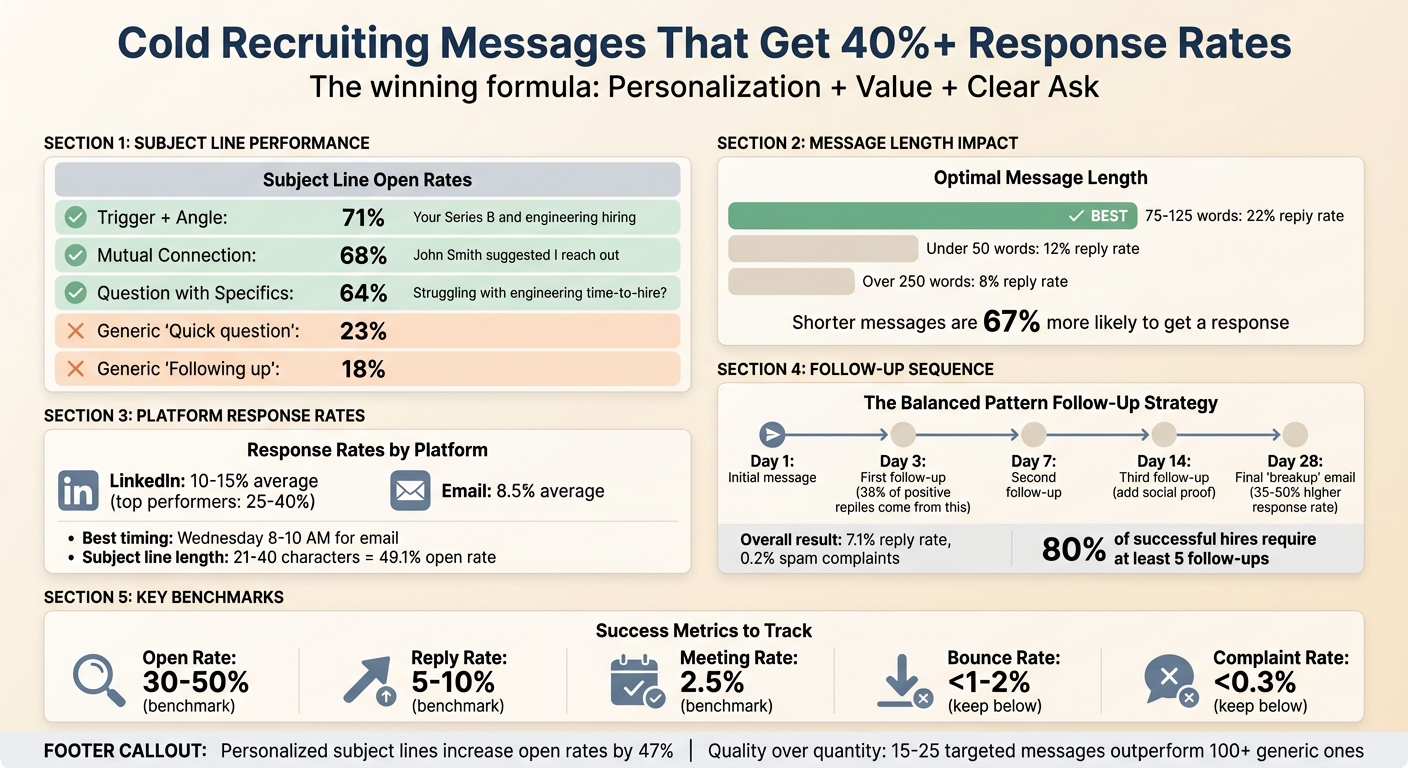 {Cold Recruiting Message Response Rate Formula: Key Statistics and Best Practices}
Why Most Cold Recruiting Messages Fail
Recruiting messages miss the mark when they center on the recruiter instead of the candidate. Think about it: when a developer opens your message, the first question they ask is, "Why should I care?" If you don’t answer that right away, you’ve already lost them.
The main culprits? Generic subject lines that fade into the inbox abyss, messages that fail to highlight clear benefits, and long-winded emails that lose attention fast. At the core of these issues is one big mistake: treating outreach as a numbers game instead of a meaningful conversation between two professionals. Let’s dive into how these mistakes play out.
Generic Subject Lines That Get Ignored
Your subject line is the gatekeeper - it decides whether your email gets opened or trashed. With up to 77% of emails opened on mobile devices , where only 3–4 words are visible at first glance , a subject line like "Great Opportunity!" or "Quick question" won’t cut it.
Here’s the reality: generic phrases like "Quick question" only manage 23% open rates, and "Following up" fares even worse at 18% . Now compare that to a specific, tailored subject line like "Your Series B and engineering hiring", which boasts an impressive 71% open rate . The difference? Specificity signals effort - it shows you’ve done your homework.
Keep subject lines under 45 characters so they display fully on mobile. Instead of something vague like "Exciting opportunity at a fast-growing startup", try "React role at [Company] - saw your TypeScript PR." The first sounds like spam; the second proves you know their work.
| Subject Line Type | Open Rate | Example |
|---|---|---|
| Trigger + Angle | 71% | "Your Series B and engineering hiring" |
| Mutual Connection | 68% | "John Smith suggested I reach out" |
| Question with Specifics | 64% | "Struggling with engineering time-to-hire?" |
| "Quick question" | 23% | "Quick question about hiring" |
| "Following up" | 18% | "Following up on my email" |
Messages That Don't Explain the Benefits
Even with a strong subject line, many messages fail the "What’s in it for me?" test . Too often, recruiters focus on what the company needs - "We’re looking for a senior engineer to join our team" - instead of what the candidate stands to gain.
Using company-centric language like "We are a leading provider of..." shifts the focus to the wrong person . Developers aren’t interested in your company’s self-promotion. They want to know if this role will help them build something impactful, work with exciting technologies, or advance their career.
Another mistake? Overloading candidates with too much information. Listing every possible perk - salary, health insurance, PTO, remote work, stock options, learning budgets - creates clutter. Research shows that shorter messages are 67% more likely to get a response . Instead, focus on the top 2–3 benefits that align with the candidate’s interests, based on your research.
"The most compelling outreach in the world won't be complete without a call to action. After all, if your prospect doesn't know what to do next, they're less likely to take any action… even if they're interested." - Lauren Shufran, Content Strategist, Gem
Long, Confusing Messages That Lose Attention
Developers are busy - they’re not going to wade through a 400-word email from someone they don’t know. Yet many recruiting messages ramble on about company history, detailed job specs, and unclear next steps. By the time they hit the third paragraph, they’ve checked out.
The best messages get straight to the point: why you’re reaching out, what caught your attention about their work, what they’d gain from this opportunity, and a simple next step. Anything more is just noise.
Your call-to-action (CTA) is just as important as the message itself. Open-ended questions like "What’s your availability next week?" require too much effort. Instead, offer binary choices like "Does Thursday or Friday work better?" to make it easy . Better yet, start with a low-pressure ask like "Mind if I send more details?" to open the door for a conversation rather than pushing for a meeting right away .
These common mistakes set the stage for the next step: breaking down the response rate formula into a modern framework of personalization, value, and a clear ask. By addressing these missteps, you’ll be ready to craft outreach that actually gets results.
Hiring engineers?
Connect with developers where they actually hang out. No cold outreach, just real conversations.
The Response Rate Formula: Personalization + Value + Clear Ask
Recruiting messages that hit the mark often follow a straightforward three-part formula: personalization (show you’ve done your homework), value (highlight what’s in it for them), and a clear ask (make the next step simple). When all three are done well, response rates can leap from the usual 8–12% to an impressive 40% or more.
This approach respects a developer’s time while showing you genuinely understand their work. Each piece plays a crucial role: personalization builds trust, value answers “Why should I care?”, and a clear ask removes any guesswork. Leave one out, and the message loses impact. Get them all right, and you’ll spark real conversations with candidates who are eager to engage. Let’s break down how to make each element work in your outreach.
Personalization: Reference Their Actual Work
Generic outreach doesn’t cut it. Developers can spot it instantly, and they’ll move on just as quickly. Real personalization means referencing something specific about their work, like a GitHub pull request or a daily.dev article they’ve upvoted. This shows you’ve taken the time to understand their contributions.
For example, instead of sending a vague message like, “I came across your profile and thought you’d be a great fit,” try something like, “I noticed your work on the TypeScript migration in the Vite repository - your PR #4821 really stood out.” This kind of detail proves you’re reaching out to them specifically, not just casting a wide net.
To find these personal touches, look for intent signals on platforms developers frequent. Recent GitHub commits, daily.dev upvotes, or Stack Overflow answers can all provide natural conversation starters. The goal isn’t to flatter - it’s to show genuine interest in their work and how it connects to the role you’re presenting.
Value: Explain What They’ll Gain
Once you’ve shown you’ve done your homework, the next step is to answer the big question: “What’s in it for me?” Developers care about specifics - like salary, tech stack, and work setup (remote, hybrid, or on-site). If you don’t address these upfront, you’re asking them to put in extra effort, and most won’t bother.
Lead with technical details: “You’d be working with React 18 and TypeScript on a real-time collaboration platform, similar to Figma’s architecture.” This tells them exactly what they’ll be working on and with which tools. Follow up with transparency about salary - something like, “$140,000–$165,000 depending on experience” - and the work model. Being upfront about these details builds trust and shows respect for their time.
Beyond the basics, highlight what makes the role interesting from a technical perspective. Maybe it’s the chance to make architectural decisions, tackle complex challenges, or contribute to open-source projects. Developers value meaningful work and opportunities to grow far more than superficial perks like office games or flashy job titles. By focusing on what matters to them, you elevate your pitch from just another job offer to a real opportunity for growth.
Clear Ask: Make the Next Step Easy
After establishing credibility and value, the final step is to make it easy for the candidate to respond. A good call-to-action (CTA) is low-pressure and simple - don’t ask for a resume or a long interview right away. Instead, offer an easy way to start the conversation, like, “Does this align with your current technical interests?” or “Would you be open to a 15-minute chat next Tuesday?”
Giving binary choices can also reduce decision fatigue. For example, instead of asking, “What’s your availability next week?”, try, “Does Thursday at 2:00 PM or Friday at 10:00 AM work better?” For candidates who are ready to engage, include a calendar link: “Here’s my calendar to pick a time that works for you.” This cuts down on back-and-forth emails and speeds up the process.
Another effective tactic is the rapport-building ask, such as, “I saw your project on [Project Name]; how did you handle [Technical Challenge]?” This invites a technical conversation rather than a transactional one, showing genuine interest in their expertise. By reducing friction and focusing on their work, you increase the likelihood of a response.
| CTA Type | Example Phrasing | Best Use Case |
|---|---|---|
| Interest-Based | "Does this align with your current technical interests?" | Passive candidates who aren’t actively looking. |
| Time-Specific | "Would you be open to a 15-minute conversation next Tuesday?" | Candidates with a strong tech-stack match. |
| Frictionless | "Here’s my calendar link if you’d like to grab a time to chat." | High-intent candidates or warm introductions. |
| Rapport-Building | "I saw your project on [Project Name]; how did you handle [Technical Challenge]?" | Building trust with senior-level talent. |
Research Phase: Finding Connection Points
Before sending a single message, take 5–10 minutes to dig into each candidate's digital footprint. This quick research helps you uncover actionable details that prove you're reaching out to the right person for the right reasons. Developers often leave a trail of activity on platforms like GitHub, daily.dev, LinkedIn, and Twitter. These clues reveal what they're working on, what excites them, and whether they align with your role.
The key is to identify intent signals - recent activity that highlights what a developer is focused on right now. For example, a GitHub commit from yesterday carries more weight than a project from two years ago. Similarly, an upvoted article on daily.dev last week shows what technologies they're exploring. Even a Twitter thread venting about a frustrating framework can give you insight into what they might want to avoid in their next role. These signals help you move from generic outreach to meaningful, personalized conversations.
Using GitHub, daily.dev, LinkedIn, and Twitter
Start with GitHub to see what a developer is actively building. Check their pinned repositories, recent commits, and pull requests. For instance, if they contributed to a TypeScript library last month, that's a clear sign they're working with TypeScript - and it gives you a natural angle for your message.
On daily.dev, look at the articles they've upvoted or commented on. If they're engaging with content about React Server Components or Rust performance, it’s a clear window into their current interests. A message like, "I noticed you upvoted an article on React Server Components - our team is actually implementing those in production", shows you're paying attention to what matters to them.
LinkedIn is great for understanding their career path and current role, but don't stop at their headline. Dive into their activity feed to see what they're posting or commenting on. Are they discussing remote work or technical leadership? These are hints about their priorities. Twitter (or X) can offer even more personal and technical insights. If a developer tweets about their excitement for a new framework or frustrations with legacy code, you’ll gain a better sense of what could motivate them to make a move.
| Platform | What to Look For | How to Use It |
|---|---|---|
| GitHub | Recent commits, pinned repos, open-source contributions, stars | Reference specific projects or pull requests in your message |
| daily.dev | Upvoted articles, commented posts, reading interests | Mention shared technical interests or trending topics |
| Career progression, posts, comments, skills | Understand their background and what they're discussing | |
| Technical opinions, frustrations, interests | Gauge their personality and what motivates them |
With this information, you can quickly validate their technical relevance and ensure a strong match.
Confirming Tech Stack Match
Once you’ve gathered all these connection points, take a closer look at their hands-on experience with the technologies your role requires. GitHub is a goldmine for this - search their repositories and commit history for specific tools and languages. For example, if the role requires PostgreSQL and Kubernetes, look for those keywords in their projects.
Examine their open-source contributions to understand their problem-solving approach. If they’ve contributed to a widely used library or framework, it’s a strong indicator of deep expertise. Contributions like writing documentation, opening issues, or reviewing pull requests show they’re not just skilled but also invested in the developer community and code quality. These are details a resume might not reveal but speak volumes about their experience.
Finally, compare their activity with your role’s requirements. If your team focuses on real-time features and they’ve recently starred repositories related to WebSockets or event-driven architecture, it’s a great match. Or, if they’re upvoting daily.dev articles about scaling microservices - something your team is actively working on - mention it in your outreach. The more specific you can be about how their skills and interests align with your role, the better your chances of sparking their interest. This kind of targeted research not only confirms their technical fit but sets the stage for a personalized, compelling message.
5 Proven Message Templates with A/B Test Insights
You've done the groundwork - researching, understanding the response rate formula, and refining your outreach strategy. Now, it's time to put that knowledge into action. Below are five message templates that bring together the principles of personalization, value, and clarity. These templates have been tested and fine-tuned using A/B testing, ensuring they align with what works best.
Our A/B tests revealed some interesting findings. Messages that fall within the 75–125 word range tend to perform best, achieving a 22% reply rate. Compare that to just 12% for messages under 50 words or 8% for those over 250 words . Personal touches like referencing recent company news or highlighting role-specific challenges can also make a big difference - boosting reply rates by 47% and 38%, respectively . On the flip side, generic personalization (e.g., just mentioning a job title) can actually hurt performance, decreasing response rates by 2% . With these insights in mind, here are templates that deliver results.
Template 1: GitHub Project Recognition
This template is ideal when a candidate has worked on a project that aligns with the role you're hiring for.
Subject Line Options:
- "Your [project name] repo caught my attention"
- "Quick question about your [specific technology] work"
Our tests showed that a question-based subject line (Option B) feels more conversational and drives better engagement.
Message Body:
Hi [Name],
I came across your [project name] repo and was impressed by how you tackled [specific technical challenge]. At [Company], we're working on similar issues, particularly around [related challenge your team faces], and I think you'd enjoy the opportunity to work on [specific technical benefit].
We're currently hiring a [Role Title] to focus on [specific project or feature]. Your experience with [technology] makes you a great fit for this role.
Would you be open to a quick 15-minute call to discuss this opportunity?
[Your Name]
Template 2: Tech Stack Alignment
This one works well when a candidate's recent work shows they’re actively using technologies central to your open role.
Subject Line Options:
- "Senior React role at [Company]"
- "[Technology] opportunity - saw your recent work"
A/B testing showed that mentioning the technology directly in the subject line (Option B) resonates more with candidates.
Message Body:
Hi [Name],
I noticed your recent contributions to [project] using [specific technology stack]. At [Company], we’re also building [product/feature] with a similar stack, including [list 2–3 key technologies].
The role involves tackling [specific technical challenge], which offers the chance to [specific technical benefit for candidate]. Your background in [technology] suggests you’d excel in this position.
If this sounds interesting, I’d love to share more details during a brief call.
[Your Name]
Template 3: daily.dev Content Engagement
This template taps into a developer’s engagement with daily.dev content, using shared technical interests as a conversation starter. It’s particularly effective for engaging passive candidates.
Subject Line Options:
- "Saw you on daily.dev"
- "Your interest in [topic] - we're hiring"
Our A/B tests showed that referencing a specific topic (Option B) led to better responses than a general mention of daily.dev.
Message Body:
Hi [Name],
I saw that you recently engaged with an article on daily.dev about [specific topic, e.g., React Server Components]. That’s right in line with what we’re working on at [Company].
We’re hiring a [Role Title] to take on [specific challenge related to the topic]. If you’re curious about how we’re applying [technology/concept], I’d love to discuss the role and our project.
Would you be available for a 15-minute call?
[Your Name]
Template 4: Open-Source Contribution Spotlight
Acknowledging a developer’s open-source contributions is a great way to build rapport and credibility. This template works especially well for experienced developers.
Subject Line Options:
- "Hiring [Role Title] at [Company]"
- "Your work on [open-source project]"
A/B testing revealed that focusing on the candidate’s open-source contributions (Option B) generated more engagement than generic hiring announcements.
Message Body:
Hi [Name],
I came across your contributions to [open-source project], particularly [specific PR or feature], and was impressed. At [Company], we’re tackling similar challenges in [related technical area] as we develop [product/feature].
We’re hiring a [Role Title] and are looking for someone who shares your dedication to quality and performance. Would you be open to a quick 15-minute call to explore this opportunity?
[Your Name]
Template 5: Career Growth Opportunity
This template is designed for senior developers or tech leads who are motivated by leadership opportunities and career progression.
Subject Line Options:
- "Senior [Role Title] opportunity"
- "Leading [specific initiative] at [Company]"
Our tests showed that emphasizing leadership and ownership (Option B) resonated more with candidates looking to step into strategic roles.
Message Body:
Hi [Name],
Your expertise in [technology/domain] positions you perfectly to lead [specific initiative or team] at [Company]. This role involves [specific leadership responsibility, e.g., architecting our new platform, mentoring junior engineers].
We’re at an exciting point with [brief context about company growth or technical challenge], and we’re seeking someone ready to make a lasting impact. If advancing into a leadership role interests you, let’s connect.
[Your Name]
Platform-Specific Messaging: LinkedIn vs. Email vs. GitHub
When it comes to recruiting developers, the platform you choose can make or break your outreach. Each platform has its own "personality" - its culture, user habits, and best practices - that influence how candidates respond. By aligning your approach with the platform's unique dynamics, you can significantly improve engagement.
Response Rates and Best Practices by Platform
LinkedIn is a professional network where recruiting InMails typically see response rates between 10–15%, with top performers hitting 25–40% . Crafting a great subject line is critical - it determines whether your message gets opened, accounting for 40% of its success . Aim for curiosity-driven subject lines rather than sales pitches. Keep your tone professional yet approachable, and reference recent posts or shared connections to build trust. Timing matters too: send InMails during weekday mornings in the recipient's time zone for the best results .
Email outreach has an average reply rate of 8.5%, with Wednesday mornings (8–10 AM) delivering the highest responses at 5.8% . Subject lines between 21–40 characters perform best, achieving open rates of 49.1% . Avoid tracking pixels - they can trigger spam filters and hurt your chances. In fact, disabling them can double your reply rates . Stick to plain text formatting and keep your emails concise - shorter messages can boost responses by up to 67% .
GitHub outreach works best when you adopt a technical, peer-to-peer tone. Mention specific repositories, commits, or pull requests to show genuine interest in the candidate's work. While GitHub doesn't publicly track response rates like LinkedIn or email, conversations often feel more meaningful because they’re grounded in shared technical interests. The key is to engage on topics the candidate is actively working on.
| Platform | Avg. Response Rate | Best Timing | Tone | Key Elements |
|---|---|---|---|---|
| 10–15% (top: 25–40%) | Weekdays, mornings | Professional & Social | Subject line curiosity, mutual connections, recent posts | |
| 8.5% | Wednesday, 8–10 AM | Professional & Technical | Plain text, no tracking, 21–40 char subject lines | |
| GitHub | Not tracked | Weekdays, business hours | Peer-to-peer & Technical | Specific repos, commits, PRs |
By tailoring your approach to the platform, you can maximize your chances of connecting with candidates. The next step? Choosing the channel that best matches their activity patterns.
Picking the Right Platform for Your Candidate
The first step is to figure out where the candidate is most active. If their GitHub profile shows recent commits but their LinkedIn looks abandoned, GitHub or email is likely the better choice. On the other hand, candidates who are active on LinkedIn or daily.dev might respond more positively to outreach on those platforms, especially if you reference their recent activity.
Use LinkedIn for candidates who post regularly, have mutual connections, or are in senior roles where professional networking is key. It's also a good choice if you're looking for a warm introduction or a softer entry point.
Choose email when you need to share detailed information, like salary ranges, benefits, or technical role descriptions. Email gives you more room to elaborate without feeling intrusive.
GitHub is ideal when you can reference specific technical contributions. Generic messages won’t work here - your outreach needs to reflect a deep understanding of their work.
For developers active on platforms like daily.dev, use their engagement as a natural conversation starter. For example, you might say, "I noticed you interacted with an article about React Server Components on daily.dev." This approach works well on LinkedIn or email, turning a cold message into a warm one by focusing on shared interests rather than diving straight into a job pitch.
Follow-Up Sequences That Don't Annoy Candidates
Recruiting often hinges on persistence. While 44% of recruiters stop after sending just one message, research shows that 80% of successful hires require at least five follow-ups . So, if you want results, consistent and well-timed follow-ups are essential.
When and How Often to Follow Up
The "Balanced Pattern" is a proven approach: send your first message on Day 1, then follow up on Days 3, 7, 14, and 28 . This timing strikes the right balance, delivering a 7.1% reply rate with minimal spam complaints (just 0.2%) .
The Day 3 follow-up is particularly effective, generating 38% of all positive replies . However, engagement tends to level off after the fourth or fifth message, so it's best to avoid going beyond five touchpoints . For optimal results, schedule follow-ups Tuesday through Thursday between 9:00 and 11:00 AM, matching the candidate's local time .
"The difference between a great sourcer and a sub-par sourcer is in how much discipline someone has in following up... Response rates on that initial outreach might be 15%, but they might be 50% on the follow-up." - Angela Miller, Head of Talent, Moloco
With timing in place, your focus should shift to crafting follow-ups that add real value.
Writing Follow-Ups That Add Value
Generic, repetitive messages won't cut it. Each follow-up should introduce something fresh, like a relevant stat, an update about your company, or a quick example of the work your team is doing. Keep messages short - between 40 and 70 words or under 400 characters - to increase response rates by 22% .
On Day 14, consider using social proof. Share a technical blog post, highlight a recent product milestone, or include a testimonial from someone who made a similar career leap. For your final message on Day 28, send a "Breakup Email" - a brief, polite note that wraps up the conversation. Surprisingly, this approach can generate 35–50% higher response rates than other follow-ups .
Lastly, always send follow-ups as replies to your original thread. This keeps the conversation history visible, making it easier for candidates to re-engage .
Tracking and Improving Your Response Rates
Tracking the right metrics is key to boosting your response rates. For example, the difference between a 2% and 5% reply rate could completely transform your pipeline - from nearly empty to bustling with opportunities . Start by focusing on metrics that directly impact hiring success: meetings booked (your ultimate goal), positive reply rate (showing genuine interest), and overall reply rate (measuring engagement) . While open rates can give you some insight, keep in mind that tools like Apple Mail Privacy Protection might inflate them by 15–25% .
Metrics to Track
To drive better hiring results, keep an eye on these benchmarks. On average, reply rates hover around 8.5%, open rates at 52.3%, and meeting rates at 2.5% . If your open rates are between 30–50% and reply rates fall between 5–10%, you're on the right track . Make sure to differentiate between uninterested replies and those that show genuine enthusiasm - this helps you gauge the quality of your outreach . Also, monitor your bounce rate (keep it below 1–2%) and spam complaint rate (stay under 0.3%) to maintain a strong sender reputation .
"Meeting Rate is the number that matters most - not reply rate." - Peter Korpak, Founder, Death to Cold Emails
Once you've established these metrics, the next step is to improve your strategy through A/B testing.
Running A/B Tests to Improve Results
A/B testing is all about experimenting with one variable at a time - like subject lines, opening hooks, or calls to action (CTAs). To get meaningful results, run your tests for 7–14 days and aim for at least 100–200 recipients per variant (though 1,000+ is ideal) to achieve 95% confidence . Wait until you hit statistical significance before drawing conclusions . For instance, personalized subject lines can increase open rates by 26–50%, and tailored CTAs can double reply rates . If you're debating between two subject lines, such as "Quick question about your React work" versus "Opportunity at [Company]", split your list randomly and analyze the results only after achieving significance.
To keep track of your findings, use a structured spreadsheet.
Response Rate Tracking Spreadsheet Template
A simple spreadsheet can help you stay organized. Include columns like:
- Date
- Hypothesis (what you're testing)
- Variant A (control)
- Variant B (test)
- Total Sent
- Opens
- Replies
- Positive Replies
- Meetings Booked
- Bounces
- Significance Reached (Y/N)
- Final Insights
You can also add a research matrix to track personalization details, such as candidate names, current companies, specific projects, technical skills, or mutual connections . This not only helps refine your messaging but also builds a knowledge base for tailoring outreach to different segments, like enterprise versus SMB candidates .
By consistently tracking and testing, even small improvements in reply rates can lead to big hiring wins.
| Metric | Benchmark | What It Measures |
|---|---|---|
| Open Rate | 30–50% | Subject line relevance and deliverability |
| Reply Rate | 5–10% | Overall message engagement |
| Meeting Rate | 2.5% | Outreach success |
| Bounce Rate | < 1–2% | List hygiene and sender health |
| Complaint Rate | < 0.3% | Spam perception |
Conclusion
Getting great response rates isn’t about sending more messages - it’s about sending smarter ones. The key lies in personalization, delivering clear value, and keeping your call-to-action simple.
Here’s what the data says: Cutting your message length in half makes recipients 67% more likely to respond . A personalized subject line? That boosts open rates by 47% . And emails between 75 and 125 words? They hit a 22% reply rate consistently . These results come from careful testing and adjustment. As Jack Reamer from SalesBread explains:
"Write your 'B' variation after analyzing your negative replies. It's the fastest, most reliable way to run successful A/B tests" .
In February 2024, Reamer’s team used this method to increase reply rates from 9.8% to 18%, with over 70% of responses being positive. That effort resulted in 30+ meetings from just 206 prospects .
The takeaway? Data-driven strategies work. Start small: use a proven template, tweak it, and measure everything - opens, replies, meetings. Pay close attention to feedback, especially when someone declines. Those insights are gold for your next round of outreach. And remember, quality beats quantity every time. A handful of personalized messages will always outperform a flood of generic ones.
The right candidate is waiting for a message that shows you value their time and understand their work. With these strategies, templates, and insights, you’re ready to take your recruiting outreach to the next level.
FAQs
How can I personalize outreach quickly without spending hours per candidate?
Personalizing outreach doesn’t have to be time-consuming. By tapping into genuine connection points - like a candidate’s GitHub contributions, daily.dev activity, or even their recent social media posts - you can make your messages feel thoughtful and relevant. Including specific details, such as their preferred tech stack, salary expectations, or remote work preferences, demonstrates both transparency and effort on your part.
Leverage tools that allow you to quickly gather insights into a candidate’s activity. This helps you create concise, tailored messages that strike the perfect balance between efficiency and personalization. It’s all about showing you’ve done your homework while keeping the process streamlined.
What should I include first: salary, tech stack, or mission?
When reaching out to developers, always start with the mission. Why? Because developers are drawn to work that feels meaningful, offers autonomy, and presents challenges. Personalization and relevance are critical here. By leading with the mission, you’re speaking directly to what they value most, creating an immediate connection.
Once you’ve sparked their interest and built some rapport, you can dive into the details - things like salary, the tech stack, or other specifics. But remember, the mission is your hook. It aligns with what developers care about and makes your outreach more engaging from the start.
How many follow-ups is too many?
Sending more than 4–5 follow-up emails can be overkill. A well-planned sequence typically includes 4–5 emails sent at intervals such as Day 1, Day 3, Day 7, Day 14, and Day 28. Beyond five follow-ups, reply rates tend to dip below 0.5% per message, which also raises the likelihood of spam complaints. To keep your cold recruiting outreach effective and professional, it’s best to limit follow-ups to five or fewer.
.png)


