

GitHub is a powerful tool for finding and evaluating developers. Unlike resumes or LinkedIn profiles, GitHub showcases what developers have actually built, providing insights into their coding skills, problem-solving abilities, and collaboration habits. With over 100 million developers in 2026, it’s the largest platform for live code contributions. Here's why it matters:
- 68% of top-tier engineers are discovered via GitHub.
- 30% of developers don’t use LinkedIn, making GitHub a key resource for accessing hidden talent.
- Personalized outreach referencing specific GitHub contributions achieves higher response rates (25–40%) compared to LinkedIn InMail (10–15%).
To effectively recruit on GitHub:
- Analyze Profiles: Look at contribution graphs, repositories, stars, forks, and followers for activity and influence.
- Search Smartly: Use filters like
language:,location:, andpushed:to find active and skilled developers. - Evaluate Code: Review README files, commit messages, pull requests, and code reviews for quality and collaboration skills.
- Customize Outreach: Reference specific contributions in your messages to stand out and build trust.
Ethical recruiting is crucial - GitHub is a workspace, not a job board. Respect developers' boundaries by avoiding spammy or generic messages and using private channels for communication.
How to Read GitHub Profiles
A GitHub profile isn't just a digital resume - it's a dynamic portfolio that reveals how developers code, solve problems, and collaborate with others.
Contribution Graphs and Activity Patterns
The contribution graph, often represented as a grid of green squares, shows a developer's coding activity over the past year. The darker the square, the more commits were made on that day. While overall totals matter, recent activity (especially the last 90 days) is a better indicator of current engagement. Keep in mind that many developers contribute to private repositories, which won't appear on public graphs.
It's also important to note that contribution counts only include commits made with the account's email on the default branch of standalone repositories. Some developers opt to display anonymized private contributions, which provide activity data without revealing specific project details. Beyond the graph, dive into repositories and look for engagement signals like stars and forks to get a fuller picture.
Repositories, Stars, and Forks
Repositories on GitHub fall into two categories: original projects (often labeled "Sources") and forks of existing projects. Original repositories are where you'll see what a developer has built from scratch. Projects with 100+ stars, for example, demonstrate that the community values the work. Similarly, forks indicate that other developers are using the code as a foundation for their own projects, which highlights its practical utility.
Skip over repositories that are basic tutorials, simple to-do apps, or clones, as these rarely showcase real problem-solving skills. Likewise, repositories filled with solutions from platforms like LeetCode or HackerRank often reflect interview prep rather than complete software projects.
Followers and Pinned Projects
A developer's follower count can offer clues about their influence in the coding community. While many developers have only a handful of followers, having 10–50 followers can already be noteworthy. If someone has over 1,000 followers, it usually indicates elite recognition within a specific domain or technology.
Pinned repositories are the projects a developer chooses to spotlight - their "greatest hits." These repositories are worth a closer look. Check for clean, readable code, thorough documentation (especially in the README file), and solid test coverage. A strong README should explain the project's architecture, usage, and the problem it solves - hallmarks of advanced thinking. These elements not only showcase technical skills but also highlight a developer's ability to communicate their work effectively.
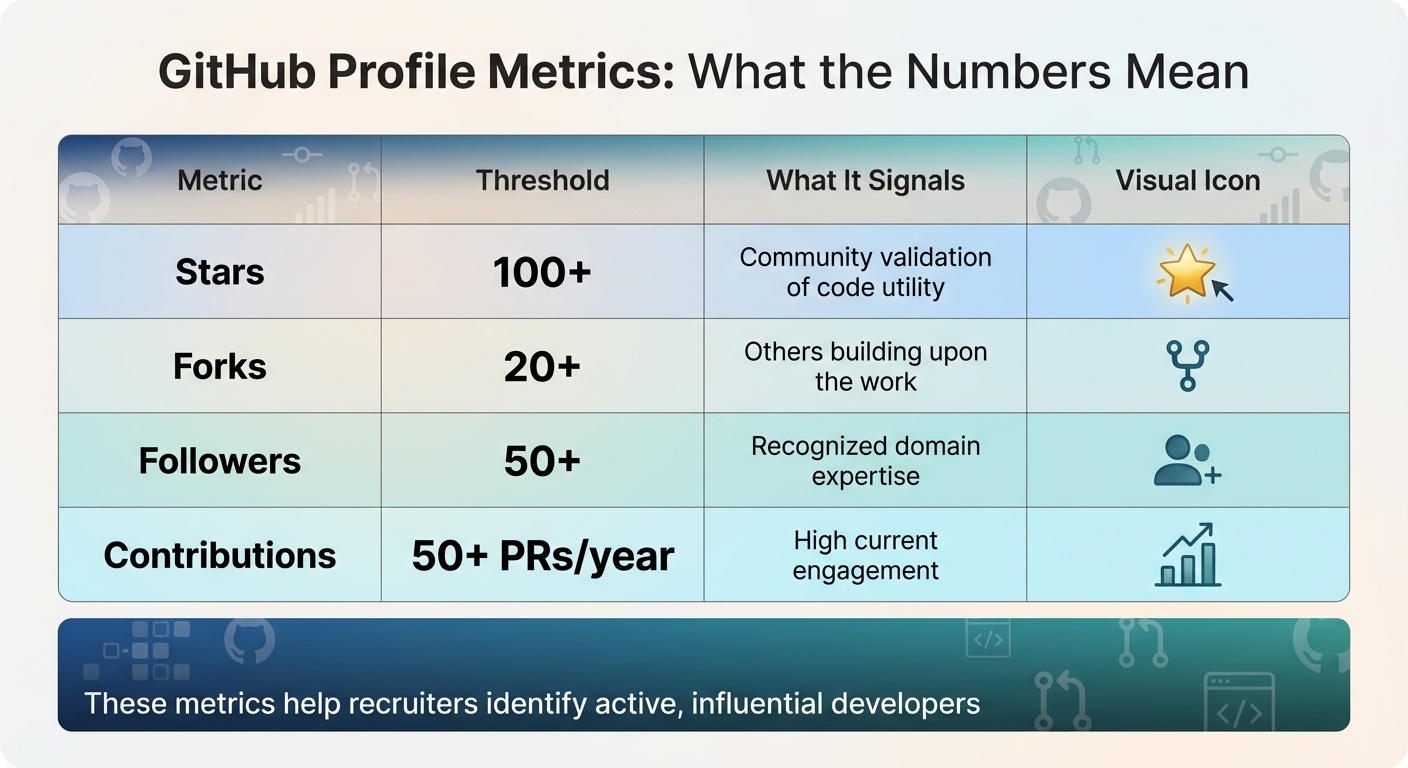
| Metric | Threshold | What It Signals |
|---|---|---|
| Stars | 100+ | Community validation of code utility |
| Forks | 20+ | Others building upon the work |
| Followers | 50+ | Recognized domain expertise |
| Contributions | 50+ PRs/year | High current engagement |
GitHub Search Techniques for Finding Developers
GitHub's massive developer community might feel like a maze, but its coding-focused candidate sourcing tools can help you narrow things down with precision. By using specific filters, you can find developers based on their skills, location, activity, or even their standing within the community. Let's break down how to use these search qualifiers effectively.
Using Search Qualifiers
Search qualifiers like language: and location: are your go-to tools for pinpointing talent. For instance, try language:python location:"San Francisco" to find Python developers in the Bay Area. To focus on active contributors, add pushed:>2026-01-01 - this ensures you're looking at profiles with recent activity.
If you're after developers with strong community recognition, use qualifiers like followers:>100 or stars:50..500. These filters highlight individuals whose work is appreciated by others. For a broader range, you can use ranges like followers:50..150. And if you want to exclude certain skills, simply use the - operator: -language:javascript removes JavaScript developers from your results.
For more targeted searches, try the in: qualifier. For example, in:readme "machine learning" will show developers who’ve mentioned machine learning in their repository descriptions. Similarly, the org: qualifier can help you find contributors affiliated with specific companies - org:netflix will surface developers who’ve worked on Netflix’s public projects.
Finding Contributors to Relevant Projects
Another way to discover great developers is by looking at contributions to important projects. For example, if you're hiring for React expertise, search for pull requests in the official React repository or check out contributors to popular React libraries. These contributions are a goldmine for finding developers with hands-on experience in your desired tech stack. For a broader look at where to find talent, consult our guide to developer sourcing channels.
To dig even deeper, visit a repository’s "Insights" tab and click on "Contributors." This will show you who’s actively building features, fixing bugs, or reviewing code. These individuals aren’t just learning - they’re actively improving the tools you care about. You can also use topic: searches like topic:tensorflow or topic:react-native to find developers focused on specific areas like AI or mobile development.
"GitHub isn't just a code hosting platform. It's a live, open record of what developers care about, contribute to, and improve." - Raj Patel, Reczee Blog
GitHub Search Qualifiers Reference Table
Here’s a handy table summarizing the key search qualifiers:
| Qualifier | Purpose | Example Syntax |
|---|---|---|
language: |
Filters by primary programming language | language:typescript |
location: |
Filters by the location listed on a profile | location:"New York" |
followers: |
Filters by number of followers (influence) | followers:>100 |
stars: |
Filters repositories by popularity | stars:50..500 |
pushed: |
Filters by date of last code update | pushed:>2026-01-01 |
topic: |
Finds repositories tagged with specific tech | topic:react-native |
org: |
Limits search to a specific organization | org:google |
in: |
Restricts search to name, bio, or readme | in:readme "machine learning" |
type: |
Restricts results to users or organizations | type:user |
How to Evaluate Code Quality on GitHub
Once you've explored a developer's profile, the next step is to dive deeper and assess their code quality. A GitHub profile offers a window into how a developer writes, organizes, and maintains their code.
Checking Repositories and Documentation
Start by reviewing their repositories to see if their work reflects the skills you're looking for. Pay close attention to the README files. A well-written README that explains the architecture, setup instructions, and usage details is a good indicator of maintainable code. Look for elements like:
- Descriptive naming conventions
- Consistent formatting (e.g., adherence to PEP 8 for Python or Prettier for JavaScript)
- Inclusion of automated tests
Skip over projects that seem trivial, such as tutorials, basic apps, or cloned websites. Instead, focus on pinned repositories - these typically showcase their best work. If you come across a forked repository, check whether they made meaningful contributions after forking or simply copied the code without changes.
Reading Pull Requests and Commit Messages
Commit messages can tell you a lot about how a developer communicates their technical decisions. The best commit messages are written in the imperative mood ("Fix bug" rather than "Fixed bug") and include detailed explanations of why changes were made, not just what was done. Look for messages that reference issues (e.g., "Fixes #234") and provide context, as opposed to vague entries.
Pull request (PR) descriptions are equally important. A strong PR description reads like an incident report, explaining what was changed, why it was changed, and how the changes were tested. Developers who create concise PRs with clear branch names like fix/validate-schema demonstrate an understanding of efficient collaboration and make their code easier to review. This clarity often extends to how they participate in code reviews.
Reviewing Code Reviews and Engagement
A developer's involvement in code reviews reveals a lot about their technical expertise and teamwork. Look for constructive, respectful feedback in their reviews, as this reflects both their depth of knowledge and their ability to lead. Similarly, check how they handle feedback on their own pull requests. Polite, evidence-based responses show strong collaboration skills, while defensive or dismissive behavior can be a warning sign.
Finally, check for signs of thorough quality control, such as running local linting, type-checking, or build scripts. Depending on the language they use, there are specific things to watch for:
- TypeScript: Preference for explicit types instead of relying on
any. - Go: Simple and clean code flow with minimal dependencies.
- Python: Use of context managers and type annotations.
These practices not only highlight technical skill but also show a commitment to producing high-quality, maintainable code.
How to Write Outreach Messages That Get Responses
When reaching out to developers, the way you craft your message can make or break your chances of starting a meaningful conversation. A personalized approach that highlights their technical contributions is far more likely to get a response than a generic message.
Reference Specific Contributions
The most effective outreach messages focus on specific repositories, pull requests, or commits. Instead of a vague statement like, "I saw your GitHub profile and was impressed", try something more detailed:
"Your work on the React Query library, especially the caching layer in PR #247, really stood out to me. We’re tackling similar challenges at scale, and I think you’d find our problems engaging."
This approach not only shows that you’ve done your homework but also connects their expertise to the role you're pitching. On the other hand, personalization mistakes cause outreach to miss the mark and often gets ignored.
Why Generic Templates Fail
Messages like "I saw your GitHub profile" or "You’d be a great fit for our team" lack specificity and fail to resonate. Developers can spot these templates from a mile away, and many choose to mute them. In fact, 43% of developers report muting generic messages, while personalized outreach can boost response rates by three to five times .
Building Trust Through Personalization
Trust starts with showing genuine interest in their work. A strong outreach message includes:
- A quick introduction
- A reference to their specific contributions
- An explanation of how their work aligns with the role or challenges at hand
- A clear and concise call to action
Keep your message short - long-winded emails are less likely to be read. For added credibility, consider having a hiring manager or senior engineer send the message instead of a recruiter. Peer-to-peer outreach often carries more weight .
Small gestures like starring their repository or leaving thoughtful feedback can also make your name stand out. And always remember: use private channels like email for outreach. Public comments are not only unprofessional but could even get you blocked.
Ethical Considerations When Recruiting on GitHub
GitHub serves as a collaborative space for developers to build software, share ideas, and solve technical challenges - not as a job board. When engaging with developers on this platform, it’s crucial to respect the distinction between sharing code publicly and actively seeking employment. Missteps here can harm your reputation and strain relationships with the developer community.
Public Code vs. Job Interest
Just because a developer has an active GitHub profile doesn’t mean they’re looking for a job. In fact, around 80% of GitHub users contribute to open source projects or maintain repositories out of passion, not because they’re job hunting.
"GitHub is a workspace, not a job board." - Vamo Talent
Treating every GitHub user as a potential hire is a risky assumption. Developers typically share their work to tackle technical problems or contribute to communities they care about - not to signal job availability. Misinterpreting this can damage your employer brand in a tight-knit community where word spreads quickly. Ethical recruiting means using an active developer network to focus on a developer's actual contributions and avoiding impersonal, generic outreach.
Avoiding Spam and Low-Quality Messages
Reaching out to developers respectfully starts with personalizing your communication. Generic, bulk messages often lead to frustration and can backfire. In fact, 43% of developers report muting recruiters because of irrelevant or poorly crafted messages. Sending the same cookie-cutter message to multiple developers wastes their time and risks tarnishing your company’s reputation.
Pitching jobs through public GitHub channels is another red flag. This practice is widely regarded as inappropriate and can result in bans from repositories or even public criticism. Instead, use private email or professional profiles to initiate contact. If a developer doesn’t respond after one polite follow-up (sent 5–7 days later), respect their decision and move on.
"GitHub is a developer collaboration platform, not a recruiting site. Respect this by avoiding promotional language and mass outreach." - Nimrod Kramer, CEO, daily.dev
Ultimately, a single, well-researched message that references specific contributions is far more effective than sending multiple generic ones. Thoughtful engagement demonstrates respect and builds trust within the developer community.
Other Platforms for Developer Sourcing
Looking beyond GitHub can open doors to additional developer talent, especially when you apply similar evaluation techniques across platforms.
While GitHub leads the way with over 65 million developers , platforms like GitLab and Bitbucket also provide excellent opportunities to discover skilled professionals. The same principles you use on GitHub - such as assessing contributions, code quality, and collaboration - can be extended to these platforms.
GitLab is tailored for the entire DevOps lifecycle, making it a great place to find developers skilled in coding, continuous integration, security scanning, and project planning. Instead of "Pull Requests", GitLab uses "Merge Requests", which can help you evaluate how candidates handle feedback and code reviews. You can also use the GitLab Commits API with filters like author, since, and path to zero in on developers who have recently contributed to high-value projects or specialized areas .
Bitbucket, on the other hand, shines within the Atlassian ecosystem, making it particularly useful for teams that rely heavily on tools like Jira, Trello, or Confluence. Developers active on Bitbucket often excel in structured workflows and integrated project management. The platform’s free tier for teams of up to five users also makes it appealing to startups and smaller, private projects.
You can use Boolean and X-Ray search techniques across these platforms just as you would on GitHub. For instance:
site:gitlab.com "DevOps" "location:San Francisco"site:bitbucket.org "Python" "machine learning"
These searches can help you uncover relevant profiles. Additionally, some developers mirror their repositories across multiple platforms, offering a more comprehensive view of their skills and activity . Incorporating GitLab and Bitbucket into your sourcing strategy enhances your ability to find the right talent while complementing your efforts on GitHub.
How daily.dev Recruiter Combines Code and Reading Signals
Expanding on the role of GitHub profiles in talent sourcing, daily.dev Recruiter takes things a step further by also analyzing what developers are reading. While GitHub highlights what a developer has built, daily.dev Recruiter provides insights into what they’re learning, offering a glimpse into their evolving interests and potential future skills.
Developer Reading Behavior as a Signal
Code contributions showcase a developer’s current technical skills, but their reading habits can reveal where they’re headed. For example, if someone is diving into content about Kubernetes, GraphQL, or machine learning, it’s a clear sign they’re actively developing expertise in those areas - often before these skills are reflected in their repositories.
"GitHub is used by engineers who are learning new technologies and tackling complex projects outside of their day job, a good indicator of motivation and drive to learn new coding skills." - Lauren Greer, Celential.ai
This is especially relevant since about 30% of software engineers aren’t on LinkedIn . For recruiters, this means that tracking both coding and learning signals with the best developer sourcing tools is essential to identifying skilled candidates who may not be visible on traditional platforms. By focusing on these signals, recruiters can connect with developers who are actively growing their capabilities, even if they’re not actively job hunting.
Double Opt-In Introductions
It’s important to remember that public code contributions don’t necessarily mean a developer is open to recruitment. GitHub was designed for collaboration, not as a job marketplace. Developers use it to share and work on projects - not to receive unsolicited job offers.
To address this, daily.dev Recruiter introduces a double opt-in system. Before any communication happens, both the recruiter and the developer must agree to connect. This ensures developers only engage with opportunities they’ve already reviewed and expressed interest in . The result? No spam, no cold outreach - just meaningful conversations based on mutual interest. This trust-first approach transforms recruiting into a collaborative and respectful process, where both sides are genuinely invested from the start.
Conclusion
GitHub recruiting takes the guesswork out of hiring by showcasing what developers have actually built, how they collaborate, and how they solve technical challenges. The platform’s data provides a clear window into developer performance, backed by real-world evidence.
This approach boils down to three essential strategies: targeted search, thorough code evaluation, and thoughtful outreach. For example, you can use search qualifiers like pushed:>2025-06-01 to find developers who are actively contributing. Focus on original repositories with clear documentation to gauge a developer's skills, and always reference specific contributions when reaching out. Avoid generic messages - developers invest significant time and effort into open source, and a personalized approach shows you respect that.
It’s equally important to respect the platform itself. Avoid posting job pitches in public areas like Issues or Pull Requests. Instead, use private email, tailor your messages to each individual, and keep in mind that 80% of developers are passive candidates . These developers aren’t actively job hunting - they’re busy building, learning, and contributing. A generic recruitment pitch won’t resonate with them.
Finally, evaluating developers goes beyond just reviewing their past work. Pay attention to their ongoing contributions and learning patterns. GitHub provides a unique opportunity to see developers in action through their commits, pull requests, and interactions with the community. By combining an analysis of their code with insights into their learning habits, tools like daily.dev Recruiter offer a more complete view of a developer's potential. This dual approach - examining what they’ve built and how they’re growing - reveals insights that traditional recruiting methods often overlook.
FAQs
How do I find active developers on GitHub fast?
To locate active developers on GitHub, leverage advanced search operators to zero in on recent activity, contributions, and overall engagement. For example, you can use filters like pushed:>YYYY-MM-DD to find developers with recent commits or contributions:>X to highlight those with a specific number of contributions.
Want to narrow it down further? Combine these operators with filters for programming languages, geographic location, or repository stars. This approach helps you identify developers actively working within your desired tech stack or focus area.
What GitHub profile signals actually predict strong engineers?
Strong engineers on GitHub stand out through their actions, not just their repositories. Here are some key behaviors to watch for:
- Detailed pull request descriptions: These go beyond the code itself, explaining the reasoning behind changes and the thought process involved.
- Meaningful review comments: Providing constructive feedback on others' work shows an ability to collaborate and improve team outcomes.
- Commits that simplify or improve systems: Whether it’s optimizing code or fixing bugs, impactful changes demonstrate problem-solving abilities.
- Consistent contributions across multiple repositories: Regular activity across different projects reflects dedication and a broad skill set.
These habits emphasize teamwork and critical thinking, showcasing an engineer’s value beyond just building a personal portfolio.
How do I reach out to GitHub developers without sounding spammy?
When reaching out to someone on GitHub, skip generic phrases like "I saw your GitHub profile." Instead, take the time to reference specific work or contributions that caught your attention. Point out details like repositories they've worked on, interesting code snippets, or standout projects.
For example, if they've made meaningful open-source contributions or have a notable commit history, mention those directly. Personalizing your message this way not only shows genuine interest but also demonstrates how their skills align with your hiring needs. This approach can make your outreach feel thoughtful and increase the chances of a positive response.
.png)


