

Switching from LinkedIn Recruiter to a developer-focused hiring platform can save time, reduce costs, and improve the quality of technical hires. Generic tools often fall short for developer recruitment due to low response rates, skill mismatches, and limited integration with modern systems. Developer platforms address these issues by using verified profiles, AI-driven skill matching, and better integration with tools like Greenhouse or Workday.
Here’s a quick summary of the migration process:
- When to Switch: If technical roles take over 90 days to fill or response rates are under 3%, it’s time to consider alternatives.
- Data Export: LinkedIn limits exports to 25 profiles per batch and caps monthly totals. Prioritize active candidates to avoid disruptions.
- Testing: Run both platforms side-by-side for 4–8 weeks to compare response rates, time-to-hire, and candidate quality.
- Training: Focus team training on new workflows, personalized outreach, and platform features like double opt-in introductions.
- Metrics to Track: Monitor time-to-hire, cost-per-hire, and technical assessment pass rates to measure success post-migration.
When to Consider Switching Platforms
Deciding to move away from LinkedIn Recruiter is no small choice. However, there are clear signs that it might be time to explore a developer-focused platform. For example, if technical roles remain unfilled for over 90 days or recruiters are spending more than half their time on manual outreach instead of connecting with qualified candidates, it’s worth reevaluating your current tools. These challenges often highlight deeper issues with sourcing and integration that need addressing.
Evaluating Developer Sourcing Performance
Start by reviewing key performance metrics to assess how well your current platform supports developer hiring:
- Low InMail response rates: If passive developers respond less than 3% of the time, you may be targeting the wrong channel.
- Limited reach: Sourcing fewer than 50 qualified developers per recruiter each week suggests your talent pool is too narrow.
- Skill mismatches: Interview-to-hire rates below 15% or skill mismatches exceeding 40% point to fundamental sourcing problems.
These numbers often reveal the limitations of generic recruiting platforms .
Feedback from hiring managers can also be telling. If candidates seem perfect on paper but fail technical screenings, the platform might lack real-time skill validation. Developer-focused tools often address this by verifying skills through coding activities and community contributions rather than relying solely on self-reported data.
Once you’ve identified these performance gaps, the next step is ensuring the new platform integrates seamlessly with your existing systems.
Checking Integration Compatibility
Before making the switch, confirm that the new platform works smoothly with your current applicant tracking system (ATS), whether it’s Greenhouse, Workday, or another solution. A practical checklist can help:
- Ensure seamless data export and import for at least 1,000 candidate records.
- Verify real-time syncing of candidate profiles.
- Check that custom ATS fields map correctly.
- Look for in-ATS indicators to avoid duplicate outreach.
It’s also important to confirm technical capabilities. The platform should support modern REST or GraphQL APIs, use secure authentication methods like OAuth 2.0, and handle API rate limits of 100–600 requests per minute without data loss. Running a short pilot - around 4–8 weeks - with one or two roles can help identify potential integration hiccups before a full rollout. Ensuring smooth integration is key to maintaining your candidate pipeline and avoiding disruptions during the transition.
Calculating Cost and Efficiency Impact
Compare your current cost-per-hire for developers to industry benchmarks. If you’re spending more than $4,000 per technical hire due to low-quality leads or extended time-to-fill, switching to a platform with AI-driven matching and verified technical profiles can cut costs by 20–40% and reduce time-to-hire from over 45 days to about 25 days .
Keep in mind that LinkedIn Recruiter often costs over $10,000 per seat annually. Hidden costs, like bad hires, can add up too - potentially costing 30% of an employee’s first-year salary .
Additionally, automating data entry between platforms and your ATS can save recruiters an average of 3.5 hours per week. This time can be redirected toward meaningful candidate engagement, improving both efficiency and hiring outcomes. These savings and productivity boosts can provide a clear return on investment, making the case for migration even stronger.
Migration Process: Step-by-Step
Switching platforms while maintaining your hiring pipeline requires thoughtful planning. By breaking the migration into smaller, actionable steps, you can keep your recruiting operations on track as you transition to daily.dev Recruiter.
Exporting Your LinkedIn Recruiter Data

LinkedIn Recruiter imposes strict limits on data exports, so a strategic approach is essential. You can only export 25 profiles at a time for both PDF and CSV formats. However, CSV exports are restricted to Professional or Corporate accounts - Recruiter Lite users don’t have this option . Additionally, monthly export caps allow up to 200 profiles via PDF and 5,000 unique profiles via CSV per account seat .
The CSV files typically include details like first name, last name, headline, location, current job title, current company, and profile URL. Contact details such as emails or phone numbers are only included if you’re already connected to the candidate . Notes added to a candidate profile are tied to specific projects, meaning they won’t appear in exports if you download them from a different project .
To stay within monthly limits, export your data in batches. Start with your most active candidates - those in advanced pipeline stages or with recent communication - and review ongoing InMail threads to ensure no crucial interactions are overlooked. This staggered method helps safeguard key relationships during the transition.
Once your data is exported, you can begin aligning your sourcing strategy with daily.dev Recruiter’s workflow.
Adapting Your Workflows
Shifting from LinkedIn’s cold outreach methods to daily.dev Recruiter’s warm, double opt-in model requires rethinking how you connect with candidates. Instead of generic InMails, focus on personalized messaging to developers who’ve already expressed interest in relevant roles.
Map your existing sourcing criteria to daily.dev Recruiter’s targeting features. For instance, if you typically search LinkedIn for "Senior Backend Engineer with Python experience in San Francisco", you can apply similar filters on daily.dev Recruiter to find candidates with matching skills and active engagement in the developer community. The platform’s automated screening options streamline the process, saving time and improving candidate alignment.
Your messaging will also need to evolve. Leverage daily.dev Recruiter’s tailored job briefs to provide clear, detailed information about technical requirements, team dynamics, and role highlights. Developers on the platform appreciate transparency and context, so this approach boosts engagement. Additionally, daily.dev Recruiter integrates seamlessly with your existing ATS, ensuring a smooth transition without disrupting your current systems.
Once workflows are adapted, a phased timeline will help guide the full migration process.
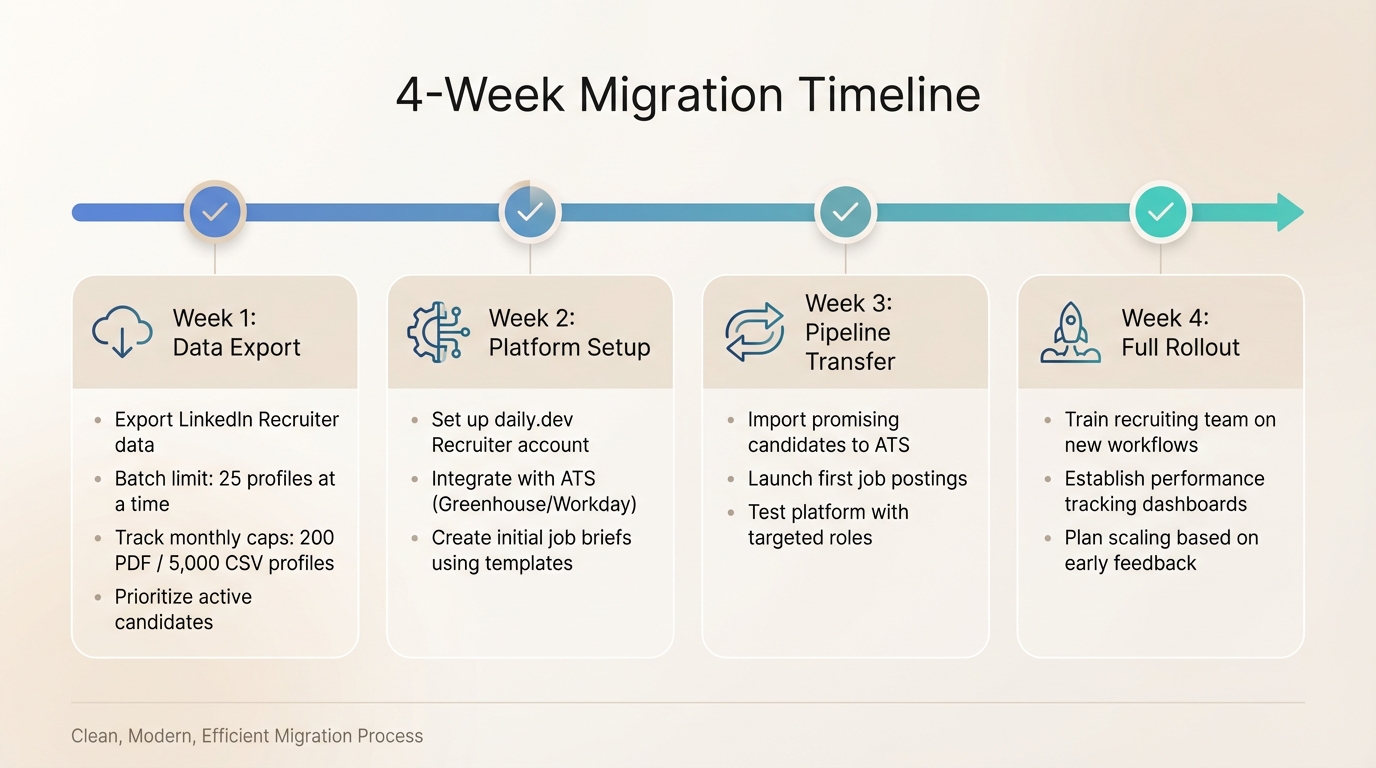
4-Week Migration Timeline
A gradual migration plan reduces risk and ensures your hiring pipeline remains intact.
- Week 1: Begin exporting your LinkedIn Recruiter data. Stick to the 25-profile batch limit while keeping track of your monthly export caps .
- Week 2: Set up your daily.dev Recruiter account, integrate it with your ATS (such as Greenhouse or Workday), and create initial job briefs using the platform’s templates.
- Week 3: Start transferring your pipeline. Import your most promising candidates into your ATS if needed, and launch your first job postings on daily.dev Recruiter with carefully selected targeting to test the platform.
- Week 4: Prepare for a full rollout. Train your recruiting team on the new workflows, establish performance tracking dashboards to monitor key recruitment metrics, and plan for scaling based on early feedback.
This phased approach ensures a smooth transition while keeping your candidate relationships intact.
Testing Both Platforms Side-by-Side
Using both platforms simultaneously can provide the insights needed to make an informed decision before committing fully. This side-by-side testing allows you to keep your hiring pipeline moving while evaluating how daily.dev Recruiter stacks up against your current platform. It’s an effective way to measure candidate engagement and process efficiency under real-world conditions.
Running Concurrent Campaigns
Start by choosing a few comparable roles to post on both platforms at the same time. Focus on positions that align with your typical hiring needs - like a senior backend engineer or frontend developer - to ensure the results reflect your actual recruiting environment. This method lets you assess performance without jeopardizing your existing hiring pipeline.
Before launching, clean up your candidate database. Remove duplicates and outdated entries, and categorize candidates based on their activity level to prioritize which data to track . This ensures you’re working with up-to-date information. Align data fields between platforms - like matching "Interviewed" on one system with "In Process" on another - for a fair comparison .
Take time to document your entire recruitment workflow, from job intake to placement, before setting up daily.dev Recruiter . Mapping out your process upfront not only prevents unnecessary rework but also highlights bottlenecks that the new platform might help address. Unlike rigid, linear workflows, modern approaches built for parallel testing offer real-time visibility and flexibility to adapt to shifting priorities .
Tracking Performance During Testing
Focus on metrics that matter most: candidate quality and engagement. Use a weekly-updating dashboard to track key indicators like response rates, time-to-hire, pipeline progression, and cost per qualified candidate. Dive deeper into pipeline quality by monitoring how many candidates advance through stages like phone screens, technical interviews, and final rounds.
To calculate cost per qualified candidate, divide your total platform expenses by the number of candidates who meet your technical requirements and make it to the interview stage. This gives a clearer picture of ROI compared to just counting applications. Additionally, gather feedback from candidates about their experience with each platform. Since daily.dev Recruiter employs warm, double opt-in introductions, you’ll likely see higher engagement and fewer negative interactions compared to traditional cold outreach methods.
Set up a simple tracking spreadsheet or dashboard to organize these metrics. Break down data by platform and role, and update it weekly. This real-time comparison will help you identify trends quickly, ensuring you make data-driven decisions about whether to scale your migration to daily.dev Recruiter.
Training Your Recruiting Team
A well-prepared team is key to ensuring a smooth transition and maintaining recruiting performance during the migration process. Training plays a vital role in helping your team master daily.dev Recruiter's unique features, like its double opt-in model and developer-focused job briefs. Focus on workflows that integrate seamlessly with tools like Slack to minimize disruptions and avoid unnecessary context switching .
Platform Training Sessions
Plan your initial training across three focused days to build skills without overwhelming your team:
- Day 1: Walk through skill-based searches and semantic matching within the vast 800M+ developer profile database.
- Day 2: Teach recruiters how to craft concise, targeted job briefs and execute the double opt-in process, which can increase response rates by up to 3× .
- Day 3: Cover ATS synchronization with platforms like Greenhouse and demonstrate how to track pipeline progression effectively.
Group training sessions with 5–10 recruiters are more effective, speeding up adoption by 50% compared to one-on-one sessions . Include role-playing exercises to practice personalized outreach, such as referencing a candidate’s GitHub contributions or technical blogs. These activities help recruiters shift from generic messaging to tailored, high-context interactions.
After the sessions, provide clear internal documentation to reinforce the training and ensure process consistency.
Creating Internal Documentation
Develop searchable internal guides with detailed instructions, workflow diagrams, and best practices for engaging developers using platform data . Include U.S.-formatted dates (e.g., 03/09/2026) for easy reference.
Templates can help streamline the process. Suggested sections include:
- Sourcing Checklist
- Engagement Scripts
- ATS Mapping (tables to show how candidate data aligns across systems)
Embedding short video walkthroughs into the documentation can cut technical recruiters' training time by 40% . Use tools like Notion or Google Docs to create collaborative wikis, complete with screenshots, checklists for verifying double opt-in status, and glossaries for terms like "targeted visibility" .
Leverage this documentation during pilot testing to address challenges quickly and refine your training approach.
Gathering Feedback from Early Users
Select 2–3 pilot recruiters - about 20% of your team - to test daily.dev Recruiter before rolling it out fully . Choose tech-savvy team members with at least two years of recruiting experience, especially those who have tested other platforms. These early adopters can identify potential issues and suggest process improvements .
Track key metrics during the pilot phase:
- Time-to-first-outreach: Aim for under two days.
- Double opt-in conversion rates: Strive for 40% or higher.
- Feature usage: Ensure 80% of recruiters actively use job briefs .
Additionally, gather Net Promoter Scores (NPS) and compare them to your baseline. Use standardized U.S. number formats (e.g., 45.6%) for clarity. Feedback from the pilot group will help you refine both your training and migration strategies, highlight any gaps, and decide whether your team is ready for a broader rollout.
Measuring Results After Migration
The first 90 days after switching platforms are crucial for evaluating whether the migration was a smart move. To assess the impact of daily.dev Recruiter on hiring speed, candidate quality, and recruiting costs, focus on metrics that align with your core business objectives.
Metrics to Monitor Post-Migration
Start by tracking time-to-hire, measuring the duration from initial contact with a candidate to offer acceptance. Break this down by developer role and experience level to identify patterns or bottlenecks. Another key metric is technical assessment pass rates, which can reveal how well candidates align with job requirements.
Offer acceptance rates are equally important - they indicate whether the roles you're offering meet developer expectations. Recalculate cost-per-hire, factoring in platform fees, recruiter hours, interview time, and the indirect costs of unfilled positions. Additionally, monitor reply rates and candidate satisfaction scores to get a sense of how your employer brand is perceived. For deeper insights, segment your data by technology stack and experience level, as aggregated numbers can sometimes obscure important trends.
Once these metrics are in place, compare data from before and after the migration to check for measurable improvements.
Comparing Before and After Performance
To make a direct comparison, pull ATS reports covering the 90 days before and after the migration. Use real-time dashboards to track leading indicators like reply rates and lagging indicators like time-to-hire. For example, in August 2025, Executive Integrity tracked their post-migration performance and saw a 34% improvement in fill rate and a 28% increase in average billing per consultant within just a few months .
If the results don’t meet your expectations, a post-migration audit can help uncover issues. For instance, in 2025, Ocean Red Partners engaged key stakeholders early, which helped them shorten their migration timeline to under two weeks and achieve an 85% boost in monthly billing . Keeping temporary access to your old system allows for side-by-side validation, while assigning super-users can help identify friction points and advocate for the platform’s benefits .
Expanding Based on Early Results
Once you’ve compared performance and established benchmarks, use the initial data to scale your hiring efforts. If your pilot team is consistently efficient at engaging candidates and managing follow-ups, it’s a sign you’re ready to expand. Adjust workflows to align candidate qualification and interview scheduling with your team’s specific needs .
Track source-to-close metrics to ensure daily.dev Recruiter is speeding up your recruitment funnel rather than slowing it down. Assess the quality of source data by checking the percentage of applications with standardized tags. If adoption rates are low, consider introducing role-specific training modules for recruiters and hiring managers to smooth the transition .
Conclusion
Switching to a developer-focused platform doesn’t have to derail your hiring process. Think of migration as an ongoing journey rather than a one-time task. This gradual approach not only simplifies the transition but also improves how you connect with candidates.
The real benefits of a developer-focused platform emerge when you move from cold outreach to warm, double opt-in introductions. Instead of chasing unresponsive leads, you’re engaging with developers who are already invested in growing their skills and careers. This trust-centered approach shifts recruiting from impersonal transactions to meaningful, high-context conversations - respecting both your time and theirs. It’s a smarter way to recruit, fostering deeper connections and better results.
The numbers back this up. Companies monitoring their performance during the first 90 days of implementation using a data-driven recruitment checklist often notice measurable gains in fill rates and recruiter productivity. Plus, the platform’s seamless integration with your ATS reduces administrative work, giving your team more time to focus on building relationships.
FAQs
Will I lose candidates or messages when I export from LinkedIn Recruiter?
Exporting candidates or messages from LinkedIn Recruiter requires careful handling to prevent data loss. Start by planning the process thoroughly and creating backups of all critical information. Before proceeding, validate the steps to ensure everything is set up correctly. It's also a good idea to test the migration process in a controlled environment to catch any potential issues. Once the export begins, monitor the data closely to ensure its integrity throughout the process. These precautions can help protect your candidate information and messages during the transition.
How do I run both tools in parallel without duplicate outreach?
To keep outreach efforts organized and avoid duplicate communication, connect your ATS with daily.dev Recruiter. This integration allows you to sync candidate data and streamline communication. Use tools like candidate segmentation based on engagement status or sourcing channels to prevent overlapping efforts. Additionally, maintaining a shared, real-time updated pipeline across both systems ensures recruiters can easily track contact history and communication channels, making outreach smoother and more efficient.
What results should I expect in the first 90 days after switching?
In the first 90 days of using a developer hiring platform like daily.dev Recruiter, you’ll likely notice smoother operations, better engagement, and stronger connections with qualified candidates. Response rates often improve thanks to real-time activity tracking and warm, double opt-in introductions that make interactions more meaningful. Plus, integrating your ATS simplifies your workflow - automating data syncing, cutting down on manual input, and helping you make faster, more precise hiring decisions.
.png)


