

Yes, recruiting without an ATS is entirely possible. For small teams hiring fewer than 10 people annually, manual recruitment processes using tools like spreadsheets, email, and cloud storage can be cost-effective and practical. Here's what you need to know:
- Cost Savings: ATS platforms can cost $2,800–$5,400 annually for small teams, making manual recruiting a budget-friendly alternative.
- Best For: Teams hiring 3–10 people per year or filling niche roles where quality matters over quantity.
- Tools Used: Google Sheets or Excel for tracking, cloud storage for resumes, and free job boards like Indeed, LinkedIn, and Wellfound for posting.
- Challenges: Manual recruiting can be time-consuming, prone to errors, and hard to scale as hiring needs grow.
- Lightweight Alternatives: Spreadsheets work for small-scale hiring, while platforms like daily.dev Recruiter help source pre-qualified developers.
If you're handling low-volume hiring, manual recruiting offers flexibility and control. However, as hiring scales, consider tools to reduce administrative workload and improve efficiency.
Can You Recruit Without an ATS?
Yes, recruiting without an ATS is entirely possible - and it’s not as complicated as it might seem. Instead of relying on software, manual recruiting leans on everyday tools like spreadsheets, email, and cloud storage. Recruiters often create centralized trackers in programs like Excel or Google Sheets to keep tabs on key details such as candidate names, contact information, job titles, application dates, and hiring stages .
Candidate details are manually transferred from platforms like LinkedIn, Indeed, or GitHub into these trackers . Resumes? Those can be easily stored in cloud drives like Google Drive or OneDrive, with links added directly to the spreadsheet. To keep everything organized, Excel’s Data Validation feature can be used to create dropdown menus for statuses like "Phone Screen", "Interview", or "Offer" .
This method works best for smaller hiring needs - typically between 3 and 10 hires per year . It’s particularly effective for specialized roles, such as niche developer positions, where personalization and precision are critical.
For sourcing, recruiters often rely on Boolean searches across platforms like LinkedIn, GitHub, and Twitter. To stay efficient, it’s recommended to dedicate about 30 minutes daily to sourcing 10 to 15 profiles, avoiding the stress of last-minute, high-volume searches .
Manual recruiting offers benefits like full control of your data, minimal costs, and flexibility to tailor the process to your team’s specific needs. The key is to establish a smart, repeatable system that aligns with your hiring volume. Up next, we’ll walk through the step-by-step workflows for manual recruiting.
Hiring engineers?
Connect with developers where they actually hang out. No cold outreach, just real conversations.
Steps in Manual Recruiting Workflows
If you're managing recruitment without software, having a structured workflow is essential. Manual recruiting requires a step-by-step approach to stay organized, especially as your candidate pipeline grows. Here's how to tackle each phase effectively.
Advertising Job Openings
Begin by listing your job openings on free, high-traffic platforms that are popular among developers. For example:
- Indeed: Offers unlimited free job postings.
- LinkedIn: Allows one free job post at a time .
- Wellfound: Ideal for tech roles, providing free branded profiles for startups .
- Learn4Good: Grants 20 free listing credits every six months.
- Hubstaff Talent: Completely free for remote positions .
Want to show up on Google for Jobs? Add JobPosting structured data (using JSON-LD schema markup) to your career page. Include key details like the job title, description, company info, location, employment type, salary range, and posting dates. Once Google's crawlers pick it up, your job will appear in search results - for free .
To maximize visibility, combine a major job aggregator with a few niche platforms. For instance, Craigslist works well for local or hourly roles, while Facebook Marketplace helps target specific geographic areas .
Collecting and Organizing Candidate Information
Keep track of applicants using a master spreadsheet in Google Sheets or Excel. Set up standardized columns like:
- Application ID
- Name
- Contact Info
- Role
- Source
- Resume Link
- Status
- Interviewer
Use dropdown menus for the "Status" column with options such as "Applied", "Screening", "Interview Scheduled", and "Offer Extended." Add color-coded conditional formatting - green for "Hired", red for "Rejected", yellow for "Interview Scheduled" - to make your pipeline easy to scan .
Store resumes in Google Drive or OneDrive and paste direct links into the spreadsheet's Resume/Portfolio Link column. To avoid clutter, keep the master file in a secure cloud folder .
If you're working solo, focus only on candidates who respond to your outreach to reduce admin work . Use a separate "Lists" tab in your spreadsheet for dropdown options, keeping the main sheet clean . And if your spreadsheet grows beyond 500 rows, archive older roles in a separate workbook to prevent lag .
Screening and Shortlisting Candidates
Manually review resumes, comparing each candidate's qualifications against your job requirements. Use the Notes/Feedback column in your spreadsheet to document technical evaluations and interview feedback .
Check the "Source" column to identify which platforms deliver the best candidates. Since spreadsheets lack notification features, sync follow-up dates with your digital calendar to keep track of interviews . Once you've shortlisted candidates, focus on clear and timely communication.
Candidate Communication and Scheduling
Reach out to candidates via email or use LinkedIn strategies for passive technical candidates. Keep in mind that developers often receive over 50 recruitment messages per month, and LinkedIn InMail has a low response rate (3–5%) .
To improve your chances:
- Send a personalized message to stand out.
- Follow up once, 5–7 days after your initial outreach. Avoid sending more than three follow-ups in one week, as it could come across as pushy .
For scheduling, coordinate interview times through email threads and add confirmed slots to your team's shared calendar. Update the "Status" dropdown in your spreadsheet immediately after scheduling to keep your records current.
Making Offers
Use a standard offer letter template that includes details like compensation, benefits, start date, and role expectations. When targeting passive candidates, consider offering 10–20% above their current compensation to make the switch worthwhile .
Send offers via email, along with a personal note explaining why you're excited to have the candidate join your team. Track offer progress in your spreadsheet with options like "Offer Extended" or "Offer Accepted." To protect candidates' personal information, use view-only links when sharing data with external parties .
Advantages of Recruiting Without an ATS
Handling recruitment manually gives you complete control over the process. For smaller teams hiring just a handful of developers each year, this approach can be both practical and effective. Here’s why this method can work well for teams focused on a more tailored, candidate-first strategy.
Personalized Candidate Evaluations
Manual recruiting lets you spot details that automated systems often miss. Think about a career changer with transferable skills, a developer who spent a gap year contributing to open-source projects, or a bootcamp graduate with a standout portfolio. These kinds of candidates might never make it past keyword-based filters.
"Humans catch nuance that algorithms still miss... These soft signals matter - especially for senior roles, culture-fit-critical positions, or creative fields." – Marxel
Additionally, manual recruiting helps build institutional memory. You can track standout candidates for future roles by adding custom notes to your spreadsheets - like "Creative Test Scores" or "Cultural Fit" - to capture qualities that align with your team’s needs .
Flexibility in Changing Criteria
When hiring priorities shift mid-search, manual recruiting makes it easy to adapt. Need to track salary expectations or portfolio links? Just tweak your spreadsheet . If a candidate brings unexpected but valuable skills not originally listed in the job description, you can pivot your evaluation process without being boxed in by rigid software . You can even introduce a "second-look" policy for unconventional candidates as you refine your criteria . This kind of flexibility is especially important in developer recruitment, where technical requirements often evolve.
Cost-Effectiveness for Small Teams
For teams hiring only a few people each year, the cost savings of manual recruiting can be substantial. Enterprise ATS platforms often range from $2,800 to $6,500 annually, with onboarding fees adding another $200–$500 . For smaller teams, these expenses can be hard to justify. As one expert puts it:
"If you're placing fewer than 15 candidates per year, you probably don't need applicant tracking software yet." – Augtal
Challenges of Recruiting Without an ATS
Recruiting without an Applicant Tracking System (ATS) might give you more control over the process, but it often creates significant hurdles. These challenges can slow down hiring, increase inefficiencies, and become overwhelming as your hiring needs grow - even for smaller teams. Let’s break down why manual recruiting can be such a headache.
Time-Consuming Processes
Manual recruiting is a major time sink. HR professionals spend an average of 23 hours reviewing resumes for just one hire - that’s nearly three full workdays dedicated to screening before even starting interviews [[16]](https://www.hrmantra.com/guide/ats vs manual recruitment - a 2025 comparison.html). One staffing firm in Texas shared their struggle: recruiters spent about 10 hours a week managing spreadsheets and emails. This inefficiency caused them to lose 19 qualified candidates due to delayed follow-ups. After switching to an ATS, they cut time spent on manual tasks by 32% and made 14 extra placements in just three months .
Tasks like data entry, posting individual job listings, coordinating interviews, and compiling reports quickly pile up. On average, companies relying on manual methods take 43% longer to fill positions [[16]](https://www.hrmantra.com/guide/ats vs manual recruitment - a 2025 comparison.html). It’s not just about the time - it’s about the opportunities lost while you’re stuck on administrative work.
Risk of Errors and Mismanagement
Manual tracking systems like spreadsheets come with a high risk of errors. In fact, studies show that 88% of spreadsheets contain mistakes . Mismanagement is almost inevitable when juggling multiple spreadsheets for different roles or hiring stages. For example, a candidate might be marked as "Interview Scheduled" in one file but "Screening" in another. This can lead to duplicate interviews, missed updates, and a poor candidate experience .
Shared spreadsheets add another layer of complexity. File locking and version conflicts can make real-time updates a nightmare . Processing resumes manually also eats up time - just 50 resumes at 3 minutes each equals 2.5 hours of tedious data entry, increasing the likelihood of typos and mistakes .
"At 3 minutes per resume, 50 resumes = 2.5 hours of data drudgery. That's time you could spend sourcing, screening, or strategizing." – Raj Patel, Author, Reczee
Security is another major concern. Spreadsheets don’t offer detailed access controls, which means sensitive data - like compensation details or interview feedback - could end up in the wrong hands. This lack of security increases the risk of breaches and bias . The administrative burden can even force recruiters to cut corners. Dana Bozich from Relay Fire and Safety shared:
"I only record the people who actually get back to me... Otherwise, it just would be too administratively heavy to keep track of everyone I'm contacting, sourcing, and otherwise."
Scalability Challenges
Manual recruiting systems simply can’t keep up when hiring needs grow. Teams often find themselves juggling multiple spreadsheets for different roles, sources, or stages. This scattered approach leads to missed follow-ups, confused candidates, and a lack of a centralized tracking system . Important information gets buried in emails, local drives, and various files, making it nearly impossible to track candidate histories or evaluate which sourcing channels are working .
Collaboration becomes another headache. Larger teams face frequent version control issues, making it harder to stay aligned . And with 60% of job seekers abandoning long application processes , delays caused by manual workflows can drive away top candidates.
"Losing someone fantastic hurts whether you're hiring 30 people or 3000 – arguably more for smaller organizations. And paying for 10x the recruitment time for repetitive admin is pretty unaffordable whatever your size." – Tribepad
Lightweight Alternatives to an ATS for Developer Recruitment
If you're managing developer recruitment without the need for a full-fledged ATS, lightweight options can provide structure without the overwhelming costs or complexity. These alternatives are ideal for small teams or startups looking for simplicity and efficiency.
Using Spreadsheets for Candidate Tracking
For small teams or startups handling fewer than 100 applicants per role, spreadsheets like Excel or Google Sheets can work as a basic ATS alternative . They’re flexible, customizable, and capable of tracking key details specific to developer hiring, such as tech stacks, GitHub profiles, salary expectations, and notice periods .
To make your spreadsheet more effective, consider including:
- A Candidate Pipeline Tracker with stages like "Applied", "Phone Screen", and "Technical Interview."
- An Interview Scheduling Matrix to manage timelines.
- Source Analysis to track where candidates are coming from (e.g., referrals or job boards).
- An Offer/Joining Tracker to monitor final steps.
For developer-specific roles, add columns for "Tech Stack", "GitHub/Portfolio Link", and "Technical Assessment Score" to keep technical evaluations front and center. Conditional formatting can highlight priority candidates or flag those who haven’t been contacted in over 48 hours . Instead of lumping all feedback into one "Comments" column, you can use separate columns for each interviewer’s notes or create a linked tab for detailed feedback .
"Starting your recruitment with sheets isn't just acceptable - it's smart. It allows you to move fast, stay organized, and understand your early hiring patterns without heavy investments." – Raj Patel
Cloud-based spreadsheets allow for real-time collaboration, minimizing version conflicts . Plus, tools like Zapier can connect to your spreadsheet to automate reminders or enable bulk updates with mail-merge functions . However, as your data grows (e.g., over 500 rows), spreadsheets may slow down, and you’ll need to archive older roles to maintain performance . Always secure your master file with restricted download rights and remove candidate PII before sharing externally . If your applicant volume exceeds 100 per role or compliance becomes a concern, it’s time to consider upgrading to a more advanced system .
For a more tailored approach to developer hiring, you might want to explore specialized tools.
Leveraging daily.dev Recruiter
For teams specifically hiring developers, daily.dev Recruiter offers a targeted solution. This platform doesn’t focus on managing applications or cold outreach. Instead, it connects you with passive, pre-qualified developers through warm, double opt-in introductions . When a developer opts into your role, you receive a direct introduction, eliminating the hassle of cold outreach.
Other features include:
- Built-in analytics to measure reply rates, pass-through rates, and pipeline health .
- A 100% trust score, thanks to its opt-in process .
- Transparent pricing with a flat monthly fee per active role - no placement fees or long-term contracts .
Since developers frequently engage with content on daily.dev, your role is displayed in a context where they’re already active. This makes it a great complement to traditional recruiting methods.
Combining Manual and Targeted Tools
You don’t need to pick just one method. Many small teams successfully combine manual processes with specialized tools to strike a balance between control and efficiency. For instance, you could use a spreadsheet to track candidates and interview stages while relying on daily.dev Recruiter to source passive developer talent.
This hybrid approach allows you to automate time-consuming tasks like sourcing and initial outreach while keeping the rest of the process simple and under your control. The key is identifying which parts of your workflow need support and integrating tools where they add the most value.
When to Choose Manual Recruiting vs. Alternatives
::: @figure 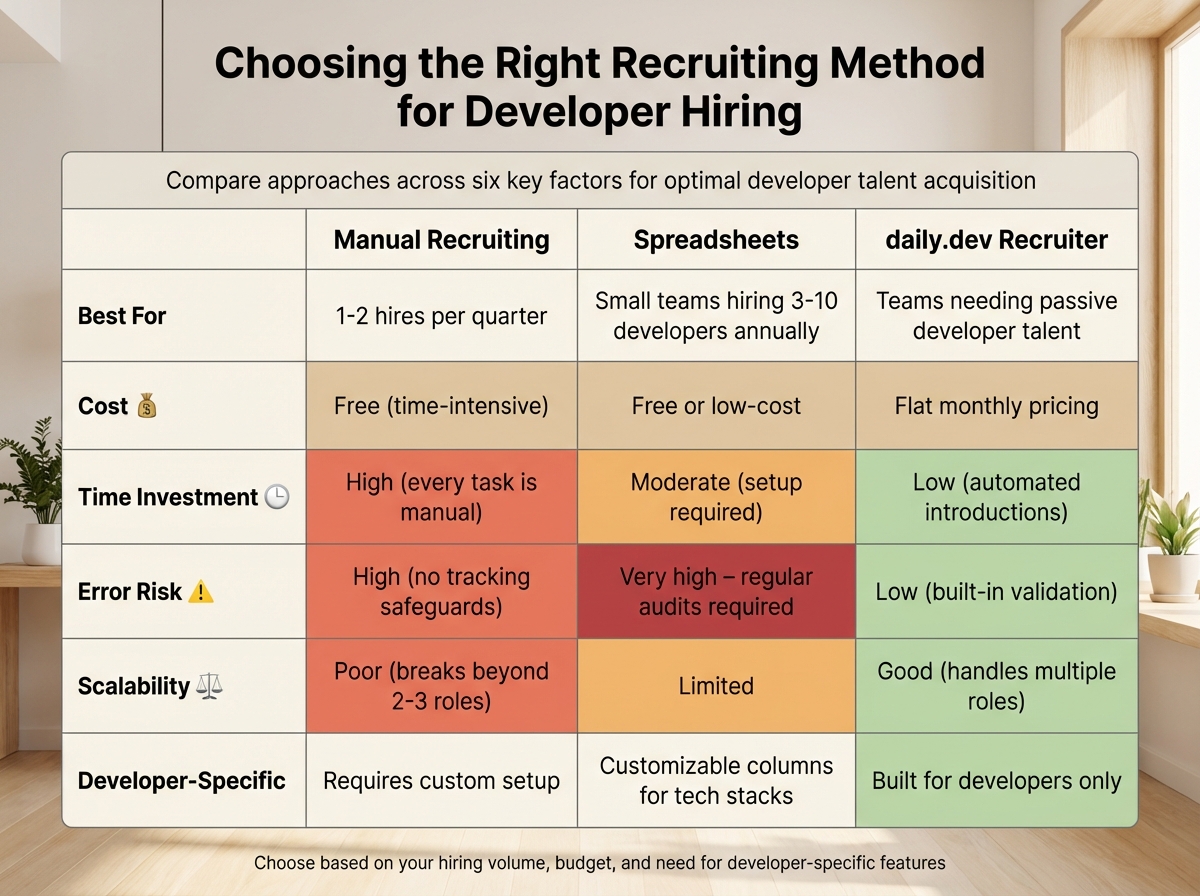 {Manual Recruiting vs Spreadsheets vs daily.dev Recruiter Comparison}
Deciding on the right recruiting method depends on factors like hiring volume, team size, and budget. While there’s no universal solution, understanding how different approaches work in various scenarios can help you make a more informed choice.
Comparing Manual Recruiting, Spreadsheets, and daily.dev Recruiter
| Factor | Manual Recruiting | Spreadsheets | daily.dev Recruiter |
|---|---|---|---|
| Best For | 1-2 hires per quarter | Small teams hiring 3-10 developers annually | Teams needing active vs passive developer recruitment strategies |
| Cost | Free (time-intensive) | Free or low-cost | Flat monthly pricing |
| Time Investment | High (every task is manual) | Moderate (setup required) | Low (automated introductions) |
| Error Risk | High (no tracking safeguards) | Very high – regular audits required | Low (built-in validation) |
| Scalability | Poor (breaks beyond 2-3 roles) | Limited | Good (handles multiple roles) |
| Developer-Specific | Requires custom setup | Customizable columns for tech stacks | Built for developers only |
In June 2025, Dana Bozich, a solo recruiter at Relay Fire and Safety in Maryland, managed hiring for technicians, sales, and accounting roles without using an ATS. She relied on spreadsheets, pivot tables, and tools like Indeed and LinkedIn for candidate tracking. To streamline her process, she used ChatGPT as a "virtual assistant" to create job descriptions and interview questions .
This table and example highlight how each method fits different hiring needs.
Making the Right Choice for Your Hiring Needs
If hiring volume is low: Manual recruiting works best for one or two roles per quarter, especially if you can personally oversee every step of the process.
When cost matters most: For teams hiring 3-10 people annually, spreadsheets offer a low-cost solution. However, keep in mind that nearly 88% of recruitment spreadsheets contain errors . To minimize risks, use version control and conduct regular audits. If your process involves sensitive compliance data, the potential for mistakes might outweigh the savings.
For hiring developers: daily.dev Recruiter is ideal for sourcing pre-qualified developer talent, especially if you want to skip cold outreach. Pair it with a spreadsheet to track your candidate pipeline while benefiting from daily.dev's warm introduction model. The platform’s flat monthly pricing ensures predictable costs, and its automation saves time by cutting down on repetitive tasks.
Ultimately, the tipping point comes when manual processes start eating into time that could be spent on strategic decisions. If you’re spending hours screening resumes or coordinating interviews, it might be time to introduce tools or automation to keep things running smoothly.
Conclusion
Recruiting without an ATS can work well for low-volume, specialized hiring. If you're only bringing on one or two employees per quarter, manual recruiting might fit the bill. For teams hiring three to ten people annually, spreadsheets can often handle the workload effectively.
That said, traditional ATS systems come with drawbacks. They often filter out qualified candidates - about 75% of resumes, in fact, never make it past ATS algorithms to a human recruiter . Outdated keyword-matching systems can misread technical symbols like <> or {}, leading to errors that exclude talented applicants. For developer hiring, a hybrid approach - leveraging automation for sourcing and pre-qualification while retaining personal interaction - can deliver stronger results.
For those hiring developers, daily.dev Recruiter offers a thoughtful alternative. Rather than relying on outdated resume searches or cold outreach, it connects you with pre-qualified talent through warm, opt-in introductions. Developers on the platform are already engaged - reading, learning, and networking - so when they agree to connect, their interest is genuine. Plus, flat monthly pricing keeps costs predictable, and its automation reduces repetitive tasks like screening.
If manual recruiting feels like it's consuming time better spent on strategic hiring, consider tools that grow with your needs. Whether you stick with manual methods for niche roles, use spreadsheets for simple tracking, or try daily.dev Recruiter for connecting with active developer talent, choose the approach that suits your goals.
Looking to skip cold outreach and connect with developers who are ready to engage? Check out daily.dev Recruiter and see how warm introductions can redefine your hiring process.
FAQs
When should I stop recruiting without an ATS?
When managing recruitment with manual methods like spreadsheets starts eating up too much time or leads to frequent errors, it’s probably time to switch to an ATS. This usually becomes an issue as the number of candidates grows, making it harder to keep track of applications and maintain an organized hiring process.
How do I prevent spreadsheet hiring errors?
To cut down on spreadsheet hiring errors, focus on reducing manual input and boosting data accuracy. Here are some practical tips:
- Automate data entry: Whenever possible, rely on automation tools to handle repetitive tasks, reducing the chance of human error.
- Stick to clear, consistent formatting: Use a uniform structure for all entries to make the data easier to read and manage.
- Regularly review your data: Set aside time to check for inconsistencies or errors before they become bigger problems.
- Limit manual edits: The less manual input, the lower the risk of mistakes.
- Apply validation rules: These can help flag missing or incorrect information automatically.
- Stay organized: A well-structured spreadsheet makes workflows smoother and helps prevent confusion.
By combining these strategies, you can keep your hiring data accurate and your processes running smoothly.
How can I keep candidate data secure without an ATS?
To protect candidate data without using an ATS, rely on manual processes like spreadsheets or tracking tools. Limit file access to only those who are authorized, use password protection for sensitive documents, and ensure data is backed up on a regular basis. Avoid sharing confidential information through unsecured emails or cloud services unless encryption is in place. These precautions help safeguard data while managing recruitment manually.
.png)


