If you hire mid-to-senior engineers, this round can change level, pay, and final decisions. In most cases, it works best for candidates with 5+ years of experience, follows a 60-minute flow, and should score judgment, tradeoffs, scale, depth, and communication - not memory.
Here’s the short version:
- I’d use system design interviews mostly for mid, senior, and staff+ roles.
- I would not rely on them for most junior roles because the signal is often weak.
- I’d keep the round simple: scope -> design -> deep dive -> tradeoffs -> wrap-up.
- I’d score with a 1-5 rubric tied to written proof, not gut feel.
- I’d watch for candidates who set scope first, explain decisions out loud, and talk about failure, monitoring, rollback, cost, and team impact.
- I’d send remote whiteboard tools 48 hours ahead so tool issues do not hurt the interview.
A few numbers stand out. The guide frames this as a 60-minute interview, asks for notes within 24 hours, and points out that 100 million requests per day is about 1,160 requests per second. That kind of rough math is part of the signal.
Here’s a quick view of when I’d use it:
| Role level | Use it? | Main signal |
|---|---|---|
| Junior | Usually no | Better to use coding or role-based screens |
| Mid | Yes | Clear high-level design and sound choices |
| Senior | Yes | Tradeoffs, scale, and failure handling |
| Staff+ | Yes | Cost, SLOs, team boundaries, and org impact |
Bottom line: I’d treat this round as a judgment test. If the process, prompt, and scoring are lined up, you get cleaner hiring signals. If they are not, you get noise.
System Design Interviews: What They Test And When To Use Them
What System Design Interviews Test In Mid-To-Senior Engineers
Recruiters should brief interviewers on five signals: scoping, depth, tradeoffs, scalability, and communication. These map directly to the areas interviewers score and that recruiters compare across candidates.
Problem scoping comes first. Strong candidates don't rush into boxes and arrows. They usually spend the first few minutes setting boundaries: What features matter most? What scale are we designing for? What can wait? In better interviews, the candidate is shaping the problem with the interviewer, not tossing out generic clarifying questions. When someone jumps straight into architecture, the signal is often weaker.
Technical depth shows up in the high-level design itself: services, databases, APIs, and caching layers. The key question is simple: can the candidate explain why each part exists, how the pieces fit together, and where the design could break?
Tradeoff reasoning is often the clearest line between mid-level and senior engineers. Every design choice gives you something and costs you something. Picking NoSQL may help write throughput and horizontal scaling, but it can make complex queries tougher. Choosing eventual consistency may cut latency, but it brings sync risk. Strong candidates say those tradeoffs out loud. For senior and staff roles, this should matter more than it does for mid-level hiring.
Scalability is not just “add more servers.” Strong candidates think in rough numbers. They look for bottlenecks and ask whether the design fits the expected load and cost. That sense of proportion - building for the problem in front of them, not for some giant hypothetical future - is a big reason this round works well for mid-to-senior hiring.
Communication gives you a read on how the person will work with your team. Can they explain a hard idea in plain English? Do they treat the interviewer like a thought partner? Long silent stretches make this tough, because interviewers can't judge reasoning they can't hear.
Organizational impact matters more for staff-plus roles. At that level, interviewers may push past the diagram and ask about cost/ROI, security compliance, team boundaries, SLOs, monitoring, and rollback paths.
Next, these same dimensions help you decide when the round helps and when it just muddies the picture.
When System Design Interviews Add Signal And When They Add Noise
This round tends to work best once candidates have at least a few years of production experience. For engineers with 5+ years, it's often one of the most heavily weighted rounds in the loop . It surfaces judgment, operational maturity, and tradeoff reasoning - especially when candidates talk through failure modes, monitoring, and rollback paths instead of stopping at the happy path.
It adds noise in a few cases.
Junior engineers usually don't yet have the production context that makes this round useful. They may not have seen enough failure modes, capacity planning, or the cost of architecture choices in practice. Running a system design round for a junior candidate often gives shaky signal and can screen out strong early-career talent for the wrong reason.
The round can also create noise when the role doesn't call for distributed systems thinking in the first place. A frontend engineer focused on component architecture, a data scientist building models, or a low-level systems engineer working on firmware is often better judged with assessments tied to the actual day-to-day work.
Another easy-to-miss source of noise is tooling friction. If a candidate struggles with Excalidraw or Miro in a remote interview, that doesn't tell you much about architecture skill. It usually tells you they don't use that tool often. Recruiters who ignore this can end up screening on the wrong thing entirely .
| Role / Level | Use System Design? | What to look for |
|---|---|---|
| Junior | Usually no | Adds noise; focus on DSA or a more role-specific screen |
| Mid (L4/L5) | Yes | Clean high-level architecture and sound choices |
| Senior (L5/L6) | Yes | Defending decisions under probing and discussing failure modes |
| Staff+ (L6/L7) | Yes | Organizational impact, cost/ROI, and cross-team ownership |
Once you know when to use the round, the next step is structure. Interviewers need to judge the same things, in the same way, or the round starts to drift.
How A Good System Design Round Is Structured
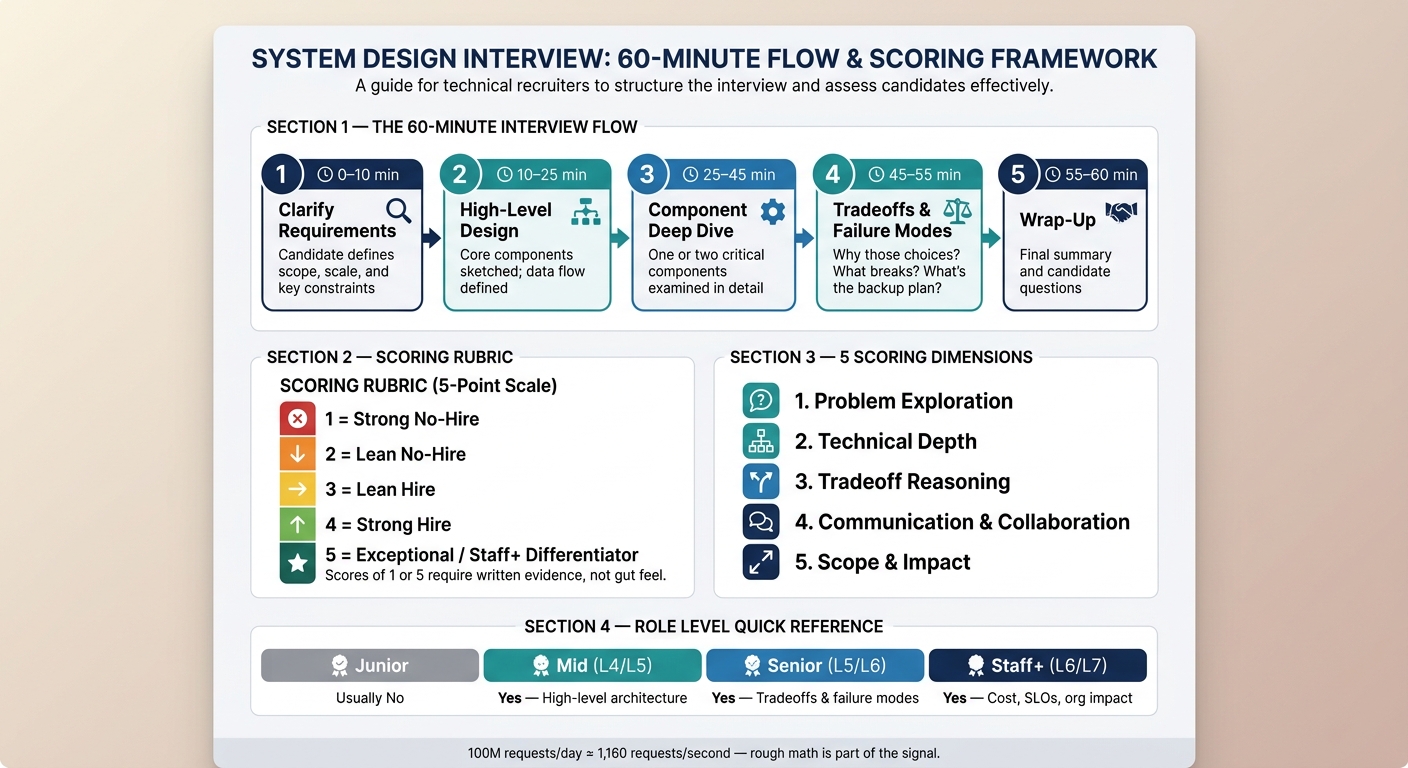
A Standard Interview Flow: Scope, Design, Deep Dive, Tradeoffs, Wrap-Up
A good system design interview follows a set flow: scope, design, deep dive, tradeoffs, then wrap-up. That sequence keeps scoring steady and stops the round from wandering off track. When the format stays the same, recruiter and interviewer feedback is easier to compare across candidates.
Here’s how a solid 60-minute round usually breaks down:
| Phase | Time | What's Happening |
|---|---|---|
| Clarify Requirements | 0–10 min | Candidate defines scope, scale, and key constraints |
| High-Level Design | 10–25 min | Core components are sketched and the data flow is defined |
| Component Deep Dive | 25–45 min | One or two critical components are examined in detail |
| Tradeoffs & Failure Modes | 45–55 min | Why those choices? What breaks? What's the backup plan? |
| Wrap-Up | 55–60 min | Final summary and candidate questions |
That flow only works if interviewers score the same behaviors in the same order. Otherwise, one candidate gets judged on problem framing while another gets judged on box-drawing, and the signal gets muddy fast.
Signs Of Strong Performance Recruiters Can Spot
Recruiters can often spot a strong performance in the first few minutes. It’s not about how polished the diagram looks. It’s about how the candidate starts.
Strong candidates usually do not jump straight into drawing. They use the opening minutes to narrow the problem, confirm limits, and shape the scope. If someone starts sketching in the first two minutes, that’s often a weak sign. Better candidates treat the opening like a working discussion. They don’t just ask, “What’s the scale?” They offer a path forward: "I'll focus on the core feed logic and set aside search for now - does that work?" That shows control, judgment, and clear thinking.
A good pattern to watch for is: decision, then reasoning, then diagram flow . Strong candidates explain why before they draw. For example, “I’m adding a Redis cache here because our read-to-write ratio is roughly 100:1” tells you much more than a box labeled “Cache” with no context. If a candidate draws boxes for several minutes without talking through the logic, that’s a red flag.
At the senior level, pay attention to operational maturity. Strong candidates talk about what happens when things fail, not just when everything goes right. Do they mention failure modes on their own? Do they bring up monitoring, rollback paths, or what a degraded state looks like? That’s a useful sign of senior-level readiness. For staff-plus roles, go a step further. Look for signs that they think beyond the system itself: cross-team impact, cost and ROI, SLOs, and ownership boundaries.
Common Prompt Types Recruiters Should Know
The prompt you choose changes the kind of signal you get. So the prompt should match the level of the role.
| Prompt | What It Tests | Best Fit |
|---|---|---|
| URL Shortener | Hashing, read-heavy scaling, storage needs | General backend roles |
| Chat System | Real-time delivery, message ordering, online status | Distributed systems or product-focused roles |
| News Feed | How updates reach many users, how fresh the data stays, and what happens at large scale | Distributed systems, product-focused roles |
| Rate Limiter | How to cap traffic reliably across servers | Infrastructure or security-focused roles |
A URL shortener is a solid baseline for mid-level candidates. It’s narrow enough to manage, concrete enough to discuss clearly, and good for testing whether someone can estimate traffic and storage. For example, a system handling 100 million requests per day works out to about 1,160 requests per second . That kind of math matters.
A news feed prompt tends to work better for senior candidates because the harder part isn’t drawing the parts. It’s thinking through tradeoffs. What happens when a celebrity with millions of followers posts something? How do you deal with fan-out pressure, stale data, and system load without making the product feel slow? That’s where stronger judgment shows up.
One pattern recruiters should watch for across all prompt types: candidates who name-drop tools without explaining the choice. Saying “I’d use Kafka because we need at-least-once delivery” is very different from just tossing out a tech name. The second version shows memorization. The first shows judgment . Even if a recruiter doesn’t know the details of Kafka, they can still spot the gap between a reasoned choice and a canned answer.
Once the prompt is set, the next step is scoring it the same way every time.
How To Score, Calibrate, And Debrief System Design Interviews
Build A Simple Scoring Rubric Recruiters Can Enforce
Recruiters need a consistent rubric so they can compare feedback across roles without getting pulled into side debates about whether a candidate picked the "right" database. A good rubric shifts the focus to what you can actually observe: how the candidate thinks, how they make decisions, and how they adjust when the problem changes .
A solid rubric covers five scoring areas: Problem Exploration, Technical Depth, Trade-off Reasoning, Communication & Collaboration, and Scope & Impact . Use a 1–5 scale:
- 1 (Strong No-Hire)
- 2 (Lean No-Hire)
- 3 (Lean Hire)
- 4 (Strong Hire)
- 5 (Exceptional/Staff+ differentiator)
That scale is usually enough to separate a borderline pass from a clear hire.
Scores of 1 or 5 should always include written evidence. Not a vibe. Not a gut feeling. A concrete decision, tradeoff, or example. For instance: "Candidate changed the design after clarifying that a small share of users drives most traffic."
The table below shows what evidence-based scoring looks like across each dimension:
| Evaluation Dimension | What Interviewers Should Document |
|---|---|
| Problem Exploration | Clarifying questions that change the design; defined non-functional requirements such as QPS or latency targets |
| Technical Depth | Explained how a component works, not just named it |
| Trade-off Reasoning | Quantified what was sacrificed, such as latency versus consistency |
| Communication & Collaboration | Drove the conversation, narrated decisions, and checked in with the interviewer |
| Scope & Impact | Considered organizational impact, security, and long-term evolution |
The rubric also needs to match the role level. A mid-level (L4) candidate who can scope the problem and design a basic read/write path may pass. That same performance at staff level (L6) is usually a warning sign. At L6, the bar includes SLOs, cross-system trade-offs, build-vs-buy reasoning, cost awareness, and operational maturity .
Common Calibration Mistakes To Avoid
The most common calibration mistakes are simple: people overvalue tools they know well, and they mistake confidence for clear thinking. The score should reflect the candidate's reasoning, not whether they named your favorite system or happened to speak with more force.
Another common miss is when an interviewer rewards a candidate for landing on the exact design they would have built. That's interviewer preference, not candidate quality.
"The design round is not a knowledge test. It's a judgment test. Two candidates can produce completely different architectures for the same question and both get Strong Hire." - Sumedh, System Design Interview Roadmap
To keep calibration tighter, use shadowing, paired calibration, and full-packet review before debrief . One easy structural fix is to hide feedback until each interviewer has submitted their own notes. That cuts down anchoring bias, where the first strong opinion sets the tone for everyone else .
What Good Debrief Notes Look Like
Ask interviewers to write notes that are specific, tied to the rubric, and submitted within 24 hours. Vague comments like good communicator or appeared to show distributed systems knowledge don't help much in a hiring committee. They also make side-by-side candidate comparison much harder.
Strong notes follow a simple pattern: what the candidate did, which rubric dimension it maps to, and what it says about level. For example: "When asked about fan-out, candidate identified that a small share of users drives most content, which changed the fan-out design" is useful because it ties the observation to trade-off reasoning . It gives the committee something concrete to discuss, and it makes the level signal much clearer.
In many hiring committee debriefs, one Strong Hire can offset one Lean No-Hire . Two Lean No-Hire ratings usually lead to rejection, and a Strong No-Hire on any single dimension will almost always stop the candidate from moving forward . That kind of weighting only works when the notes are specific enough to support it, which is why the 24-hour rule and rubric-tied templates matter so much.
With scoring standardized, the next step is pipeline placement and interview logistics.
Pipeline Placement, Logistics, And Closing Best Practices
Remote Vs. In-Person System Design Interviews
Once scoring is set, logistics can make or break the interview. In 2026, most system design interviews are remote. They usually run over video with a shared digital whiteboard. Common tools include Excalidraw, Miro, and built-in canvases from platforms like CodeSignal or HackerRank. Your job as a recruiter is simple: make sure the candidate spends the session solving the problem, not fumbling with a tool they’ve never used.
"Tool friction in the first 90 seconds wastes the opening of the interview." - Arslan Ahmad, Founder, DesignGurus.io
Send the exact whiteboard link at least 48 hours before the interview so the candidate has time to test it and practice drawing with a mouse or trackpad . It also helps to confirm the backup plan ahead of time. If the video drops, the canvas freezes, or an interviewer can’t make it at the last minute, everyone should already know what happens next.
Some companies have shifted back to in-person interviews to cut down on tool issues and security worries. Here’s what changes from a recruiting and coordination point of view:
| Feature | Remote | In-Person |
|---|---|---|
| Tools | Excalidraw, Miro, CodeSignal, HackerRank | Physical whiteboard, markers, or in-room displays |
| Coordination | Link access, permissions, internet stability | Room booking, visitor badges, hardware setup |
| Key Risk | Tool confusion in the first 90 seconds | Limited whiteboard space; geographic constraints |
| Note-Taking | Screenshots and canvas exports | Whiteboard photos |
Where System Design Fits In The Interview Pipeline
After calibration, placement is the next big call. Put the round too early, and candidates may burn energy before they’ve even settled in. Put it too late, and the team may miss a key signal until the end.
In most cases, system design should come after the recruiter screen, the hiring manager screen, and at least one coding or technical screen . It should happen before the final hiring committee decision . For senior and staff roles, this is often the heaviest round. It can also shape offer level .
The prompt should match the role level and the domain of the job. Keep the interview focused on the fundamentals the role actually uses. If you’re building or reviewing your pipeline, the resources at /resources/hiring-engineers-faster-without-increasing-interview-load and /toolkit/interview-questions are useful references.
A Short Checklist For A Fair And Useful System Design Interview
Use one final check before every loop. Before the interview, confirm the candidate level, the prompt, interviewer calibration, and tool access. After the round, collect notes within 24 hours . Debrief notes should follow a Decision -> Reasoning -> Diagram format so the conversation stays centered on judgment, not just the final sketch .
A short pre-flight check like this keeps scoring, logistics, and note quality in line from one loop to the next.
FAQs
How do I pick the right system design prompt?
Start by defining the goals and skills you want to assess based on your company’s needs and the candidate’s seniority.
Then choose an open-ended, real-world problem like a URL shortener, chat system, news feed, or rate limiter. The prompt should be broad enough to let the candidate scope the problem, but focused enough to surface trade-offs and scaling decisions.
Match the difficulty to the role. A senior or staff candidate should be expected to go deeper, cover more edge cases, and make stronger system design calls than a mid-level candidate.
What should I do if interviewers score inconsistently?
Use a structured rubric built on observable behaviors, not gut feel. That means interviewers score what the candidate did or said, not whether they “seemed strong.”
Define clear competencies up front, such as:
- Problem framing
- Tradeoff analysis
- Technical depth
With clear criteria, interviewers can back up each rating with facts from the interview instead of vague impressions.
It also helps to run calibration sessions so the team scores candidates the same way across interviews. On top of that, ask interviewers to write specific, evidence-based notes during the round. Those notes should point to exact answers, decisions, or examples from the conversation.
This cuts down on bias and keeps scoring more consistent across the hiring pipeline.
Can a candidate do well with a simple design?
Yes. In a system design interview, a simple design can do very well when it fits the functional and non-functional requirements and you can explain why you chose it.
What interviewers are often judging is your decision-making. Can you scope the problem well? Can you talk through tradeoffs in a clear way? Can you defend your choices without piling on extra moving parts?
A simple design that is well thought out usually shows more technical maturity than a complicated one that doesn’t solve the right problem. In many cases, adding complexity too early does more harm than good. It can make the system harder to explain, harder to maintain, and harder to justify under the interview’s constraints.
.png)