If the job involves coding with other people, I’d use a pair programming interview. It shows how a candidate talks through problems, handles feedback, and works under time pressure in a live session. In most cases, a 60–90 minute session with a job-matched task and a shared rubric gives me a better read than a whiteboard round or a long take-home.
Here’s the short version:
- I’d use this format most for backend, frontend, and full-stack roles
- It works best for mid-level, senior, and staff hires
- I’d center the task on bug fixes, refactoring, small features, or failing tests
- The best setup is often 5 minutes for context, 45 minutes of coding, and 10 minutes for wrap-up
- I’d score the session on:
- communication
- problem breakdown
- code quality
- testing
- response to feedback
- I would not treat speed as the main signal
- I’d avoid common mistakes like:
- interviewer takeover
- puzzle questions
- bad tooling
- uneven hints
- rushed timing
- loose scoring
A few facts stand out. Take-home tests can take several hours or days, while pair programming usually stays under 90 minutes. And unlike solo tasks, this format lets me watch the candidate make choices live, explain trade-offs, and recover from mistakes without hiding behind polished prep.
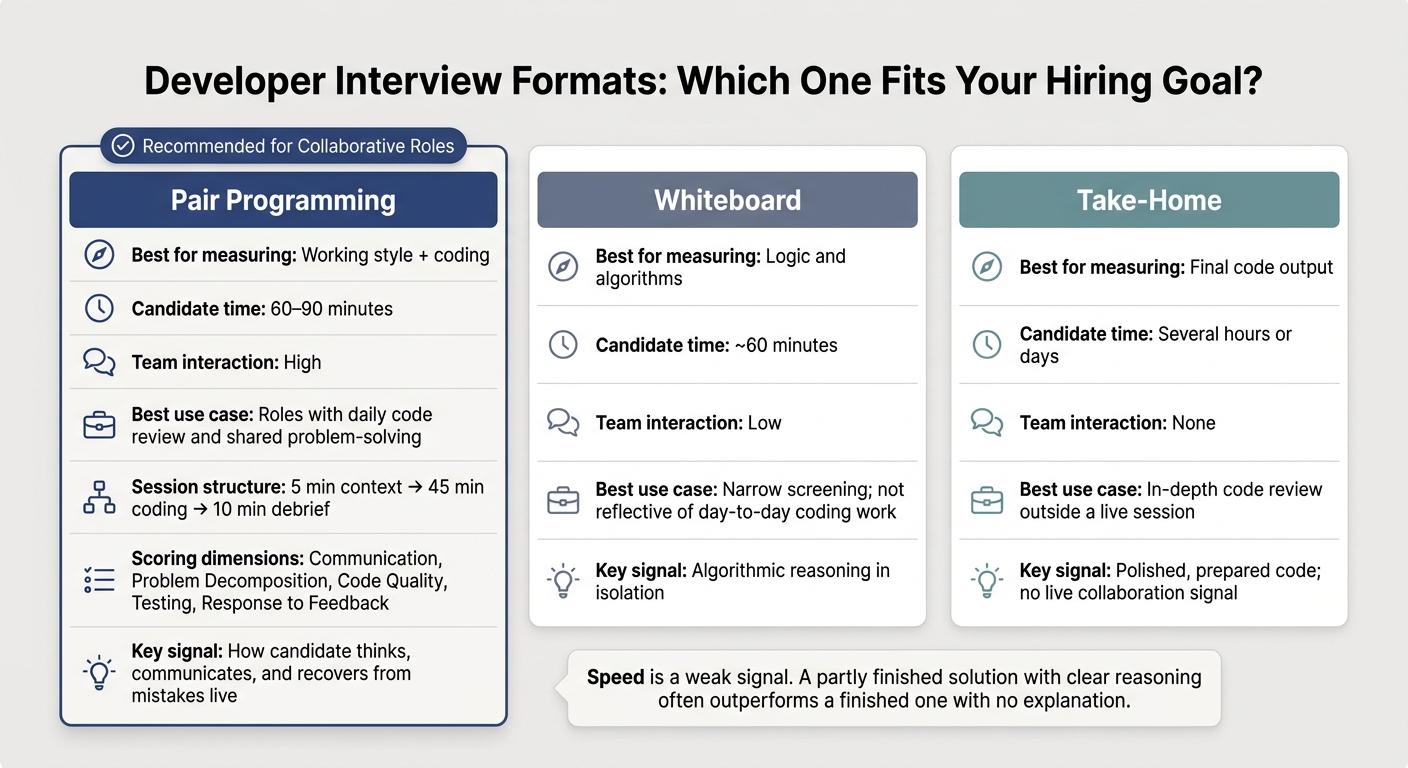
Quick Comparison
| Format | Best for measuring | Time for candidate | Team interaction | Best use case |
|---|---|---|---|---|
| Pair programming | Technical and soft skills | 60–90 minutes | High | Roles with daily code review and shared problem-solving |
| Whiteboard | Logic and algorithms | ~60 minutes | Low | Narrow screening, not day-to-day coding work |
| Take-home | Final code output | Several hours or days | None | When I want to review code in depth outside a live session |
The main point is simple: pair programming is not for every role, but it fits well when collaboration is part of the job. To get good signal from it, I’d keep the task close to actual work, make the setup easy, and score each candidate the same way.
When Pair Programming Interviews Work Best
Roles, Levels, and Team Environments Where This Format Fits
Pair programming interviews make the most sense for roles where people spend a lot of time reviewing code, fixing bugs, and shipping small updates. That’s why this format tends to fit backend, frontend, and full-stack teams best. In those settings, working well with others isn’t just a nice bonus. It’s part of the job.
For mid-level engineers, this kind of session shows how someone solves day-to-day problems, organizes code, and balances technical pace with team communication . You get to see more than whether they can land on the right answer. You see how they get there.
For senior and staff-level roles, debugging or refactoring tasks usually tell you more than puzzle-style exercises. They help reveal judgment, trade-offs, and architectural decision-making . That matters because senior work often looks less like writing code from scratch and more like improving what already exists.
Teams that do a lot of mentoring or heavy code review also tend to get more from this format. Why? Because it rewards coachability, clear communication, and the ability to break a problem into smaller parts .
Cases Where the Format Needs Adjustment
Pair programming can work for junior roles, but only if the task is simple and the interviewer gives enough structure. Without that support, the session can turn into a stress test instead of a fair read on ability.
For highly specialized or architecture-heavy senior roles, pair programming usually works better as one part of a broader assessment process, not the only live technical round. The format should fit the role, not the other way around.
With the role fit defined, the next step is choosing candidates who are comfortable with live collaboration.
Using daily.dev Recruiter to Reach Candidates Who Fit Collaborative Interviews
daily.dev Recruiter helps you reach developers who are already active in the daily.dev network and set expectations before the live interview. This proactive approach helps optimize recruitment funnel conversion rates by reducing drop-offs. When the candidate match is better, it becomes much easier to run a focused, productive session.
Once you know where pair programming fits, the next step is a simple setup, a job-matched problem, and a clear rubric.
How to Set Up and Run the Session
Choose Your Tools and Environment Before Interview Day
A broken setup measures friction, not skill.
Use VS Code Live Share if you want a real IDE feel, or CoderPad if you want a browser-based session. Either way, give candidates a real coding setup with syntax highlighting, compiler support, and terminal access. Also keep a screen-share backup ready in case the main setup fails.
Send clear setup instructions and the problem brief well before the interview. It also helps to offer a short tech check the day before. For U.S. candidates, send times in MM/DD/YYYY and 12-hour time. The point is simple: remove setup friction so you can actually see how the person works with you. This is a critical step in any developer hiring checklist to ensure a smooth candidate experience.
Once the environment is stable, the interview can focus on collaboration instead of tech issues. Then you can move to the next part: picking the right task.
Pick a Problem That Matches the Job
Problem choice shapes what you learn.
The best task looks like the work the role involves day to day. Skip puzzle-style questions. Instead, use existing-code tasks that bring out debugging, decision-making, and communication.
Good options include:
- debugging a failing test
- fixing a bug
- adding a feature
- refactoring existing code
Aim for something a candidate can dig into in 45–60 minutes. A common format is 5 minutes for context, 45 minutes of active coding, and 10 minutes for debrief and candidate questions .
Let candidates work in a language they already know well. If the role does not strictly require one language, forcing someone into an unfamiliar stack just adds noise.
From there, the interviewer’s role matters just as much as the problem itself.
Act as a Collaborative Partner, Not an Examiner
Your job is to see how the candidate works with another person, not how they perform in isolation.
In a driver-and-navigator setup, the candidate drives and writes the code. You navigate by clearing up goals, asking good questions, and giving small nudges when needed. The interviewer should sometimes type, share ideas, and respond like a teammate.
If you stay silent the whole time, the session stops being pair programming and starts feeling like a take-home test with an audience.
| Supportive Behavior (Navigator) | Dominating Behavior (Examiner) |
|---|---|
| Offers progressive hints when stuck | Provides the direct solution immediately |
| Asks "Why" to understand intent | Corrects syntax errors silently |
| Encourages candidates to talk through their thinking | Remains silent for long periods |
| Proposes trade-offs for discussion | Dictates the specific architecture |
One useful habit: if a candidate makes a mistake, wait at least five seconds before jumping in. They may already see it and be about to fix it on their own. If you do give major guidance or a direct answer, write that down so you can score the session fairly later .
It also helps to frame the interview as a work simulation, not an exam. Tell candidates up front that they can use Google Search or Stack Overflow and ask questions while talking through their thinking . That simple framing can lower stress and give you a cleaner signal .
That’s the behavior your scoring rubric should look for next.
How to Evaluate Candidates and Avoid Common Mistakes
Use a Rubric Focused on Collaboration and Code Quality
Once the session ends, look at how the candidate worked, not only what they got done. The process matters as much as the final code, so use one shared rubric for everyone.
If you skip that rubric, two interviewers can watch the same session and walk away with very different scores. A structured scoring framework helps keep those judgments in line.
Score candidates across five core dimensions: communication and collaboration, problem decomposition, code readability and structure, testing habits, and response to feedback. Use a 1–4 scale with behavioral anchors instead of fuzzy labels like "good" or "poor." Good anchors sound like this: "candidate broke the problem into clear sub-tasks before writing any code" or "candidate ignored the hint and repeated the same approach."
Change the weighting based on seniority. For junior candidates, look more at upside: basic problem-solving instincts, willingness to ask questions, and how they take in feedback. For senior candidates, put more weight on trade-off thinking, code structure, and judgment in the moment.
Coachability should be part of the score too. The way someone reacts to a small nudge can tell you a lot about how they'll work with a team. If they get defensive or brush off suggestions, that's not a small detail.
To avoid groupthink, have each interviewer submit scores on their own before any debrief. Then compare them. Big gaps usually point to unclear anchors or uneven hinting, and both issues can be fixed.
Don't Penalize Thoughtful Pace
Speed is a weak signal in a collaborative coding interview. A candidate who explains their thinking, scopes the problem with care, and improves the solution after feedback is often showing the kind of engineering judgment you want. In many cases, a partly finished solution with clear reasoning is stronger than a finished one with no explanation.
Start by judging the process. If you write down that a candidate moved slowly, also write down why. Were they stuck and silent? Or were they thinking out loud, weighing options, and asking smart questions? Those are not the same thing.
Take structured notes during the session. Include both rubric scores and short observations. Notes like "asked two clarifying questions before writing any code" or "rewrote the function after feedback without being prompted" give the debrief something concrete to work with. They also help reduce snap judgments.
Common Failure Modes
Most pair programming interviews go off track for pretty predictable reasons. Here are the ones that show up most often, along with the fix.
| Pitfall | Effect on Signal or Experience | Corrective Practice |
|---|---|---|
| Interviewer domination | Candidate becomes passive; problem-solving signal is lost | Train interviewers to navigate, not drive; use a standardized hint protocol |
| Contrived puzzles | Signal is lost when the task stops resembling real work | Use realistic tasks - bug fixes, refactoring, or feature extensions |
| Unstable tooling | Wastes time and raises stress before the session even starts | Pre-test all tools; keep a simple screen-share fallback ready |
| Inconsistent hints | Creates unfair advantages across candidates | Standardize a hint bank and log when hints are used |
| Unrealistic time pressure | Signal is lost when candidates rush instead of reason | Set a realistic scope; make clear that finishing is secondary to approach |
| No interviewer calibration loop | Scoring standards drift apart over time without anyone noticing | Run periodic sessions where interviewers score the same recorded interview and reconcile results |
One fix deserves extra attention: test your problem internally before giving it to candidates. Have three engineers on your team work through it. If the exercise doesn't give you useful signal from people you already know well, it probably won't do much better in an interview.
After the rubric is stable, combine this assessment with the rest of your hiring process.
How to Fit Pair Programming Into the Full Hiring Process
Combine Pair Programming With Other Assessments
Once you have a rubric, pair programming should sit in the hiring loop where it adds the most signal. Put it after a baseline screen and before final hiring and cultural-fit interviews. That way, only qualified candidates reach the most time-heavy step. In practice, the session becomes a filter instead of a repeat of earlier screens.
To cut repetition, start from the candidate's take-home and ask them to refactor or extend it. That gives you a cleaner view of how they think while keeping the work grounded in something they've already touched. For a closer look at how to structure the full developer hiring loop, see the developer recruitment process guide.
When you recruit senior software engineers, pair programming is especially useful because it shows engineering judgment in a way a coding screen simply can't. For junior roles, keep the task narrow and highly guided.
Why Developers Often Prefer This Format
That same setup also improves candidate experience. Developers often prefer pair programming because it looks more like actual work: real tools, real tasks, and real collaboration. When the session feels like day-to-day engineering work, candidates tend to trust the process more.
Pair programming offers the best mix of realism, fairness, and collaboration. Whiteboard and take-home formats usually give up one of those strengths.
Conclusion: Use Pair Programming Where Collaborative Coding Is Part of the Job
Pair programming interviews aren't a universal fix. But when the role genuinely involves collaborative coding day to day, this format gives you better signal than almost anything else. The basics matter here: define the format clearly before the session, choose tasks that match the work, set up tools ahead of time, train interviewers to act like partners instead of judges, and score every candidate against the same rubric.
It works best inside a structured hiring process with clear setup, clear scoring, and trained interviewers. Use pair programming when collaboration is part of the job, not as a one-size-fits-all technical screen.
FAQs
How do you keep a pair programming interview fair?
Standardize the process so every candidate walks into the same setup, with the same expectations and the same level of challenge. That means using consistent, job-relevant tasks - like debugging an issue or extending a feature - and scoring them with a structured rubric. It makes the review less subjective and keeps the focus on how someone handles work that mirrors the role.
Set expectations at the start. Explain the format, how the session works, and what the driver and navigator roles mean. Interviewers should also be trained to guide the session in the same way each time and show up as teammates, not examiners.
What should candidates be allowed to use during the session?
Candidates should be free to use the same tools they use on the job. The point is to mirror a normal development setup, not turn the interview into a memory test. That includes Google Search and Stack Overflow.
They should also code in a language and editor they already know, often with shared coding setups like VS Code Live Share. That keeps the focus where it belongs: working together and making sound engineering calls, not reciting syntax from memory.
Can pair programming interviews work for junior engineers?
Yes, but they need careful adjustment for junior engineers.
Pair programming can add pressure and make it harder for a junior candidate to think on their own. That means it may not work as well for early-career roles, where you often want to see how someone approaches a problem without too much outside influence.
For junior candidates, a structured live-coding session is often a better fit. The interviewer can stay mostly in observation mode and step in only when needed. This gives the candidate room to work through the task, while still letting the team see how they write code and handle problems.
Use interactive pair programming when collaboration itself is a main signal to assess, such as in senior roles.
.png)