

Are your recruiting tools slowing you down instead of speeding things up? Many mid-sized recruiting teams juggle 7-10 tools, but only a few (2-3) are truly necessary. The rest? They waste time, money, and create inefficiencies.
Disconnected systems lead to:
- Recruiters spending 30%-40% of their time on manual tasks.
- 9% of annual work hours lost due to app-switching (1,200 toggles/day).
- Poor candidate experiences, with nearly 50% abandoning clunky hiring processes.
The fix? Audit your tech stack. Here's the process:
- List and categorize all tools in your stack.
- Identify overlapping tools and assess performance.
- Spot gaps that disrupt your hiring process.
- Calculate ROI to decide what to keep or cut.
- Ensure new tools integrate seamlessly.
Key takeaway: Streamlining your tools can improve time-to-hire by 46% and cut cost-per-hire by 62%. Start by identifying inefficiencies and consolidating your stack for better results.
::: @figure 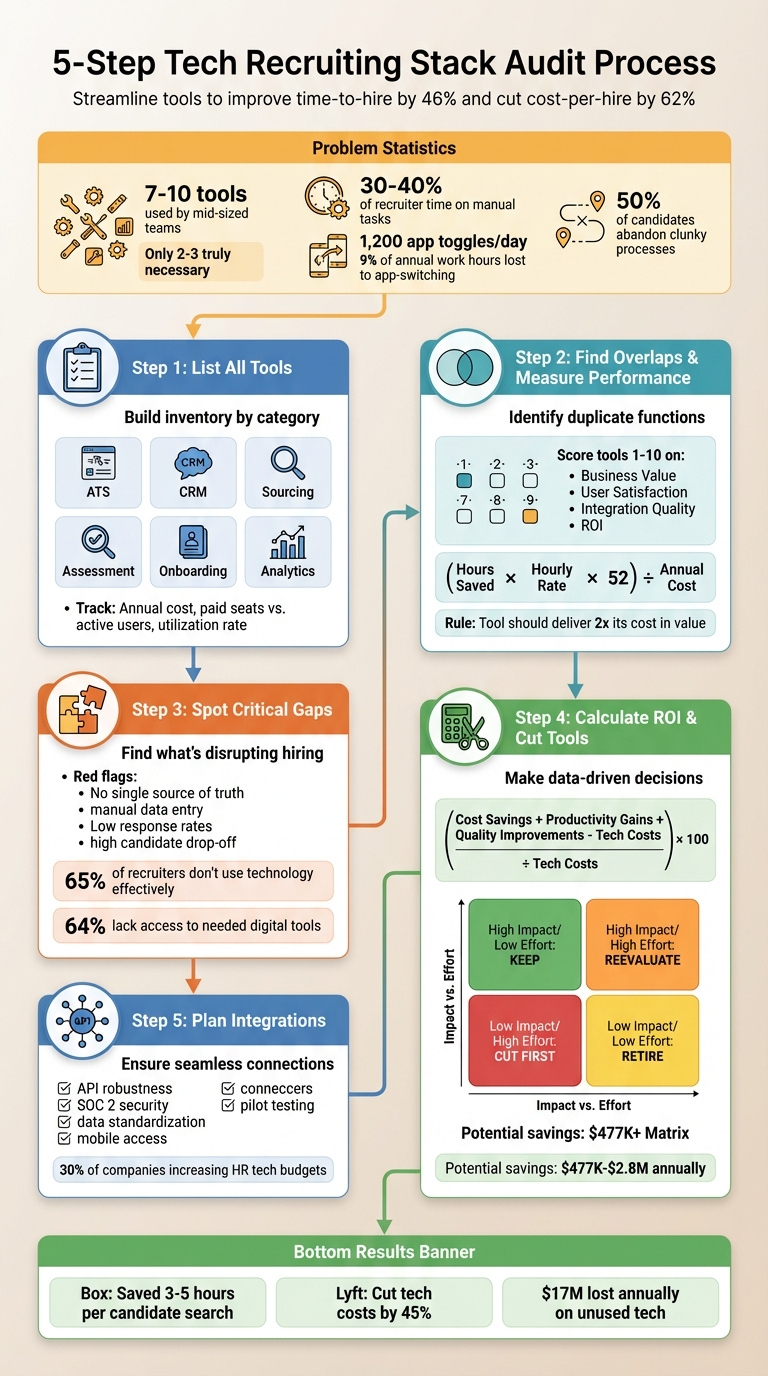 {5-Step Tech Recruiting Stack Audit Process}
Step 1: List All Your Current Recruiting Tools
Start by taking stock of your current tech stack. Most talent acquisition teams typically juggle between 5 and 9 different technology solutions . Yet, surprisingly, many leaders can't name every tool their team uses. Creating a complete inventory of tools is the first step toward understanding which ones truly add value.
How to Build Your Tool Inventory
A simple spreadsheet can help you organize your tools by category. A modern recruiting stack usually includes six key functional areas:
- Applicant Tracking System (ATS)
- Recruitment CRM
- AI-powered sourcing and job distribution
- Video interviewing and assessment
- Onboarding and back-office automation
- Reporting and analytics
To ensure you capture every tool, Follow the journey of a single hire from start to finish, including automated candidate sourcing workflows. Note where data is entered, stored, or transferred. Pay close attention to shadow spreadsheets - those unofficial Excel files that often reveal unmet needs .
This process shouldn't be a solo effort. Involve front-line recruiters, sourcers, and coordinators who work with these tools daily. Include IT and system administrators to document integrations and security compliance, finance teams for accurate cost tracking and contract details, and legal teams to confirm that data privacy standards are met. As Kyle Lagunas, Head of Strategy & Principal Analyst at Aptitude Research, explains:
"Data does more than transform the way we recruit - it transforms the way recruiters are viewed within the organization."
What Metrics to Track for Each Tool
For every tool you list, be sure to track these key details:
- Annual cost (USD): Include license fees, support, and training expenses.
- Paid seats vs. active users: Understand how many licenses are actually being used.
- Utilization rate: Measure how often the tool is actively used.
- Primary function: Identify the tool's main purpose.
- Internal owner(s): Specify both a business owner (responsible for usage) and a technical owner (responsible for integrations and security).
Also, evaluate whether the tool integrates seamlessly with your ATS or requires manual data entry. Tools that don't integrate well can lead to costly data silos. Lastly, confirm whether each tool meets basic security standards, such as SOC 2 certification - a critical requirement for many companies today .
Step 2: Find Overlapping Tools and Measure Performance
Now that you've listed all your tools, it's time to figure out where you're doubling up and assess how well each tool performs. Many companies unknowingly pay for tools that do the same thing or invest in ones that don't deliver much value.
How to Identify Overlapping Tools
Start by sorting your tools into functional categories. Most recruiting stacks fall into six main areas: ATS, Recruitment CRM, Sourcing/Job Distribution, Assessment, Onboarding, and Analytics . Assign each tool to its primary function and check for overlap within each category.
To make this even clearer, trace the journey of a single hire through your system. Look for manual workarounds you noted earlier. For instance, if your team uses both a dedicated sourcing tool and LinkedIn extensions for candidate discovery, you may be dealing with overlapping features.
Joe Gillespie, Head of Tech Recruiting at Robinhood, shared his experience with this challenge:
"His team relied on a mix of free extensions and paid products for tasks like template management, sequencing, email finding, and social media scraping. It was a scrappy, manual process with limited team visibility" .
By consolidating these fragmented tools, Robinhood streamlined their workflows and improved team transparency.
If your tools require manual data transfers, you might have a "Franken-stack" on your hands. For example, if your sourcing tool doesn’t sync candidates directly to your ATS or if you need a separate reporting tool for basic analytics, you’re likely dealing with unnecessary duplication .
How to Evaluate Each Tool's Value and ROI
Not all overlaps are bad - some tools might be worth keeping if they excel in a critical area. To figure out which tools to keep, try scoring them on a 1–10 scale across four key areas: Business Value, User Satisfaction, Integration Quality, and ROI .
- Business Value: Does this tool directly improve hiring speed, quality, or cost?
- User Satisfaction: Are recruiters and hiring managers actively using it and finding it helpful?
- Integration Quality: Does it sync seamlessly with your ATS or HRIS, reducing manual effort?
- ROI: Does the time or cost saved justify the price?
Here’s a simple formula to calculate ROI:
(Hours Saved per Week × Hourly Rate × 52 Weeks) ÷ Annual Software Cost
If a tool doesn’t deliver at least double its cost in value, it’s worth reconsidering . For assessment tools, you can also measure reducing time-to-hire for technical roles by dividing the total time-to-fill for all roles by the number of roles filled .
Brie Bastidas, Global Director of Technical Talent at Scale AI, described a similar situation during an audit:
"The team had been using Tableau for data visualization; however, the tool required constant maintenance and wasn't well integrated. By switching to integrated dashboards, Scale AI provided real-time visibility to the CEO and hiring managers without the overhead of a separate business intelligence tool" .
Tool Evaluation Table
Here’s a quick reference to help you compare tools side by side:
| Tool Category | Key Performance Indicator | ROI Calculation Basis |
|---|---|---|
| ATS | Workload reduction (%) | (Manual hours saved × Hourly wage) – Tool cost |
| Assessment | Time-to-fill (days) | Reduction in average days to hire |
| Sourcing | Pipeline velocity | Cost per qualified lead vs. manual sourcing |
| Onboarding | New hire engagement score | Estimated profit margin per engaged hire |
| Analytics | Report generation time | Hours saved on manual reporting |
Make sure tools allow for bidirectional syncing to avoid manual data entry. One-way integrations can end up creating nearly as much manual work as they’re supposed to eliminate . If a tool performs poorly across key metrics or if you find two tools doing the same job with similar results, it’s time to consider consolidating.
These steps will help you decide which tools to keep and which ones to cut as you move forward with your audit.
Step 3: Find Missing Pieces in Your Developer Recruiting Stack
Take a close look at your tech hiring stack and figure out what's missing. The goal? Spot the gaps that are costing you hires.
What Counts as a Critical Gap?
A critical gap isn’t just some flashy feature a vendor says you need - it’s something that disrupts your day-to-day recruiting operations. Start by building on your inventory and overlap evaluation. Are you seeing delays or relying too much on manual work? That’s a sign of a real problem. For instance, if your main system doesn’t act as a single source of truth, that’s a clear red flag .
Other warning signs include recruiters spending hours on manual data entry between disconnected systems, low response rates to outreach efforts, or a high number of candidates dropping off during the application process. Consider this: 65% of recruiting professionals say their weakest point is not using technology effectively . To dig deeper, test your own process. Submit an application and track its journey - where does it slow down, and where does key information get lost? And don’t forget mobile functionality. If recruiters or candidates can’t complete critical tasks on their phones, you’re likely losing engagement from both sides .
This analysis helps you pinpoint exactly where your hiring process needs improvement, especially when it comes to developer-specific tools.
Assessing Your Need for Developer-Focused Tools
Once you’ve identified the gaps, it’s time to customize your tools to meet the specific challenges of developer recruitment. At this stage, you’re no longer just identifying what’s missing - you’re finding the right features to fill those gaps.
Developer hiring comes with its own set of hurdles that general-purpose tools often can’t handle. For example, keyword-based ATS searches might overlook qualified candidates who use different terminology or come from unconventional backgrounds. Or, if your outreach feels like shouting into the void, you might need tools that offer warm introductions or double opt-in matching.
Here’s a telling stat: 64% of recruiters say they lack access to the digital tools they need for modern recruitment . Meanwhile, staffing firms using AI to screen candidates are 86% more likely to place them within 20 days . For technical roles, it’s not enough to rely on another resume database - you need tools that actively engage passive talent.
Platforms like daily.dev Recruiter tackle these challenges head-on. They connect employers with developers directly through a space developers already use for learning and growth. Every introduction is warm and double opt-in, meaning you’re only engaging with candidates who want to connect. This trust-focused approach shifts recruiting from a noisy, impersonal process to one that taps into a global network of pre-qualified developers.
Before adding any new tool, make sure you’ve clearly defined your hiring problem - whether it’s low response rates, poor candidate quality, or a lack of system integration . That clarity will guide you toward the right solution.
Step 4: Calculate ROI and Decide What to Cut
Now that you've mapped out your tools and identified the gaps, it's time to dig into the numbers. This step is all about making data-driven decisions - no guesswork, no vendor hype. The goal? Pinpoint what delivers value and cut what doesn’t.
How to Calculate ROI for Each Tool
Here’s a formula to guide you: (Cost Savings + Productivity Gains + Quality Improvements – Technology Costs) ÷ Technology Costs × 100 . Breaking this into dollars means putting real numbers behind cost savings, productivity boosts, and quality improvements.
- Vacancy Costs: Calculate how much an unfilled role costs your business. Take your annual revenue, divide it by your total employee count, and then divide that by 220 working days. That’s your daily loss for every open position . For example, if a tool shortens your hiring process by a week, multiply that daily loss by seven to see your savings.
- Recruiter Productivity: Measure the hours saved through automation, multiply by the hourly wage, and subtract the tool's cost .
- Quality of Hire: Bad hires are expensive. If someone leaves within a year, it costs about 30% of their first-year salary . If a tool helps you avoid just two bad hires for $100,000 roles, that’s $60,000 saved.
- External Costs: Check if the tool eliminates other expenses like job board fees, agency costs, or third-party services. Add those savings to the equation .
This approach ensures your investments align with the gaps you’ve identified. As Ginni Gold from Cadient puts it, "What you can't measure, you can't defend" .
A big hurdle for 62% of HR leaders is proving ROI . When presenting your findings to finance, focus on tangible figures like "$18,200 in labor cost savings" . Concrete data makes your case stronger.
Using an Impact vs. Effort Matrix
Once you’ve crunched the numbers, the next step is prioritization. This is where the impact vs. effort matrix comes in. It helps you decide what to keep, tweak, or cut based on hiring impact and maintenance effort .
- High Impact, Low Effort: These are your no-brainers - tools like automated scheduling or seamless ATS integrations. Keep them.
- Low Impact, High Effort: These are the first to go. Think outdated systems requiring manual data entry or tools that make recruiters juggle multiple screens .
- High Impact, High Effort: These deserve a second look. Low adoption rates might stem from insufficient training, not the tool itself . Try a 21-30 day pilot with real candidates. Measure a key metric (like time-to-schedule) and a secondary one (like quality of hire) . If it still underdelivers, it’s time to move on.
For example, in 2025, Box streamlined their recruiting tools into one platform, cutting search time by 3 to 5 hours per candidate . This kind of efficiency is what you’re chasing. Eliminating redundant tools can save organizations anywhere from $477,000 to $2.8 million annually .
Timing matters too. Review contract dates to align tool exits with renewal periods . Use the matrix alongside your audit checklist to prioritize what stays and what goes.
| Priority Category | Impact Level | Effort/Cost Level | Recommended Action |
|---|---|---|---|
| Critical Assets | High | Low/Managed | Retain and optimize integrations |
| Underperformers | Low | High | Retire; replace with a consolidated platform |
| Hidden Gems | High | High | Reevaluate; improve training for adoption |
| Redundant Tools | Low | Low | Retire; functionality exists in other tools |
Step 5: Decide Whether to Build or Buy and Plan Integrations
Deciding whether to build or buy new recruiting tools is a critical step in optimizing your hiring process.
How to Decide Between Building and Buying
Weighing the opportunity cost is key here. If your engineering team shifts focus from core projects to develop a recruiting tool, what essential work might be delayed? This decision builds on your earlier audit findings to avoid repeating inefficiencies. For most companies, recruiting software development isn't a core strength - it can distract from primary business goals. Kayla Vatalaro, Head of Recruiting at Asana, offers this advice:
"If you're considering investing in a new tool, think about whether it will continue to serve your company when you're twice or three times the size you are now" .
In most cases, buying is the better option when it comes to scalability and security. Vendors manage updates and maintenance, saving your team from tasks that can drain internal resources. With 30% of companies increasing their HR tech budgets to meet growing hiring demands , and 64% of recruiters lacking access to essential digital tools , building a custom solution is rarely the best choice - unless your hiring needs are so unique that no existing vendor can meet them.
Once you've decided on the right approach, ensure that any new tool integrates seamlessly with your current systems to support a streamlined, data-driven recruitment strategy.
Integration Checklist for New Tools
After selecting a new tool, evaluating its integration potential is crucial. Use this checklist to guide you:
- API Robustness: Ensure the tool integrates smoothly with your Applicant Tracking System (ATS), sourcing platforms, and analytics tools . For example, Kayla Vatalaro's team at Asana uses Looker and Tableau to pull data from their Greenhouse ATS, enabling data-driven hiring decisions .
- Security Compliance: Confirm the tool has SOC 2 certification to safeguard candidate data and meet privacy standards .
- Data Standardization: Map how data flows between systems. A unified data model across platforms prevents silos and ensures consistent information .
- Mobile-Friendliness: Verify that the tool supports mobile access for both recruiters and candidates, reducing friction in critical interactions .
- Phased Rollout: Start with a pilot phase. For instance, when Erica Waichman at Formation integrated GoodTime with their Greenhouse ATS in 2018, they began with a limited rollout, which eliminated manual scheduling and sped up their pipeline by several days .
Testing new integrations with a pilot phase minimizes risks. Begin with one team or role, track key metrics like time-to-schedule, and confirm the tool works as expected. This approach helps catch potential issues before they disrupt your broader hiring process.
| Integration Factor | What to Verify | Why It Matters |
|---|---|---|
| API Capability | Direct connection to ATS and BI tools | Prevents manual data entry and data silos |
| Security Compliance | SOC 2 certification | Protects candidate data and ensures privacy |
| Data Standardization | Shared data model across platforms | Ensures consistent and updated information |
| Mobile Access | Works on phones for recruiters and candidates | Simplifies engagement at key points |
| Pilot Testing | Small-scale test before full rollout | Identifies issues without major disruptions |
Conclusion
Auditing your recruiting tech stack isn't about piling on more tools - it’s about figuring out what actually works. Start by listing your current tools, spotting overlaps, identifying critical gaps, assessing ROI, and checking integration needs. This process helps you avoid creating "Franken-stacks" - those messy, overcomplicated systems that waste money and slow down hiring. For context, companies lose $17 million annually on unused or underutilized tech , and recruiters spend 9% of their work year - about five weeks - just switching between platforms . Tackling these inefficiencies sets the stage for a more effective and cost-conscious approach.
Streamlining your tech stack can deliver real, measurable results. For example, Box saved 3 to 5 hours per candidate search after consolidating its tools , while Lyft cut its tech-related costs by 45% through a similar strategy . A unified system doesn’t just save time and money - it creates a single source of truth for candidate data, improves decision-making, and eliminates those frustrating data silos.
This approach isn’t just about general hiring efficiency - it’s particularly game-changing for developer recruitment. The real struggle with hiring developers isn’t just organizing your pipeline; it’s finding high-quality candidates by balancing active vs passive developer recruitment. Traditional tools often focus on overcrowded channels like LinkedIn, job boards, and email, where developers are already bombarded with recruiter messages.
That’s where daily.dev Recruiter steps in. It connects you with developers where they naturally spend their time - learning, reading, and engaging on a trusted platform. Developers interact with daily.dev around 200 times a month , giving you access to passive talent in a high-trust environment. Through warm, double opt-in introductions, this tool replaces cold outreach with meaningful connections. The result? Higher-quality candidates, better response rates, and stronger hiring outcomes.
FAQs
What’s the fastest way to inventory every recruiting tool we use?
To get a clear picture of your recruiting tools, start with a structured template. Use it to list each tool, its purpose, and how it fits into your hiring process. Take a broad look at platforms like your ATS, sourcing tools, and communication methods to uncover overlaps or unnecessary redundancies. Having a centralized inventory makes it easier to see your tech stack, pinpoint missing elements, and simplify your recruitment tools for smoother operations.
How do I prove a recruiting tool’s ROI in dollars to finance?
To show the dollar-based ROI of a recruiting tool, leverage frameworks or ROI calculators. Focus on measurable metrics such as cost savings from shorter time-to-hire, reduced expenses from avoiding poor hiring decisions, and boosted recruiter efficiency. By entering your current costs, time investment, and projected improvements into these tools, you can calculate the financial benefits in concrete terms. This approach provides a straightforward, dollar-focused ROI to share with finance teams.
What should I check before adding a new tool to our ATS?
Before incorporating a tool into your ATS, take a step back and determine whether it addresses a real need in your current tech setup. Make sure it works well with your existing systems, supports your workflows, and doesn’t duplicate functionality you already have. It’s also important to evaluate whether the tool delivers measurable ROI. Beyond that, consider how it will affect the candidate experience and meet the needs of your team without adding unnecessary complexity. Conducting a detailed review of your tech stack and analyzing for overlaps can help ensure the tool is both compatible and worthwhile.
.png)


