Most developer outreach fails for simple reasons: it’s vague, off-target, and missing pay or remote details. If you want more replies, I’d keep each message built around four parts: a specific personal hook, clear role details, a salary range, and one easy next step.
Here’s the short version:
- Generic LinkedIn InMail gets under 13% response
- Personalized openers can lift replies by 27%
- The best outreach uses an 80/20 split:
- 80% fixed: role, stack, location, pay, CTA
- 20% changed: name, trigger, and one technical match
- The article covers five message types:
- cold outreach
- LinkedIn InMail
- community outreach
- follow-up after no reply
- internal referral request
- The main metrics to track are:
- reply rate
- positive replies
- scheduled calls
In other words: templates save time, but personalization gets the reply.
Before sending anything, I’d make sure the message answers the questions developers care about right away: What’s the role? What stack is it? Is it remote? What does it pay? Then I’d add one line that proves the note was written for that person, not a list.
Quick comparison
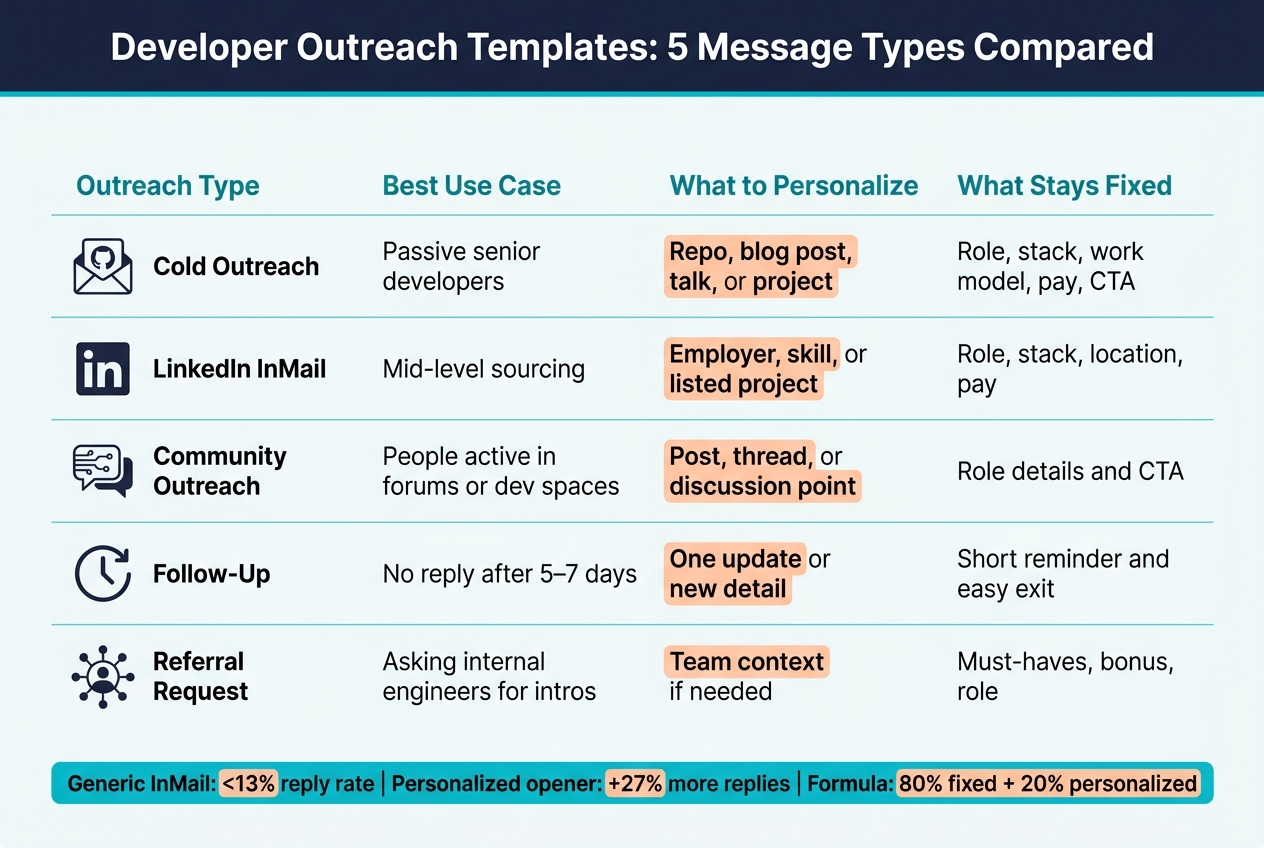
| Outreach type | Best use case | What to personalize | What stays fixed |
|---|---|---|---|
| Cold outreach | Passive senior developers | Repo, blog post, talk, or project | Role, stack, work model, pay, CTA |
| LinkedIn InMail | Mid-level sourcing | Employer, skill, or listed project | Role, stack, location, pay |
| Community outreach | People active in forums or dev spaces | Post, thread, or discussion point | Role details and CTA |
| Follow-up | No reply after 5–7 days | One update or new detail | Short reminder and easy exit |
| Referral request | Asking internal engineers for intros | Team context if needed | Must-haves, bonus, role |
The core idea is simple: be specific, be clear, and make the reply easy.
Why most recruiter outreach fails with developers
Developers tune out outreach when it feels off. If the message is vague, misses their tech stack, or leaves out pay and remote details, it usually gets ignored.
Generic LinkedIn InMail gets under 13% response. But when the opener mentions a real shared former employer, project, post, or technical interest, replies go up by 27% .
Common reasons developers ignore recruiter messages
The biggest trust-breakers are pretty simple. Sometimes the recruiter makes personalization mistakes like pitching the wrong stack, like sending a Java role to a Python engineer. Sometimes the level is wrong. Other times, there’s no salary range, the job description says almost nothing, or the first line sounds copied and pasted.
None of these issues are hard to spot from the developer’s side. And once a message feels mass-sent, it’s hard to recover.
Generic vs personalized outreach: before-and-after examples
Here’s what that looks like in practice.
Before (generic):
"Hi Sarah, I came across your profile and think you'd be a great fit for a senior engineering role at our company. We're building exciting products and looking for talented developers. Would love to connect!"
After (personalized):
"Hi Sarah, I saw that you also worked at Acme, and I noticed your recent technical post about optimizing React rendering. We're hiring a senior frontend engineer for the same React performance problem. Remote-first, compensation included. Open to a 15-minute chat?"
The second message works better because it gets to the point. It shows relevance right away, gives clear role context, and puts remote and compensation details on the table. Once that part is in place, the subject line, opening hook, role context, and CTA do the real work.
The anatomy of a developer outreach message that gets replies
Once you understand why developers ignore recruiters, the fix is structure.
A developer outreach message only needs four parts: a specific hook, clear role context, compensation, and one easy next step.
Subject line and opening hook
The subject line needs to earn the open. Lead with the role, the stack, or another detail that shows why you're reaching out.
Then make the first line feel personal. Point to one concrete detail, like a shipped project, a blog post, an open-source contribution, or a shared employer. That kind of opener shows right away that this wasn't blasted out to a giant list. It tells the person, “This is about you.”
Role context, compensation, and call to action
After the hook, get to the point. State the role, stack, work model, location, and pay range.
Keep the CTA low-friction. Ask for a simple reply or a short next step, and give them an easy out if the timing is off. The goal is a message that's clear, respectful, and easy to answer.
Use this structure to adapt the five templates below.
Five developer outreach templates you can adapt
Each template follows the same basic frame: a specific hook, clear role context, salary range, and one easy next step. The template itself matters less than the proof that you wrote it for one person, not a crowd.
Use these as frameworks, not scripts.
1. Cold outreach to a passive senior developer
When to use it: You found a senior engineer through a GitHub repo, a technical blog, or a technical talk, and you want to reach out directly.
Personalize the exact project, post, or talk you mention. Keep the role title, stack, pay range, and CTA fixed.
Subject: Your [specific project name] work + a [Role Title] opening at [Company]
Hi [First Name],
I came across your [GitHub repo / blog post / ReactConf 2025 talk on state management] and your work on [specific technical detail] maps directly to a problem our team is solving.
We're hiring a [Senior Role Title] to work on [one-sentence description of the technical challenge]. The stack is [React 18 with TypeScript and Next.js / be specific]. It's [remote / hybrid / onsite in City, State], and the comp range is $[X]–$[Y] base.
If that sounds interesting, I'd love a 15-minute chat - no pressure. And if the timing isn't right, no worries at all.
[Your name]
2. LinkedIn InMail for a mid-level developer
When to use it: You're sourcing mid-level engineers on LinkedIn and want to keep the message short while still sounding human.
Personalize one profile detail, like a past employer, a skill endorsement, or a listed project. Keep the role title, stack, location, and pay range fixed.
Hi [First Name],
I noticed you've been working with [specific tech, e.g., "Go and Kubernetes"] at [their current or past company] - that background is a strong match for what we're looking for.
We're building out our [team name] at [Company] and have a [Mid-Level Role Title] opening. The stack is [specific stack], it's [remote / hybrid in City, State], and the range is $[X]–$[Y] base.
Would you be open to a quick 15-minute call to see if there's a fit? No commitment - just a conversation.
[Your name]
3. Community outreach
When to use it: You found a developer through a technical community - a Discord server, a niche forum, or a platform like daily.dev where developers talk about content they care about. Use this only after you've already taken part in the community.
Personalize the exact discussion or post you're referring to. Keep the role details fixed.
Hi [First Name],
I've been following the [community name] discussions and saw your post on [specific topic]. Strong take on [specific point].
Lead with the shared discussion, not the job. I work at [Company] and we have a [Role Title] opening that's a close match for what you're working on - [specific stack, remote/hybrid/onsite, $X–$Y base]. Happy to share more details if you're curious, or just leave it here if it's not the right time.
[Your name]
4. Follow-up after no response
When to use it: Send this five to seven days after your first message if there's no reply. Keep it short, add one small piece of value, and give them an easy, polite exit.
Hi [First Name],
Following up on my note about [role]. I know inboxes are busy.
I wanted to share a quick update - [we just opened the position to fully remote candidates] - in case it changes anything.
If now isn't the right time, no worries - feel free to reach out down the road if things change.
[Your name]
5. Referral request to your engineers
When to use it: Use this when asking engineers already on your team to refer people from their network. Be clear about the role, the must-haves, and the referral bonus so they can filter fast.
Hey [First Name],
We're actively hiring a [Role Title] for the [team name] team. The must-haves are [2–3 specific technical criteria, e.g., "5+ years with Go, experience with distributed systems, comfortable in a fully remote async environment"].
If anyone in your network fits, we'd love an intro. Our referral bonus for this role is $[amount] if they're hired.
Even one name or profile helps. Thanks!
[Your name]
Next, decide what to personalize and what to keep fixed.
Personalization rules and outreach metrics to track
Once you have the templates, the next step is simple: decide what stays fixed, what changes, and how you'll tell if the outreach did its job.
What to personalize vs what to templatize
Use an 80/20 split.
Keep the role, stack, location, compensation, and CTA the same. Change only the name, the specific trigger, and one detail that shows the message fits the person. Generic outreach usually falls flat when it lacks genuine personalization. Specific relevance works better.
The three parts that should change for every send are:
- first name
- specific trigger, such as a project, post, talk, or community contribution
- one technical proof point that ties their background to the role
If you're using daily.dev Recruiter, intent signals can help you pick the right 20% faster.
How to benchmark and improve response rates
Track three metrics:
- reply rate: any response
- positive replies: people who actually want to talk
- scheduled calls: conversations that make it onto the calendar
A high reply rate with low positive replies usually means the hook is doing its job, but the role details aren't connecting.
Use the same framework across channels so you can compare results without muddying the signal.
| Channel | Seniority | Primary Signal to Watch |
|---|---|---|
| Cold email | Senior | Positive replies, scheduled calls |
| Cold email | Mid-level | Reply rate, positive replies |
| LinkedIn InMail | Senior | Positive replies, scheduled calls |
| LinkedIn InMail | Mid-level | Reply rate, positive replies |
| Community outreach | Senior | Reply rate, positive replies |
| Community outreach | Mid-level | Reply rate, scheduled calls |
| Internal referrals | Senior | Scheduled calls |
| Internal referrals | Mid-level | Reply rate, scheduled calls |
These metrics help you spot the problem. Is the template weak? Is targeting off? Or is the channel itself just not pulling its weight?
If a template is underperforming, test one variable at a time: the subject line, the hook, or the CTA. Also, split results by seniority. Senior and mid-level developers tend to reply for different reasons, and mixing those results can hide what's working.
Conclusion: Use templates as structure, not shortcuts
Once your templates are set, personalization becomes the part that decides the outcome. Templates give you the frame. Personalization is what makes the message land.
A strong template follows a checklist for transparent job posts and covers the three things developers usually want to know right away:
- tech stack
- salary range
- work model
It should also end with a low-pressure CTA.
But structure alone isn't enough. A template can't do the job of relevance. The template handles the base, and the 20% personalization is what helps drive replies. Pointing to a specific GitHub repo, a README, or a technical blog post shows you've put in the effort.
After each send, track the same signals across channels. Look at reply rate, positive replies, and scheduled calls to see what is and isn't working. If performance is weak, change one part of the framework at a time so you can tell what made the difference.
If you're using daily.dev Recruiter, intent signals can make personalization easier before you hit send. That can help you spot the right technical detail to mention for each developer.
The aim is a repeatable process that respects developers' time and gets better with every send. Structure saves time. Personalization earns replies.
FAQs
How much should I personalize each outreach message?
Personalize early so the message feels like it was written for this person, not blasted to 500 others. Mention one specific thing up front: a recent GitHub commit, a LinkedIn post, an open-source contribution, or a project they shipped.
Then get to the Big Three developers care about:
- Tech stack
- Salary range in U.S. dollars
- Work model like remote, hybrid, or on-site
Keep it short. In most cases, 3–5 sentences or under 200 words is enough. For LinkedIn InMail, stay under 400 characters so it feels easy to read and easy to answer.
When should I send a follow-up message?
If you don’t hear back, send your follow-up in the same email thread. That keeps the context clear and shows you’re serious without coming off as pushy.
A good rhythm is every two to four weeks. It helps if you have a reason to reach out, like a new project, a recent update, or a contribution to the community. Skip vague lines like “please respond.” Instead, give them a reason to care and make it easy for them to say no.
Which outreach metrics matter most?
Track more than open rates. Pay close attention to click-through, reply, and response-time metrics. Those numbers show whether people are noticing your message and whether it’s strong enough to start a conversation.
It also helps to track progression and response categories, such as interest, objections, and referrals. That gives you a clearer view of how outreach is moving developers toward meetings or hires - and whether you’re reaching the right talent in the first place.
.png)