Short answer: it depends on your hiring volume, reply rates, and recruiter time. A LinkedIn Recruiter seat can cost $10,000+ per year, but the bigger cost often comes from low outreach response rates and the hours your team spends sending InMails.
If I boil the article down, here’s the answer:
- LinkedIn Recruiter can make sense for large hiring teams, agency work, and high-pay roles
- It gets expensive fast for developer hiring when reply rates are low
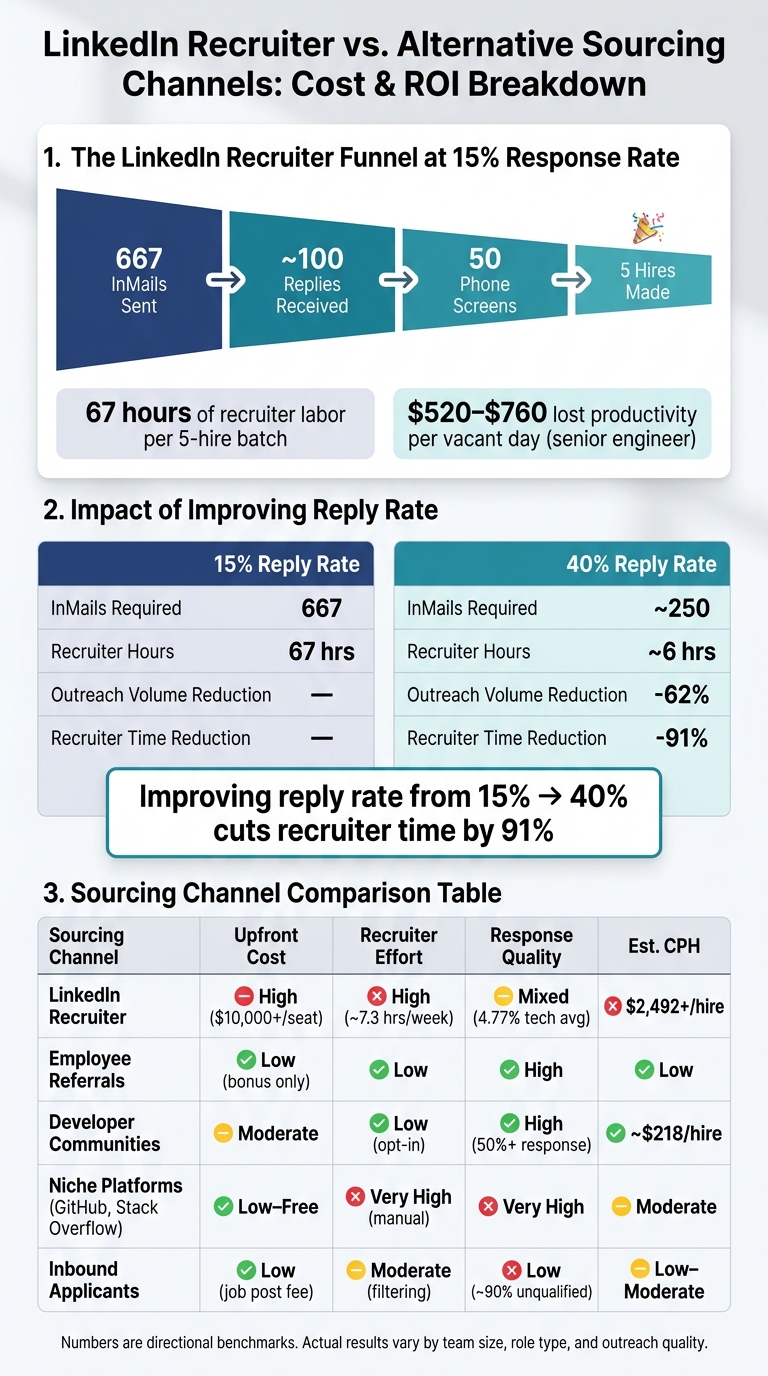
- At a 15% response rate, a team may need 667 InMails to land 5 hires
- That can mean about 67 hours of recruiter labor, at about $66/hour
- An open senior engineer role may cost $520 to $760 per business day in lost output
- The seat price is only one part of the math; labor, add-ons, and seat minimums matter just as much
If you’re trying to decide whether LinkedIn Recruiter is worth it, I’d look at four things first:
- Plan fit: Lite, RPS, or Corporate
- Total cost: subscription, extra seats, job slots, and InMail use
- Hiring funnel: replies, screens, and hires from outreach
- Channel choice: LinkedIn vs. alternatives like referrals, developer communities, niche sites, and inbound
The main point: LinkedIn Recruiter is not cheap, and database size alone does not guarantee lower cost per hire. For developer roles, intent and response rate often matter more than reach.
Quick Comparison
| Option | Best for | Main limit | Cost pattern |
|---|---|---|---|
| Recruiter Lite | Solo recruiters, small teams | No ATS integration or team tools | Lower seat cost, lower scale |
| RPS | Agencies, mid-market teams | Custom pricing, still limited vs. Corporate | Higher cost, more filters and InMail |
| Corporate | Enterprise TA teams | High spend, often more than one seat | Highest cost, full network and team workflows |
So if I were reading this article to get a fast answer, mine would be simple: LinkedIn Recruiter is worth the cost only when your hiring volume and hiring outcomes justify both the seat price and the recruiter hours behind it.
LinkedIn Recruiter pricing tiers and what each plan includes

LinkedIn Recruiter comes in three tiers, and the gap between them is about much more than cost. Search reach, InMail volume, and team tools change quite a bit from one plan to the next. Pick the wrong one, and you might pay for features you won't touch - or run into limits right when hiring picks up.
Recruiter Lite: for solo recruiters and small teams
Recruiter Lite is the self-serve starting option. It lets you search across your 1st, 2nd, and 3rd-degree connections, includes 30 InMail credits per month, and gives you 20+ search filters. For specialized roles, you might also consider coding-focused candidate sourcing tools to find technical talent. There’s no ATS integration and no team collaboration, so it works best as a solo recruiting tool.
Recruiter Corporate and Professional Services: for larger hiring programs
Recruiter Professional Services (RPS) is built for agencies and mid-market teams, while Recruiter Corporate is aimed at enterprise TA. RPS bumps InMail volume up to 100–140 credits per month, adds 40+ advanced filters, and supports integrations with 28+ ATS partners. Corporate goes further with access to LinkedIn’s full network, shared pipelines, team visibility, and full ATS integration, including API access. Both plans use custom pricing.
Here’s the side-by-side breakdown:
| Feature | Recruiter Lite | Recruiter Professional Services (RPS) | Recruiter Corporate |
|---|---|---|---|
| Best Fit | Solo recruiters / small teams | Agencies / mid-market teams | Enterprise TA functions |
| Search Scope | 1st, 2nd, 3rd degree connections | 3rd degree + limited out-of-network | Full network (1B+ profiles) |
| InMail Credits | 30/month | 100–140/month | 150/month |
| Search Filters | 20+ basic | 40+ advanced | 40+ advanced |
| ATS Integration | None | 28+ partners | Full integration + API access |
| Collaboration | None | Limited | Shared projects & pipeline visibility |
Lite is built for one-person use. RPS and Corporate add more scale, team workflows, and ATS connectivity. But the subscription price is just the starting point; add-ons and recruiter time often shape the actual cost.
The true cost of LinkedIn Recruiter beyond the subscription fee
The base subscription is only one piece of what LinkedIn Recruiter costs. In developer hiring, total spend often goes up once you factor in add-ons, annual contract terms, and the recruiter time needed to turn outreach into actual conversations.
Direct add-ons: InMail credits, job slots, and extra seats
InMail credits, job slots, and extra seats are billed on top of the base plan. And when a team is hiring for several engineering roles at once, those credits can burn out fast. Annual contracts also lock that spend in place.
LinkedIn has been increasing Recruiter pricing by 10%–15% each year. A seat that cost $7,800 in 2022 reached $10,800–$12,960 by 2026 . But for most teams, the bigger expense isn't the seat price on paper. It's the work required to make those credits lead to replies.
Hidden costs: recruiter time and low response rates in tech
This is where the math starts to bite. Senior software engineers often get 4–6 InMails a week, so many of them tune out generic outreach almost on sight. They see the same openers, the same pitch, and they ignore it .
At a 15% response rate, getting to 50 phone screens for 5 hires means sending hundreds of manual InMails and spending dozens of recruiter hours to do it . That low reply rate doesn't just slow the process down. It pushes recruiter labor up fast, which drives up cost per hire in a way the subscription fee never shows.
That recruiter labor is usually the main swing factor in LinkedIn Recruiter ROI. And it's the piece that the next section turns into ROI.
A practical ROI framework for developer hiring
Cost-per-hire and ROI formulas you can use today
When recruiter time becomes the main cost driver, the math gets pretty simple: does the total spend still pay off?
Two formulas handle most of that work:
Cost per hire (CPH) = (Internal costs + External costs) ÷ Number of hires
ROI = (Value gained − Total cost) ÷ Total cost × 100
Internal costs include recruiter salary using a loaded hourly rate: total compensation plus benefits, divided by annual working hours. External costs include the subscription fee and any other paid sourcing tools or services. Value gained equals the productivity value of the filled role minus vacancy cost.
For senior engineers, that vacancy cost adds up fast. An unfilled seat costs an estimated $520–$760 per business day in lost productivity.
Benchmarks and a funnel model for developer outreach
Here’s what the funnel looks like at a 15% response rate: 667 InMails lead to about 100 replies, 50 screens, and 5 hires.
That workload is heavier than it sounds. Manual outreach averages 6 minutes per InMail for profile review and personalization. Across 667 messages, that comes out to 67 hours of recruiter labor for each 5-hire batch.
And this is where reply rate changes the whole picture.
Switching from a 15% reply rate to a 40% reply rate cuts required outreach volume by 62% and recruiter time by 91%. That’s not a small win. It changes the cost structure in a big way.
Cost comparison across sourcing channels
The best way to compare sourcing channels is to look at the inputs behind cost per hire. The numbers below are directional, not fixed.
| Sourcing Channel | Upfront Cost | Recruiter Effort | Response Quality | CPH Direction |
|---|---|---|---|---|
| LinkedIn Recruiter | High ($10,000+/seat) | High (~7.3 hours/week) | Mixed/Low (4.77% tech response benchmark) | High ($2,492+/hire) |
| Employee Referrals | Low (bonus only) | Low | High | Low |
| Developer Communities | Moderate (per role) | Low (opt-in model) | High (50%+ response rate) | Moderate to low ($218/hire) |
| Niche platforms (GitHub, Stack Overflow) | Low to free | Very high (manual) | Very high | Moderate (labor-intensive) |
| Inbound applicants | Low (job post fee) | Moderate (filtering) | Low (~90% unqualified) | Low to moderate |
A quick read of the table shows the tradeoff: some channels cost more upfront, some drain recruiter hours, and some send a lot of weak-fit candidates. LinkedIn Recruiter can work well in the right setup, but it can also get expensive fast when response rates stay low.
That leads straight to the next issue: when does LinkedIn Recruiter justify the spend?
When LinkedIn Recruiter works, when it falls short, and where daily.dev Recruiter fits
The real question is simple: when does LinkedIn’s huge reach still earn its price tag?
Where LinkedIn Recruiter works well
LinkedIn Recruiter makes sense for large enterprises with global hiring teams and lots of open reqs. It also fits executive search firms placing $200,000+ roles, where a public professional profile helps confirm senior candidates .
Where LinkedIn Recruiter falls short in developer hiring
That same reach starts to lose steam when the role gets more specialized. Niche engineering roles - Rust developers, embedded systems engineers, and ML infrastructure specialists - are tougher to source because the talent pool is smaller, and the outreach is still cold.
That changes the math fast.
When the candidate pool is narrow, low reply rates can drive up cost per hire in a hurry. A 5-seat minimum can push starting cost to about $49,500 before outreach even begins . That’s a hard sell if you’re only hiring a few roles each quarter.
There’s also a simple human factor here: senior developers often ignore cold outreach because their inboxes are already packed.
Key takeaways and a developer-first path forward
For developer hiring, intent matters more than database size. Once reply rates drop below 10%, cold outreach usually starts working against you .
daily.dev Recruiter takes a different route. It offers opt-in introductions to developers who are already active on daily.dev. Instead of chasing replies from people who may never answer, hiring teams can move toward opt-in conversations with more predictable per-role pricing.
For enterprise teams, a practical middle path is to keep one Corporate seat for broad database searches and send developer-specific roles through a developer-first platform. That setup can cut costs by as much as 80% .
FAQs
How do I calculate LinkedIn Recruiter ROI for my team?
Calculate LinkedIn Recruiter ROI by comparing total costs with hiring results. That means looking at annual subscription fees, recruiter seats, extra InMail credits, and your team’s labor cost for searching, screening, and InMail management.
Then track InMail volume, phone screens, and hires so you can find your true cost per hire. Once you have that number, compare it with hiring targets and vacancy costs.
For technical roles, use your actual InMail reply rate to judge ROI. In many teams, that lands somewhere around 10%–25%. That range matters because a tool can look good on paper, but if replies are low, the math changes fast.
What response rate makes LinkedIn Recruiter worth it?
LinkedIn Recruiter is usually worth the spend when response rates hold steady at 18% to 25%. Once you drop below 18%, the math often gets a lot less favorable, and it may be a sign your budget would work harder somewhere else.
That matters even more for tech hiring. For tech roles, cold InMail response rates can dip to just 4.77% to 5.1%. At that point, you shouldn't judge the tool by sends alone. Look at your actual cost per response.
That one number gives you a much clearer read on whether the subscription still makes sense.
Which LinkedIn Recruiter plan fits a small hiring team?
For a small hiring team, LinkedIn Recruiter Lite is usually the best fit. It costs less, includes 30 InMail credits per month, and uses per-seat pricing for each recruiter.
If your team needs more outreach volume, Recruiter Professional or Recruiter Corporate come with 100–150 InMails per month. The trade-off is simple: they cost a lot more, which can be hard to justify for a small team.
.png)